
알라딘 전자책 (eBook) v2025.7.3
알라딘커뮤니케이션




About this app
Developer Description
Aladdin has been upgraded with new features and design e-book viewer! Smart phone, read a book on your tablet free and easy!
Aladdin eBook Viewer provides the largest typesetting options in Korea and a variety of stable functions!
With this e-book app, you can read e-books with optimized viewer resolution on various devices such as smartphones, phablets and tablets, and e-ink.
You can freely read e-books on up to 5 devices per account, and the automatic synchronization function allows you to synchronize 'scrap information such as bookmarks/memos' and 'page information being read' anytime, anywhere while using multiple devices.
1. Various functions
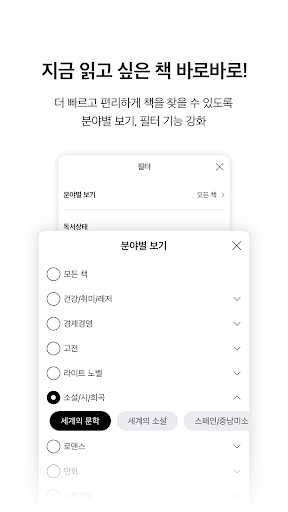
- More convenient bookshelf: List bookshelf, synchronize, move bookshelf, etc. more easily with swipe function
- Speech function: Reading various foreign languages is also OK using the TTS engine built into the device.
- Providing the largest editing function in Korea: You can freely edit only the parts you want in elegant editing like a paper book.
- Enhanced privacy: Lock function provided for each book, and books you do not want to see can be completely deleted.
2. Improved features
- Added vertical scroll function (supported from Android OS 5.0 and above)
- Improved image viewing UI within ePub viewer
- Pop-up function when long-tapping the annotation link (if it is a book with an annotation link)
- Unify brightness control options for all viewers, including ePub / comics / PDF, etc.
- Added the ability to view comics in reverse order
- You can turn the pages using a Bluetooth remote control
- View set products in bundles
- More sophisticated synchronization features
- Collect and view undownloaded books separately, freely download and cancel all books
- Share highlights and notes
▷ eBook Viewer FAQ
Q: I ordered an eBook, but it is not visible in the viewer. What should I do ?
A: Please check your order status through mobile browser or Aladdin shopping app My Account, or on PC, go to My Account > E-Book Order.
If it is displayed as “Product Preparing” instead of “Order Completed,” the order has been processed incompletely due to a temporary network failure, and purchase details will not be displayed in the viewer.
You can report it to PC Aladdin's Customer Center 1:1 Consultation > E-Book > Disability Report Center or by phone (1544-2514) and we will take care of it.
If it is not visible in the viewer even though it is in the “Order Completed” status, there is a possibility of a content error. Please report it to the Customer Center 1:1 Consultation > E-Book > Problem Reporting Center or by phone (1544-2514).
Q: The book I purchased does not appear in the purchase list.
A: Pull down the purchase list screen to synchronize the entire purchase list. If it does not appear even after synchronizing the entire purchase list, it is likely that the order was not processed properly.
Please report to the Customer Center 1:1 Consultation> E-Book> Disability Report Center or by phone (1544-2514).
Q: I purchased the series books, but they are separated.
A: There is a possibility that the book in question has not been processed into the series. After reporting it to customer service, you can pull down the purchase list screen and synchronize the entire issue.
Q: When I try to read a downloaded book, the message ‘The book file cannot be found’ appears.
A: The book file may have been deleted by an external app (especially V3). If you use the cleaner function while downloading a book, you must exclude the Aladdin eBook app.
[Access Permission Information]
• Optional access rights
- Phone: Used for user authentication
- Storage space: Used when adding user books and fonts
- Notification: Used when sending app push
(You can use the app even if you do not agree to the optional access permissions.)
What's New
최신 버전으로 업데이트하여 더욱 안정적인 환경에서 서비스를 경험해 보세요!
Version Information
- Version
- 2025.7.3
- Downloads
- 1M+
- Updated on
- Dec 9, 2025
- Released
- Sep 14, 2015
- Requires
- Android 8.0
Statistics
Google Play Rating History
Rating Distribution
Downloads Over Time
알라딘 전자책 (eBook) has been downloaded times. Over the past 30 days, it averaged downloads per day.
Shaded area shows 30-day prediction based on historical trends
Historical data collection started recently. More data points will be available over time.
알라딘 전자책 (eBook) users say on Google Play
 A Google user
A really good app. Love the TTS function but it would be better if you could highlight a word without having to turn off the TTS.
A Google user
깔끔해지고 굉장히 심플해진 것 같습니다.
A Google user
얼마전부터 아마존 fire hd 10 오류납니다. 책 누르면 열리기 전 깨져요 🤥
 jinsu Kim
책 읽어주기 기능이 제대로 작동하지 않는다. 이 문제좀 고쳐 주세요
 potato pizza
sd카드 꽂혀 있는데 왜 안되나요? 그리고 외부저장소 누르면 다시 내부저장소 되면서 내부저장소 활성화가 안돼 있다고 뜨네여 지웠다 깔아도 안되네요
ApkTrusted Ratings & Reviews
More from 알라딘커뮤니케이션
See more apps




Scan this QR code to download

Forwarding you to the page at Google Play market in seconds...
Open Google Play market now