
SDR Touch - Live radio via USB v2.742
Signalware Ltd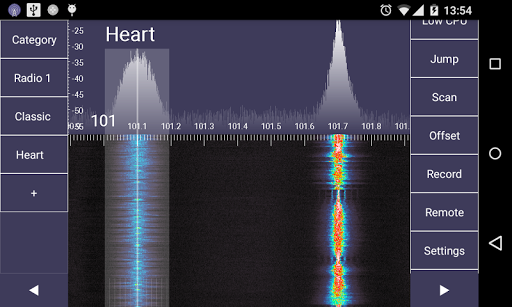
About this app
Developer Description
The most popular Software Defined Radio app for Android
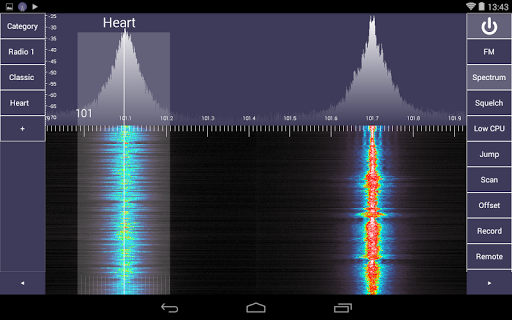
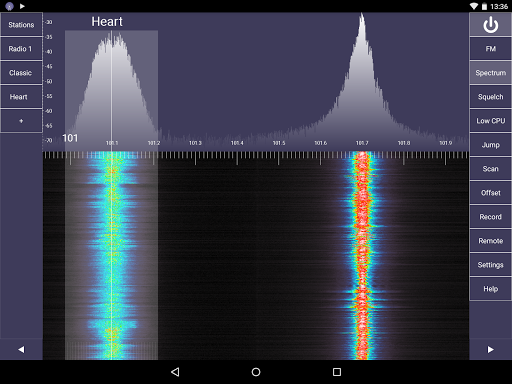
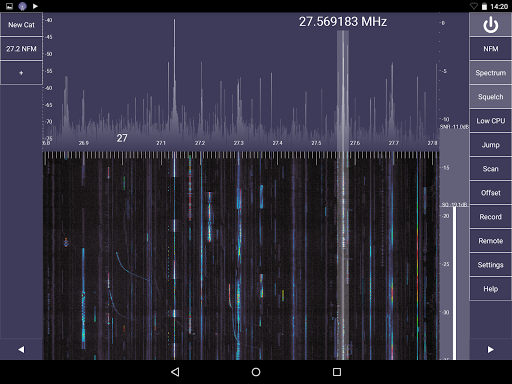
Listen and record live over-the-air FM stereo radio stations with RDS, weather reports, emergency stations, taxi traffic, airplane communications, audio of analogue TV broadcasts, HAM radio amateurs, digital broadcasts and many more! Depending on hardware used, radio frequency coverage can span from 20 MHz to 2.2 GHz. SDR Touch demodulates broadcast FM, AM, narrowband FM, upper sideband (USB) and lower sideband (LSB) signals.
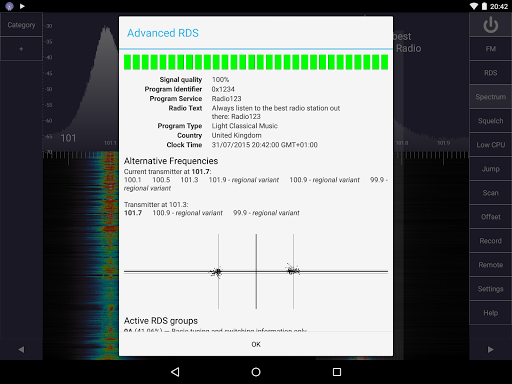
The built-in RDS monitor will allow exploring the hidden digital data feed that most commercial FM radio stations broadcast. This includes the station's program type (PTY), country of broadcast (ECC), date and time (CT), unique program identifier (PI), list of alternative frequencies (AF) and advanced statistics about the digital RDS carrier signal.
SDR Touch receives live radio via external USB hardware. The app runs offline and does not require a data plan or an internet connection! Take SDR Touch anywhere and find out what hides in the radio spectrum!
In order to run SDR Touch, you will need to plug your SDR receiver into the Android device using an USB OTG cable.
This application is currently experimental and may crash. Please, report any bugs to the email provided in the Help.
Using the open source SDR Driver, you can use one of the following compatible USB radio tuners:
- Generic RTL2832U RTL-SDR (e.g. hama nano)
- DigitalNow Quad DVB-T PCI-E card
- Leadtek WinFast DTV Dongle mini D
- Genius TVGo DVB-T03 USB dongle (Ver. B)
- Terratec Cinergy T Stick Black (rev 1)
- Terratec NOXON DAB/DAB+ USB dongle (rev 1)
- Terratec Deutschlandradio DAB Stick
- Terratec NOXON DAB Stick - Radio Energy
- Terratec Media Broadcast DAB Stick
- Terratec BR DAB Stick
- Terratec WDR DAB Stick
- Terratec MuellerVerlag DAB Stick
- Terratec Fraunhofer DAB Stick
- Terratec Cinergy T Stick RC (Rev.3)
- Terratec T Stick PLUS
- Terratec NOXON DAB/DAB+ USB dongle (rev 2)
- PixelView PV-DT235U(RN)
- Astrometa DVB-T/DVB-T2
- Compro Videomate U620F
- Compro Videomate U650F
- Compro Videomate U680F
- GIGABYTE GT-U7300
- DIKOM USB-DVBT HD
- Peak 102569AGPK
- KWorld KW-UB450-T USB DVB-T Pico TV
- Zaapa ZT-MINDVBZP
- SVEON STV20 DVB-T USB & FM
- Twintech UT-40
- ASUS U3100MINI_PLUS_V2
- SVEON STV27 DVB-T USB & FM
- SVEON STV21 DVB-T USB & FM
- Dexatek DK DVB-T Dongle (Logilink VG0002A)
- Dexatek DK DVB-T Dongle (MSI DigiVox mini II V3.0)
- Dexatek Technology Ltd. DK 5217 DVB-T Dongle
- MSI DigiVox Micro HD
- Sweex DVB-T USB
- GTek T803
- Lifeview LV5TDeluxe
- MyGica TD312
- PROlectrix DV107669
- SDRplay RSP
- HackRF One
- Rad1o
- HackRF Jawbreaker
It is your responsibility to comply with your local law before downloading or using SDR Touch. The SDR Touch team cannot be held responsible for any liabilities due to inappropriate usage of the app.
What's New
In-app purchases
$11.99 per item
Version Information
- Version
- 2.742
- Downloads
- 1M+
- Updated on
- Nov 8, 2025
- Released
- Jan 29, 2013
- Requires
- Android 5.0
Statistics
Google Play Rating History
Rating Distribution
Downloads Over Time
SDR Touch - Live radio via USB has been downloaded times. Over the past 30 days, it averaged downloads per day.
Shaded area shows 30-day prediction based on historical trends
Historical data collection started recently. More data points will be available over time.
SDR Touch - Live radio via USB - Google Play Rankings
Top Rankings
| Rank | Country | Category | List | Change |
|---|---|---|---|---|
| — |
Ranking History in
No ranking data available yet. Rankings are updated daily.
#135 in Top Grossing Music And Audio in Poland
#149 in Top Grossing Music And Audio in Italy
 Drum Pads - Beat Maker Go
SDR Touch - Live radio via USB
Drum Pads - Beat Maker Go
SDR Touch - Live radio via USB
 Audials Play: Radio & Podcasts
SDR Touch - Live radio via USB users say on Google Play
 Andrew Thomas
Not sure why some reviewers are down on this app - I've used it a few years and it's amazing for taking SDR dongles on holidays or into the great outdoors. It's pretty inexpensive yet lets you use a USB dongle or a networked TCP source, has a draggable spectrum display, adjustable bandwidth, various signal types/modes, lets you record audio and can also scan for active signals. What's not to like? My guess is the negative comments are from people who know very little about SDR!
 Tommy Fairfield
Bought the pro key. I think it's worth it. Pet peeve: can't adjust audio recording sample rate. In scenarios you want to record audio SSTV transmission your images might have banding because the default 32khz rate. Being able to set audio record sample rate to 11025hz and others would get it 5 stars.
 Teddy Johnson
This app is so close to being something amazing. Unfortunately I'm having issues getting frequencies to save correctly. When recalling a saved frequency it tunes an incorrect frequency. App is also very buggy. Scrolling ghe bad will suddenly stop until you zoom out or move the tuning marker. A paid app should be polished and bug free.
 Mykhailo Rodyhin
Useless without pro key, and trail is about 30sec. I didn't even have time to look through main functions.
 Vega Alpha
Don't Buy! Works when you first install and the companion driver. Later prompts to buy, but navigation to refuse doesn't function, while purchasing works fine. Otherwise phone is locked up. Is this the secret to million + sales? I can write App to do this, could someone else? While app runs tuning has two modes. Those being, adjust bandwidth, and adjust frequency. Each mode works such is easy to use, but switching between modes only ever happens accidentally. I never figured out how to use.
ApkTrusted Ratings & Reviews
More from Signalware Ltd
See more apps

Scan this QR code to download

Forwarding you to the page at Google Play market in seconds...
Open Google Play market now