
WCalc - Calculator Widget v4
GuoPing He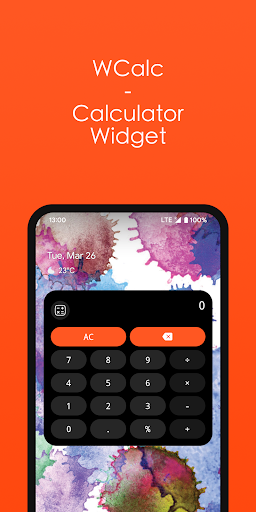


About this app
Developer Description
WCalc offers quick calculations on your home screen.
To add the Calculator Widget to your home screen:
1. Open your Android home screen.
2. Long-press on an empty area of the screen.
3. Tap Widgets.
4. Scroll down and find WCalc widget.
5. Drag the widget to the desired location on your home screen.
What's New
Version Information
- Version
- 4
- Downloads
- 500+
- Updated on
- Dec 15, 2025
- Released
- Jan 3, 2024
- Requires
- Android 12
Statistics
Google Play Rating History
Rating Distribution
Downloads Over Time
WCalc - Calculator Widget has been downloaded times. Over the past 30 days, it averaged downloads per day.
Shaded area shows 30-day prediction based on historical trends
Historical data collection started recently. More data points will be available over time.
WCalc - Calculator Widget users say on Google Play
 Kristin Cole
Edit: raised to 5 stars. Dev responded & fixed my issue w a new update less than 24 hrs after posting my 1st review I rly like this, but I have to give 1 star because it's completely unusable. I can type in numbers, but any operation buttons (+-÷×) I press won't register. I've fiddled with it in the settings and on the widget & the only thing it has done is display numbers pressed-I'm guessing this feature has only recently broken or maybe only broken for my phone model or OS version, who knows
 Sasinosoft Games
Good, but please fix: when you type fast, it will skip some digits, this reduces the speed I can use the widget at. Make it so that no matter how fast I'm typing, it will insert every key I press.
 Mark Andella
Working widget but slow reaction to input.
 Rafael Guzman-Hernandez
Super laggy on pixel 10 pro fold
ApkTrusted Ratings & Reviews
More from GuoPing He
See more apps








Similar Apps



Scan this QR code to download

Forwarding you to the page at Google Play market in seconds...
Open Google Play market now