OpenCPN v5.12.4
Dave Register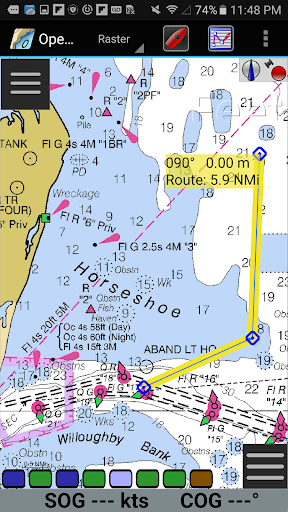



About this app
Developer Description
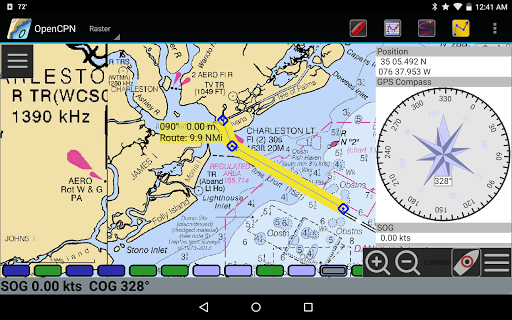
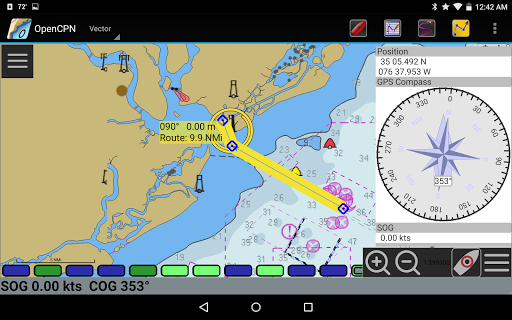
OpenCPN is a full featured ChartPlotter and Navigator for Android.
Building upon the tradition and experience of OpenCPN for the desktop computers,
OpenCPN for Android brings many of the same features to the mobile platform.
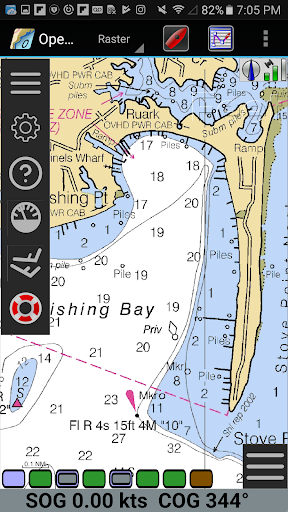
*BSB v3 raster chart (RNC) support.
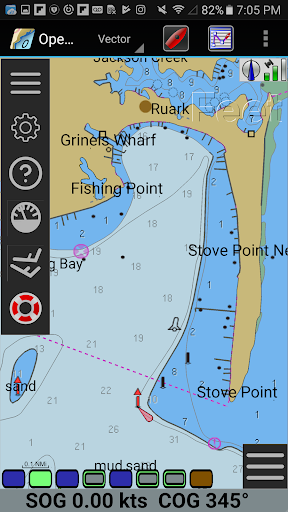
*S57 vector chart (ENC) support.
*IHO S52 compliant display of S57 vector charts.
*CM93 vector chart support, with per cell offset corrections.
*MBTiles chart overlay support.
*Integrated Chart Downloader
*Single-chart and Quilted display modes.
*North-up, Course-up and Chart-up display modes.
*Moving-map display mode.
*Route navigation with ship tracking functions.
*Waypoint navigation.
*True north or Magnetic north navigation
*Device-integrated GPS support.
*Bluetooth remote GPS support.
*Network (TCP/UDP) GPS device support.
*Standard NMEA 0183 GPS interface.
*Advance NMEA message handling structure, with built in multiplexer.
*Autopilot output support.
*Networked AIS input with full target tracking and collision alerting.
*AIS support for SART with selectable MMSI for automatic MOB handling.
*AIS support for DSC and GPSGate Buddies.
*Anchor watch/alarm functions.
*GPX Waypoint, Track and Route input and output file support.
*Tide and Current prediction and display by location.
*Route planning with tidal support.
*Builtin great-circle routing.
*GPX Layers for annotation of charts.
*A selection of display themes.
*Google Maps integration.
*Integrated links to eBook User Manual.
By using OpenCPN, you will become part of a worldwide community dedicated to the advancement of electronic charting for your kind of marine application. Whether cruising, racing, fishing, or working professionally on the water, OpenCPN has the features you need for more safety, performance, and fun.
Join us on our dedicated support Forum at
http://bigdumboat.com/aocpn/forum
What's New
Correct VDR plugin playback capability.
Add ability to import downloaded tide and current tables.
Extend plugin compatibility.
Version Information
- Version
- 5.12.4
- Downloads
- 10K+
- Updated on
- Oct 30, 2025
- Released
- Sep 16, 2015
- Requires
- Android 5.0
Statistics
Google Play Rating History
Rating Distribution
Downloads Over Time
OpenCPN has been downloaded times. Over the past 30 days, it averaged downloads per day.
Shaded area shows 30-day prediction based on historical trends
Historical data collection started recently. More data points will be available over time.
OpenCPN - Google Play Rankings
Top Rankings
| Rank | Country | Category | List | Change |
|---|---|---|---|---|
| — |
Ranking History in
No ranking data available yet. Rankings are updated daily.
#7 in Top Paid Maps And Navigation in United States


#4 in Top Paid Maps And Navigation in Brazil
 GPX Viewer PRO
OpenCPN
GPX Viewer PRO
OpenCPN
#4 in Top Paid Maps And Navigation in Italy

#5 in Top Paid Maps And Navigation in France

OpenCPN users say on Google Play
 Scott Yellig
Great value. My previous chart plotter app is no longer available on Google Play. When I got a new phone I needed to find a new app. I am really happy with OpenCPN. For $10 you can can get an app with all the updated charts you want, for free. I also like the idea that I can build something with the same user interface using free, open source software and a Raspberry Pi when I want a more permanent installation.
 James Ebersold
The application has a lot of nice features but on a tablet it has some issues compared to the PC version. It has gotten better since I started using it in 2020. Something I would like to see is the ability to remove charts in a way that actually deletes the files. I accidentally downloaded all of the NOAA MBTiles and now would like to delete the Pacific ones but you can't and the Android blocks access. I don't want to use the clear data function in Android and lose all the data.
 Harold Kim
Night mode still missing on this chart plotter. It is a must have feature for every chart plotter to be use during night navigation. Please add...
 Monty Mariner
This version caused me grief trying to add my charts, harmonics files and routes. It was difficult to specify path and when I 'poked' the app folders and added my harmonics files I could see the files in the settings but the app froze when the file was added. I eventually got it to add my harmonics files by clearing the app cache first. The same thing happened with routes GPX file, cleared cache and routes imported ok.
 Andy Hecker
The latest update appears to have removed the option to display my stored US RNC charts. As the ENCs don't show inland waterways (like the S Gulf Cove entrance to the lock and route to the four boatyards near Placida, FL), I'm forced to transition back to Navionics. I wish the Android version had at least the same capability as the Windows version, as I'm not going to keep a laptop in the cockpit. Additionally, the celestial nav tool won't run in Android.
ApkTrusted Ratings & Reviews
More from Dave Register
See more apps
Similar Apps

Wavve Boating: Marine Boat GPS
Free

Bike Route Planner
Paid

Holland America Line Navigator
Free

DeRadar
Paid

Orca: Boat GPS, Charts, Routes
Free

WeFish | Your Fishing Forecast
Free

Schiphol Amsterdam Airport
Free

Südtirol Fishing
Free
ShipAtlas - Ship Tracker
Free

VesselFinder
Free

Garmin Dive™
Free

Gaggle Paragliding, Ultralight
Free
Windfinder Pro: Wind & Weather
Paid

CoPilot GPS Navigation
Free

GPS Essentials
Free

Wanderz - Travel Guides
Free
Scan this QR code to download

Forwarding you to the page at Google Play market in seconds...
Open Google Play market now