Amazfit Bip S Watchfaces v6
0C7 Software


About this app
Developer Description
The best Watchfaces for "Amazfit Bip S"
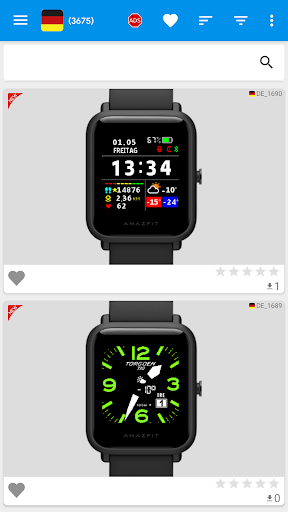
* Watchfaces for "Amazfit Bip S" translated into 25 languages
* Manage your favourite watchfaces
* Rate your watchfaces
* Sort by : Last added, rating, most downloaded of all time, most downloaded of the month, most downloaded of the week
* Powerful filter function to find your watchface
"Amazfit Bip S" is the perfect application to find the watchfaces of your dreams.
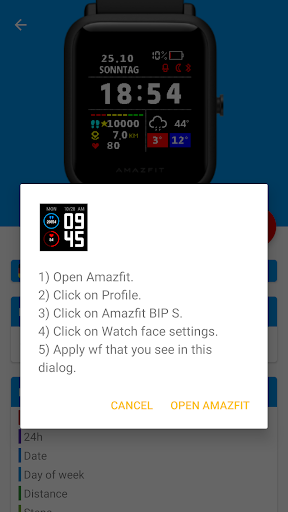
1) From settings, select the application to synchronise and the installation method.
2) Select the language, search or use the filter function and you will find your watchface for "Amazfit Bip S".
3) Download and install the watchface safely with AmazFit.
Your "Amazfit Bip S" will have a different look every day.
Before writing a negative review, read the instructions carefully! In case of problems, send an email to strike76@gmail.com
Using the application is very easy! Watch this video to understand how "Amazfit Bip S" works :
https://youtu.be/vHdobEyr3yw
What's New
In-app purchases
$3.49 per item
Version Information
- Version
- 6
- Downloads
- 100K+
- Updated on
- Oct 26, 2025
- Released
- May 2, 2020
- Requires
- Android 6.0
Statistics
Google Play Rating History
Rating Distribution
Downloads Over Time
Amazfit Bip S Watchfaces has been downloaded times. Over the past 30 days, it averaged downloads per day.
Shaded area shows 30-day prediction based on historical trends
Historical data collection started recently. More data points will be available over time.
Amazfit Bip S Watchfaces users say on Google Play
 Juan de la Cruz Sánchez Domínguez
The app is fantastic, the filters are even better. But I have a little problem. When I synced my watch, the face worked great. But the battery icon, was a red battery with an X inside, as if my watch was completely dry, even having charged it the same day and the battery % correctly showing 100%. Why am I not getting colours in the battery icon? Should I change the face? PS. Yes, apparently some faces have that problem. Just change it! Thanks to the developer for the quick answer
 David Hall
Good app, bit clunky interface but it does the job. It used to work directly with notify and fitness under Android 11 but they seem to have removed that functionality for some reason, despite it being much more seamless than the clunky Zepp integration. If they restored it as an option this would be 5 stars.
 Forrest Allison
Is there really no way to download a watch face as a file so that it can be saved or edited?
 Philip's eye
Anyway the watch itself sucks from battery issues
 D GD
D GD
I loved the app until you go to download and you cannot download the watch face you pick. I loved the option, that would let you pick what was on your watch face.
ApkTrusted Ratings & Reviews
More from 0C7 Software
See more apps
Amazfit GTS 4 Mini Watchfaces
Free
Amazfit BIP 5 Watchfaces
Free
Amazfit Band 5 Watchfaces
Free
Amazfit Band 5 Watchfaces
Free

Amazfit BIP 6 Watch Faces
Free
Amazfit Bip 3 WatchFaces
Free
Amazfit Bip / Lite WatchFaces
Free
Mi Band 6 WatchFaces
Free
Mi Band 4 WatchFaces
Free
Mi Band 5 WatchFaces
Free
Amazfit Active 2 Watch Faces
Free
Amazfit GTS 2/2e Watchfaces
Free

Amazfit Active Watch Faces
Free
Amazfit GTS 4 Watchfaces
Free

Amazfit GTS 3 Watchfaces
Free

Amazfit Balance Watch Faces
Free
Scan this QR code to download

Forwarding you to the page at Google Play market in seconds...
Open Google Play market now