Calendar v6.17
MB4ANDROID



About this app
Developer Description
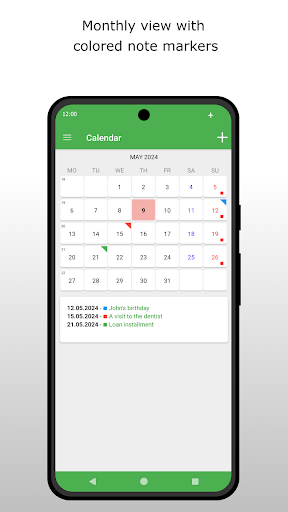
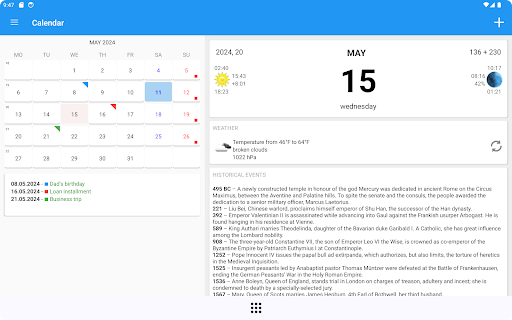
Calendar shows the current day, sunrise and sunset, historical events and more.
Full view contains weather forecast.
NOTE set the latitude and longitude of its location to hours of sunrise and sunset display properly.
Application use:
- Internet - for display advertising
What's New
Bugs fixed
6.11
Updated to Android version 15
Fixed bug
6.10
Fixed bug
6.07
Updated to Android version 14
Added the ability to mark the beginning of the menstrual cycle and predict it
6.06
Improved interface on tablets
6.05
You can invite your friends to install the application and enjoy the ad-free version for a month for each person you invite
6.00
Fixed an error with writing and reading notes
5.42
Fixed bug with no notification
Version Information
- Version
- 6.17
- Downloads
- 1M+
- Updated on
- Nov 15, 2025
- Released
- Oct 24, 2012
- Requires
- Android 5.0
Statistics
Google Play Rating History
Rating Distribution
Downloads Over Time
Calendar has been downloaded times. Over the past 30 days, it averaged downloads per day.
Shaded area shows 30-day prediction based on historical trends
Historical data collection started recently. More data points will be available over time.
Calendar users say on Google Play
 A Google user
It can be improved as it picks up wrong lat long from internet instead it must take from compass
A Google user
Your Calender widget is awesome.if you add current Weather temperature in position of Sun area( logo) and in Right you add time.Then this become top class widget. Thanks
 Cheryl Caulder
I installed this app from the Goo play store on an older device, Acer A200 with Android v.4.0.3 which already has Google calendar installed. I gave it an OK rating as I wanted a calender that in month view, would show what was typed for events in the calendar squares as I keep record of our daily high and low temperature. I wanted to be able to see what I entered for each date at a glance, albeit just a snippet as I know you can only view a certain amount of text per square. Instead this shows a little red fold down in the upper right corner of the date square indicating the date contains text/event entry and you have to select the square and it will show the event entry in a pane below the month view.
A Google user
For the new year, it's still showing all the notes for last year 2016, in 2017, what can be done to dump last year's notes, and start a clean calender for 2017?
A Google user
The screenshot that shows the settings for background and font color is fake. There are no such options in the app.
ApkTrusted Ratings & Reviews
More from MB4ANDROID
See more apps
Prayer book
Free
Money Clicker Game
Free

Montana clock
Free

The Holy Rosary
Free

Speaking clock - hear the time
Free

Memo IQ - Train Your Memory
Free

Kolędy. Wielki śpiewnik.
Free

Flappy Butterfly
Free

Block IQ - Puzzle Game 2025
Free
Work and rest - pomodoro
Free
Kolędy. Wielki śpiewnik.
Free
Multiplication table
Free

Wordsmith - find them all
Free
Similar Apps

Simple Calendar - easy planner
Free
Calendar Widget: Month/Agenda
Free
DigiCal Calendar Agenda
Free
Weather for Wear OS
Free

Progressive Pomo: Focus Timer
Paid

Ramadan Calendar 2026 - Iftar
Paid

Sunrise and Sunset Times
Free
Alarm Clock
Free

Nothing Pomodoro Timer
Paid
Simple Alarm Clock
Free
Weekly Planner - Diary, Notes
Free

Business Calendar 2 Planner
Free

Personio
Free
Scan this QR code to download

Forwarding you to the page at Google Play market in seconds...
Open Google Play market now