
Poste Business v4.41.28
Poste Italiane S.p.A.

About this app
Developer Description
One App: MPOS and Code, Business Link Accounts, PP Business Debit Cards
• receipts from the Postepay Code service
• receipts from the Postepay MPOS service
• your BancoPosta Business Link accounts
• your Postepay Business debit cards
• your Postepay Evolution Business prepaid cards
To find out the post offices where it is possible to request the opening of BancoPosta Business Link accounts and the activation of Postepay Business debit cards, consult www.poste.it Banking Transparency section
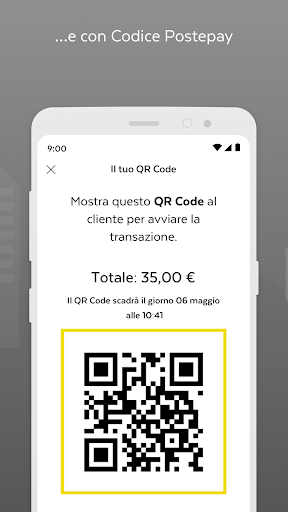
Manage collections from the Postepay Code service
Postepay Code is the service that allows you to accept payments in your point of sale (by framing the displayed QR Code or via geolocation) and remotely (by sending a link) How?
• Your customers authorize payment through their Postepay App
• You receive a notification of successful collection directly on your PosteBusiness App
• If you also participate in ScontiPoste you can offer your new and regular customers the convenience of obtaining cashback discounts for purchases made
• Furthermore, through the PosteBusiness App, you can set up personalized promotions for your point of sale which will be communicated to customers in your area
Thanks to the Postepay Code, the millions of holders of Postepay prepaid cards and Postepay and BancoPosta debit cards can find your point of sale in the maps in the Postepay App
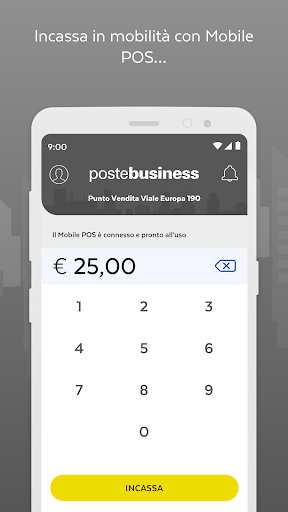
Collect with MPOS Postepay
MPOS Postepay is a service that allows you to accept payments with credit, debit or prepaid cards on the move
To be able to collect, pair the Mobile POS device with the PosteBusiness App on your smartphone/tablet (enabled for data connectivity in WiFi or 3G/4G mode and equipped with Bluetooth technology) How?
• Launch the App and enter the amount
• Insert the card into the MobilePOS or use the charge card holder's C-less mode to finalize the payment
• View payment confirmation and send receipt to cardholder
• If necessary, you can also reverse the last operation
Manage your Bancoposta Business Link accounts
• Access and control all your BancoPosta Business Link accounts easily with a single App. And if you have multiple companies enabled for financial services, choose in the App which one you want to operate on
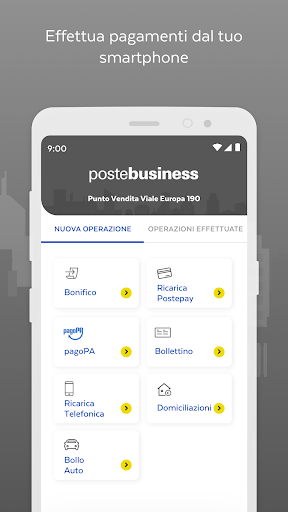
• Make payments on the move You can complete and authorize your payments in the App, even those prepared by your collaborators from internet banking
• Use the calendar to remember the deadlines for the most important receipts and payments
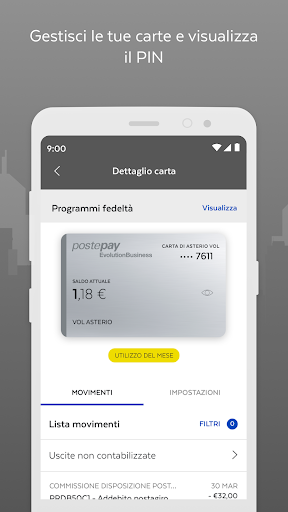
Manage your Postepay Business debit cards
• View the operations carried out with Postepay Business debit cards
• Manage and customize daily and monthly payment and withdrawal limits, enable cards for online purchases even only on specific spending categories, view the PIN and much more
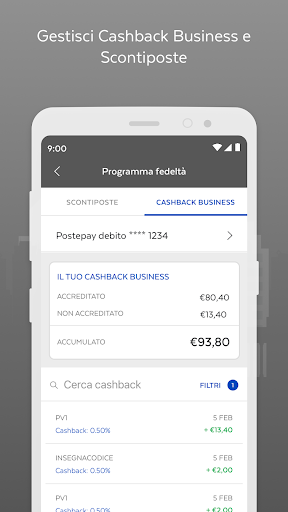
• You can also always view the amounts relating to the ScontiPoste and Cashback business loyalty programmes
HOW DOES IT WORK
• Confirm registration or register on https://business.poste.it/, download the PosteBusiness App and complete the activation procedure
Associate the QR Code that will be given to you when subscribing to the service to the App to accept payments with the Postepay Code
Associate the Mobile POS that will be delivered to you after confirming the activation of the service to the App and start collecting
Activate all products by following the instructions in the App, so you can manage your Banco Posta Business Link accounts, your Postepay Business debit cards and authorize payment transactions
ASSISTANCE or CUSTOMER SERVICE
And if you need help, customer service is available to answer any questions
For Postepay Code and Mobile POS you can contact the number 06.4526.8811
For BancoPosta Business Link accounts and Postepay Business debit cards you can contact the number 06.4526.1600
Consult the accessibility declarations on https://www.poste.it/dichiarazione-accessibilita.html
What's New
Version Information
- Version
- 4.41.28
- Downloads
- 100K+
- Updated on
- Dec 18, 2025
- Released
- Jan 17, 2026
- Requires
- Android 8.1
Statistics
Google Play Rating History
Rating Distribution
Downloads Over Time
Poste Business has been downloaded times. Over the past 30 days, it averaged downloads per day.
Shaded area shows 30-day prediction based on historical trends
Historical data collection started recently. More data points will be available over time.
Poste Business users say on Google Play
 Ile Mathew
Have been trying to do transfer from my app but is not going through WHY?
 Mustenser Akhlaq
it's good for business
 Airin Alam
molto utile
 Sulayman Mballow
Very poor service 😢
 tahjim sarwar
Last 3 days app not configured with POS.When try to configure the payment page not showed.I talked with the customer care but they didn’t gave any Solution..So now i can't use the service😢😢😢.
ApkTrusted Ratings & Reviews
More from Poste Italiane S.p.A.
See more apps



Scan this QR code to download

Forwarding you to the page at Google Play market in seconds...
Open Google Play market now