
MB WAY v2.29.1
SIBS FORWARD PAYMENT SOLUTIONS




About this app
Developer Description
With MB WAY, you only need your number to make payments and immediate transfers.
All of this always with SIBS security guarantee. The MB WAY app is the No.1 payment app in Portugal and already a reference, with more than 6,5 million users who use its advantages daily, making it the favorite payment app of the Portuguese.
FUNCTIONALITIES
How to pay with MB WAY?
To pay in shop, when paying for your purchases in physical shops, simply select the "Pagar com MB WAY" button and choose the "QR Code" or "NFC" option.
- QR Code - After the merchant enters the purchase amount in the terminal and confirms OK, a QR Code is generated. Simply scan this QR Code on the payment terminal. If the purchase is more than the amount without PIN, confirm with your MB WAY PIN, touch ID or face ID.
- NFC - Touch your mobile phone to the payment terminal. If the purchase exceeds the amount without PIN, confirm in the MB WAY app and pull over again.
To pay in online shops, select the MB WAY payment method and enter your mobile phone number. You will receive a notification to confirm the payment with your MB WAY PIN.
How to buy with MB NET?
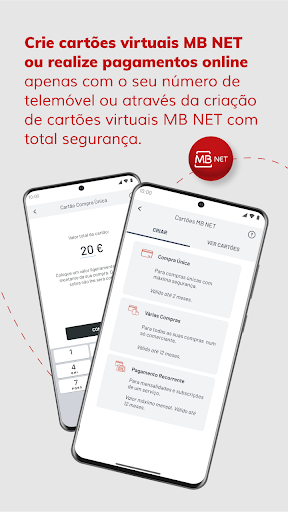
When paying for your online purchases, access the MB WAY app and generate an MB NET card in the "Cartões MB NET" option. Then, on the merchant's website, select pay with card and enter the details of the MB NET card you generated.
How to use MULTIBANCO?
To use the "Utilizar MULTIBANCO” option with the MB WAY app, you must choose the amount you want to withdraw and enter your MB WAY PIN or touch ID. Then, with the generated code, go to a MULTIBANCO ATM, press the green key and choose the "Withdraw Money" option. You can also generate a code for someone else to go to MULTIBANCO to withdraw. You can also use this option “Utilizar MULTIBANCO” to carry out other operations available at MULTIBANCO.
How to send money?
Simply press the "Enviar Dinheiro" button, enter a contact and the amount you want to send and confirm the operation with your MB WAY PIN. The money will be immediately available in your contact's account.
How to request money?
To request money, simply select the "Pedir Dinheiro" button in the app, select the contact you want to request money from, indicate the amount, and confirm the operation.
You can also request the amount through your personal QR Code.
How to split an account?
To split an account, simply select the "Dividir Conta" button. Then, select the contacts with whom you want to split the bill, indicate the amount of the bill, and confirm the operation.
How to join authorized payments?
To manage your subscriptions or recurring payments through "Pagamentos Autorizados", simply select this payment method on the participating partner, enter your mobile phone number, confirm on your MB WAY, enter your PIN for confirmation and you're done!
How to activate MB WAY?
1. Link your bank card at an ATM (MULTIBANCO)
2. Download the app for free and activate it with your mobile number
MB WAY is the only official digital payments app from SIBS, accepted by all major banks in Portugal.
How to activate MB WAY pulse?
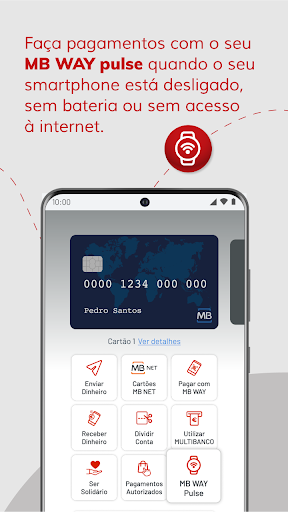
Use MB WAY pulse to make contactless payments through another device: bracelet, key ring or clip for your watch, but with the cards you have associated with MB WAY. You can now make purchases with MB WAY pulse without having to have your smartphone with you.
What's New
Version Information
- Version
- 2.29.1
- Downloads
- 5M+
- Updated on
- Jan 15, 2026
- Released
- Apr 15, 2015
- Requires
- Android 9
Statistics
Google Play Rating History
Rating Distribution
Downloads Over Time
MB WAY has been downloaded times. Over the past 30 days, it averaged downloads per day.
Shaded area shows 30-day prediction based on historical trends
Historical data collection started recently. More data points will be available over time.
MB WAY - Google Play Rankings
Top Rankings
| Rank | Country | Category | List | Change |
|---|---|---|---|---|
| — |
Ranking History in
No ranking data available yet. Rankings are updated daily.
#33 in Top Free Apps in Portugal


MB WAY users say on Google Play
 Fábio Carvalho
Great app, very useful!
 Luis Carvalho
anos depois da minha última crítica, o serviço melhorou bastante. a publicidade reduziu significativamente e apesar da app falhar de vez em quando a existência do pulse nega qualquer prejuízo nesse sentido
 Katalin Pap
The app should have Language settings available. This is basic.
 Mary M
I'm trying the authentication process the code that's supposed to be auto-filled does not do what's supposed to. please fix this or at least change it so people can introduce the code manually
 gingerbear67
garbage. lost all my config, now I can't set it up again because it doesn't respond to the confirmation SMS messages. and there's no way to manually enter the code
ApkTrusted Ratings & Reviews
More from SIBS FORWARD PAYMENT SOLUTIONS
See more apps
Scan this QR code to download

Forwarding you to the page at Google Play market in seconds...
Open Google Play market now