
Folder Widget - Large Folders v10.2.0
automan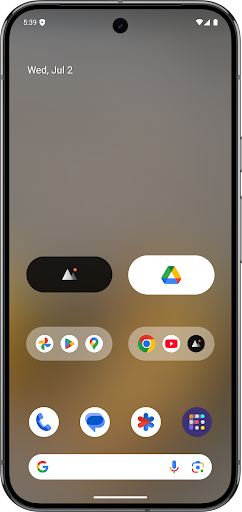


About this app
Developer Description
Put large super-sized folders or big icons in homescreen to improve productivity
Features:
- Rich configuration options
- Support hiding folder name
- Support kind of shortcuts, such as quick system settings, in-app shortcuts, files, folders, web page, activities, accessibility shortcuts, custom schema, shell and popup widget
- Kind of folder widget struct type, 2x2, 3x3, 4x4, 3+4, 1x5, 2x3, 3x2, MxN(cutstom), MxN(Scroll), Circle and more
- Custom widget size, background color, radius, margins, paddings
- Custom folder name, text color, text size, text paddings
- Custom folder grid size and icon name visibility
- Support change notification dot number styles
- Vertical scrollable inside the folder box
- Adaptive icon shape
- Support icon pack and mask
- Auto-dark folder background
- Shadow option of folder name
Popup widget- Select one or more pop-up widgets to place in a large folder or icon on the home screen launcher
File/Folders - select the file or folder path as the quickest way to open it
Accessibility shortcuts - includes quick Home, Back, Recent, Power menu, Take screenshot(Android P+), One-key Lock screen(Android P+) and more
Activities- activity screen list of all installed apps
Web page - use any URL as a separate page that can be opened quickly
Schema - jump to a specific page using a more advanced schema
Shell - command execution
If you have any questions or suggestions, please contact me by email to hanks.xyz@gmail.com
What's New
⭐ New: save template and apply online template
⭐ New: Add Contact, Files, Folders shortcut type
⭐ New: Circle Folder, Folder border, Large icon
⭐ New: Rename folder items
⭐ New: Shortcuts manager
⭐ New: Import widgets & shortcuts
⭐ New: File shortcuts, schema, shell, web page
⭐ Folder image background and dark color
⭐ Scrollable inside folder
⭐ Custom folder grid size and show icon name
⭐ System settings shorcuts
⭐ Notification dot type
In-app purchases
$1.99 - $5.99 per item
Version Information
- Version
- 10.2.0
- Downloads
- 1M+
- Updated on
- Aug 1, 2025
- Released
- Jan 11, 2022
- Requires
- Android 5.0
Statistics
Google Play Rating History
Rating Distribution
Downloads Over Time
Folder Widget - Large Folders has been downloaded times. Over the past 30 days, it averaged downloads per day.
Shaded area shows 30-day prediction based on historical trends
Historical data collection started recently. More data points will be available over time.
Folder Widget - Large Folders - Google Play Rankings
Top Rankings
| Rank | Country | Category | List | Change |
|---|---|---|---|---|
| — |
Ranking History in
No ranking data available yet. Rankings are updated daily.
#29 in Top Grossing Personalization in Japan

#54 in Top Grossing Personalization in Egypt


#54 in Top Grossing Personalization in Saudi Arabia


#60 in Top Grossing Personalization in Italy
 OneGlass 8 (Color) - Icon Pack
Folder Widget - Large Folders
OneGlass 8 (Color) - Icon Pack
Folder Widget - Large Folders
 Walli - Stunning 4K Wallpapers
Folder Widget - Large Folders users say on Google Play
 Puck Fae Vitous
Amazing app. The folders serve my needs for organization as well as being highly flexible in customization for size and color. I also highly appreciate that the folders can be stacked, not only with themselves but with other widgets which gives them points over the recent changes Samsung added to their One UI folders. If anything, I wish the overflow only showed the overflowed apps, not all in the folder
 Zmary Ayen
I really love this app. It has cute folders to choose from and customizable in many ways, too. The reason I'm giving it 4 stars is that a lot of times, it would act up. When I tap another app, it opens the app I previously accessed. So I have to tap out or exit a lot of times. It gets annoying! I'm paying premium, so I hope you guys fix it.
 Alexius Saldanha
Good as long as it runs properly otherwise very inconsistent. Sometimes all the settings have to be redone or it freezes.
 Stan Rainier Salazar
It was a great widget before it went greedy. Now requires to purchase things to make the widget fully functional. 5 stars before the latest update.
 Dalveer Singh
The app asked for PRO so quickly 😂. It wasn't even useful yet. I'm pro-uninstall.
ApkTrusted Ratings & Reviews
More from automan
See more apps
Similar Apps

KWGT Kustom Widget Maker
Free

Clock Widget: Photo & Music
Free
Shortcut Maker
Free

OneUI Widgets
Paid
Square Home
Free

Action Launcher: Pixel Edition
Free

Icon Pack Studio
Free

AIO Launcher
Free
Good Lock: Premium Lock Screen
Free

Nova Launcher
Free

MyICON - Icon Changer, Themes
Free

dynamicSpot - Dynamic Island
Free

Backdrops - Wallpapers
Free

OxygenOS 16 Icon pack
Free
Widget Lab:Wallpapers & Themes
Free

Ares Dark Icon Pack
Paid
Scan this QR code to download

Forwarding you to the page at Google Play market in seconds...
Open Google Play market now