Untrack: Stop Link Tracking v3.0-97e1b30
Djonny Stevens Abenz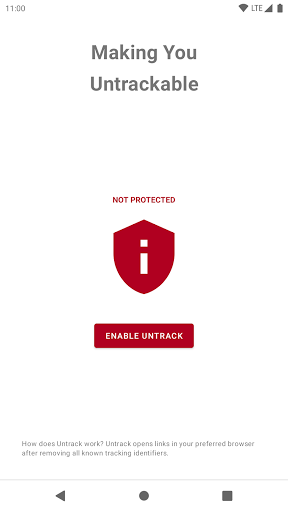



About this app
Developer Description
Making You Untrackable
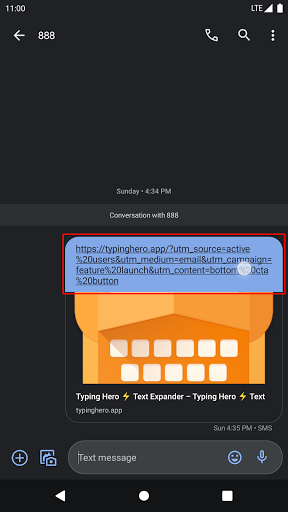
Familiar with link like this? https://example.com/?utm_source=big-tech&utm_medium=cpc&utm_campaign=summer_sale&utm_term=sunglass&utm_content=top_banner
That link contains tracking parameters such as utm_source, utm_medium, utm_campaign, utm_term, and utm_content.
Other than those tracking parameters, there are hundreds more out there! They are placed in links to track your online activities: what you're seeing, what you're clicking, which site you're coming from, which site you're heading to, and so on.
Without those tracking parameters, the link simply looks like this: https://example.com/.
It's shorter! It's cleaner! It's the same content!
And the best part is, you are not tracked!
How does it work
Untrack opens links in your preferred browser after removing all known tracking parameters.
If certain pages are broken when opened using Untrack, please write to support@untrack.app and providing the full link so I could investigate it.
How to use Untrack
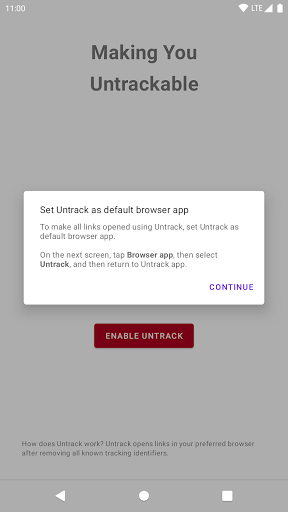
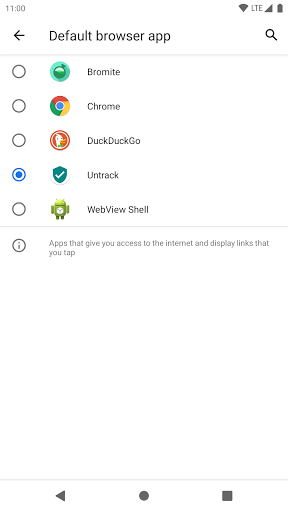
1. Enable Untrack by making it the default browser app.
This will make all links opened using Untrack, except when clicking on a link in a browser itself.
2. Set your preferred browser in Untrack app.
When a link is opened using Untrack, all known tracking parameters will be removed, and then opened in your preferred browser.
Features
🛡️ Open link without tracking parameters in preferred browser
⚠️ Links configured to be opened using certain app will not be opened using Untrack.
⚠️ Links in the pages when using a browser will be opened automatically by the browser itself. To open those links using Untrack, tap and hold the link, then choose Share, and then share the link to Untrack.
🛡️ Copy link without tracking parameters to Clipboard
🛡️ Share link without tracking parameters to other apps
🛡️ Bypass outbound link confirmation (Facebook, Google, Messenger, YouTube)
🛡️ Bypass link redirection related to ad
🛡️ Use only one tab in your preferred browser
🛡️ Bypass Accelerated Mobile Pages (AMP)
Planned Features
🛡️ Shortened link protection (might require subscription to cover server cost)
Privacy
Untrack does not require any permission to run, including access to internet.
Feel free to send feedback, suggestion, constructive criticism, bug report, or feature request to support@untrack.app.
🇮🇩 Made in Jakarta, Indonesia.
What's New
✅ Support Android 14
0.2.1:
✅ Upgrades various tools
v0.2.0:
🐞 Fix crash when opening Google Ads link
v0.1.14:
🐞 Fix default browser detection
v0.1.13:
🐞 Fix default browser detection on Android 9
v0.1.12:
🛡️ Bypass WebGains link redirection
🛡️ Show default browser name if Untrack isn't the default browser
v0.1.11:
🛡️ Bypass AMP (experimental)
v0.1.10:
🛡️ Open links in the same tab on supported browser, e.g. Bromite, Chrome
Version Information
- Version
- 3.0-97e1b30
- Downloads
- 100+
- Updated on
- Aug 9, 2023
- Released
- Apr 1, 2021
- Requires
- Android 7.0
Statistics
Google Play Rating History
Rating Distribution
Downloads Over Time
Untrack: Stop Link Tracking has been downloaded times. Over the past 30 days, it averaged downloads per day.
Shaded area shows 30-day prediction based on historical trends
Historical data collection started recently. More data points will be available over time.
Untrack: Stop Link Tracking users say on Google Play
 Grateful Quad
I love that no the applications I use can track me anymore.
 Josh O'Niell
It 5 review some sites don't allow me to go on etc post service... A on/off switch as if is a way I not notice keep uninstall must be easier way if anyone knows plz put it in review 🙏
 Ripple Rip
In that case i would accept a refund, but also would accept an email when the issue is resolved.... and then consider repurchasing.
 Ahrooran Ravindran
When it says to enable app, I did by going into settings and se lt it as default. but app still shows red warning that it is not setup yet
ApkTrusted Ratings & Reviews
More from Djonny Stevens Abenz
See more apps
Scan this QR code to download

Forwarding you to the page at Google Play market in seconds...
Open Google Play market now