Clapperboard PRO & Shot log v1.0.1
MSDC Technologies Ltd




About this app
The Clapperboard PRO & Shot log app solves the problem of inefficient film and video production by providing a professional-grade clapperboard with audio and visual sync marks, making it an essential tool for filmmakers and videographers. This app benefits professionals and enthusiasts in the film industry who need a reliable and feature-rich clapperboard. Compared to other video players in the category, Clapperboard PRO stands out with its specialized functionality and lack of ads, justifying its paid model. However, its limited user base and lack of updates may raise concerns about long-term support and compatibility.
Pros
- With a perfect 5.0 rating from users, Clapperboard PRO demonstrates exceptional quality and user satisfaction, indicating a well-designed and effective app.
- The app's paid model without in-app purchases or ads ensures a distraction-free experience, allowing users to focus on their film and video productions.
- The developer's reputation, as evidenced by their professional website and email, suggests a commitment to support and maintenance, which is crucial for a specialized app like Clapperboard PRO.
- The app's lack of permissions requests is a significant advantage, as it ensures user data privacy and security, which is essential for professionals working with sensitive content.
- Clapperboard PRO's offline capability, implied by its lack of internet permissions, makes it a reliable tool for film and video productions in various locations and conditions.
Cons
- The limited number of downloads and user reviews may indicate a small user base, which could lead to limited community support and potentially less incentive for the developer to update and expand the app.
- The app's $5.99 price tag may be a barrier for some users, especially hobbyists or students, who might opt for free or lower-cost alternatives with similar functionality.
- The lack of information about future updates and the developer's plans for the app may raise concerns about its long-term viability and compatibility with future Android versions.
- Clapperboard PRO's specialized nature may limit its appeal to a broader audience, as it is primarily designed for film and video production professionals, which could affect its overall popularity and support.
Best for: The ideal user for Clapperboard PRO is a professional filmmaker, videographer, or production crew member who requires a reliable, feature-rich, and ad-free clapperboard solution for their film and video productions, and is willing to invest in a high-quality, specialized tool to streamline their workflow and enhance their productivity.
Developer Description
A professional-grade clapperboard with audio & visual sync marks and much more.
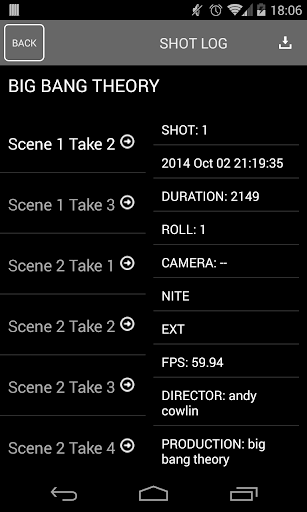
An fully functional Shot Log automatically saves, organises and categorises each and every one of your shots also allowing you to save them to your device or share them with team members,
** SHOT LOG RECORDS **
- Date / Time of shot
- Production Name
- Director Name
- Board Name
- Scene
- Take
- Roll
- Duration
- Latitude
- Longitude (Can make a map if connected to internet)
- Notes
- Frames per second
- Date/time of shot
- Camera
Features include:
- Multiple slates
- Custom FPS for timecode and timer
- "Flash" high-contrast visual cue
- Loud audible beep for audio cue
- Shot log
And much more!
Clapperboard PRO was developed by a real TV crew while producing a series of documentaries.
If you're a professional, student, work in the media or an enthusiast, Professional Digital Clapperboard is the best clapper board time code sync app for professional use with high quality visual cues and clear audio cues.
Clapperboard PRO is primarily used with the audio and visual cues to sync cameras and sound recording devices during editing.
Privacy
Given that Clapperboard PRO requests no permissions, it poses minimal risk to user data and privacy. However, users should still be cautious when using any paid app, ensuring they are downloading from trusted sources like the Google Play Store. Additionally, users should regularly review the app's terms of service and privacy policy, if available, to understand any potential data collection or usage.
Tips
To get the most out of Clapperboard PRO, users should familiarize themselves with the app's features and settings before using it on a production set. Regularly checking for updates, although not frequent, is crucial to ensure compatibility and access to any new features. For optimal performance, closing unnecessary apps and ensuring sufficient device storage can help prevent any potential issues during use.
What's New
- Select the color of the clock/timer
- Edit notes to shots after they are takene
- Delete unwanted shots
Version Information
- Version
- 1.0.1
- Downloads
- 1K+
- Updated on
- Jan 18, 2015
- Released
- Nov 2, 2014
- Requires
- Android 4.1
Statistics
Google Play Rating History
Rating Distribution
Downloads Over Time
Clapperboard PRO & Shot log has been downloaded times. Over the past 30 days, it averaged downloads per day.
Shaded area shows 30-day prediction based on historical trends
Historical data collection started recently. More data points will be available over time.
ApkTrusted Ratings & Reviews
More from MSDC Technologies Ltd
See more apps


Scan this QR code to download

Forwarding you to the page at Google Play market in seconds...
Open Google Play market now