
VESC Tool v6.06
Benjamin Vedder


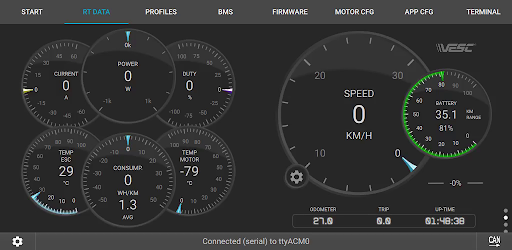

About this app
Developer Description
VESC Tool can monitor and configure VESC-compatible devices over BLE and Wifi
For details, visit
https://vesc-project.com
For VESC Original hardware, designed and maintained by the VESC developer team, go to
https://www.vesclabs.com/
To connect over BLE or WiFi a compatible module is required. They can be purchased from VESC Labs. It is also possible to build your own module based on the ESP32C3 or the NRF52 chipsets.
What's New
* 6.06.5: Some fixes for VL hardware, play store memory alignment fix
* 6.06.4: Fixed BLE connect bug introduced in new connect screen
* 6.06.3: Dialog size fixes for android 15 edge-to-edge screen
* Use temperature convention on BMS page.
* Show Min, Max and Diff voltage on BMS page.
* Filter package archive based on rules from QML description.
* Show dialog with package description in mobile UI when installing from file.
Version Information
- Version
- 6.06
- Downloads
- 10K+
- Updated on
- Oct 13, 2025
- Released
- Feb 16, 2019
- Requires
- Android 6.0
Statistics
Google Play Rating History
Rating Distribution
Downloads Over Time
VESC Tool has been downloaded times. Over the past 30 days, it averaged downloads per day.
Shaded area shows 30-day prediction based on historical trends
Historical data collection started recently. More data points will be available over time.
VESC Tool - Google Play Rankings
Top Rankings
| Rank | Country | Category | List | Change |
|---|---|---|---|---|
| — |
Ranking History in
No ranking data available yet. Rankings are updated daily.
#50 in Top Paid Tools in United States


#15 in Top Paid Tools in France

#17 in Top Paid Tools in Australia


#20 in Top Paid Tools in Germany


VESC Tool users say on Google Play
 A Google user
I was able to program the vesc completely from phone! I had a few issues with the one step programming regarding the amperage needed for the motors so I ended up going to the motor config tab to do it the old way. I would love if a simple units change option could be added (Mph) Update: The imperial units were added very quickly upon request! Thank you! At first I thought it didn't work but I just had to restart the app for it to change over.
 Guillaume Gallani
Can lock you out of your board without a warning. If you delete a pairing, the app will not unpair first, nor give you a warning, which results in you not being to connect to your board anymore. Which is just great when you only updated one motor config and are nowhere near a PC to plug the board in. At the very least, a warning would be welcome. The latest update has a much better UI.
 Marko Zaklan
After latest update app won't even boot up!!! All i get is new logo and crash!!! Please help, i was using Vesc tool successfully before today's update!!!
A Google user
Mine won't connect at all
 GPeter7 DIY mods
By updating the app from 6.2 to 6.5 my board with Tronic250R started to behave really weird, #1 simple stop doesn't work anymore, #2 now at 10mph the push-back kicks in. I did a new setup from scratch, but that didn't help, I also reflashed the firmware and did the setup again, but the pushback at 10 mph still there. #3 Also, I tried to activate a simple stop on my other VESC board, but it doesn't work either, and I know for sure that on 6.2 was working fine before upgrading to 6.5
ApkTrusted Ratings & Reviews
Similar Apps




Scan this QR code to download

Forwarding you to the page at Google Play market in seconds...
Open Google Play market now