
Polycam: 3D Scanner & Editor v2.1.8
Polycam


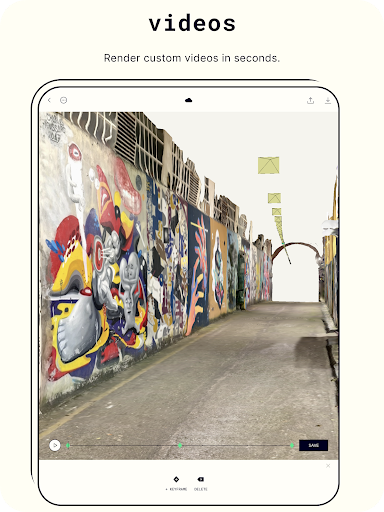





About this app
Polycam: 3D Scanner & Editor solves the problem of creating stunning 3D models with ease, benefiting professionals and hobbyists alike in the fields of photography, architecture, and product design. Compared to alternatives in the Photography category, Polycam stands out with its user-friendly interface and robust editing features. However, its limited compatibility with older Android versions might fall short for some users. Overall, Polycam's unique feature set and frequent updates make it a strong contender in its category.
Pros
- With over 1 million downloads and a 3.8/5 user rating, Polycam has demonstrated its reliability and effectiveness in delivering high-quality 3D scanning and editing capabilities.
- The app's free version with in-app purchases provides a flexible monetization model, allowing users to access advanced features without committing to a full purchase upfront.
- Polycam's developer, Polycam, has established a reputation for frequent updates and responsive customer support, ensuring that users receive timely bug fixes and new features.
- The app's offline capability and lack of ads enhance the overall user experience, allowing for uninterrupted 3D modeling and editing sessions.
- Polycam's integration with the developer's website and email support provides users with accessible resources and assistance when needed.
Cons
- Despite its robust feature set, Polycam's limited compatibility with Android versions below 10 might restrict its accessibility for some users, potentially excluding those with older devices.
- The app's in-app purchases, ranging from $17.99 to $199.99, might be perceived as expensive by some users, potentially deterring those on a tight budget.
- Some users have reported issues with the app's scanning accuracy and editing functionality, which may require additional refinement and improvement.
- The lack of transparency regarding data collection and usage, despite the app's zero-permission policy, might raise concerns among privacy-conscious users.
Best for: The ideal user for Polycam is a tech-savvy individual, likely between the ages of 18 and 45, with a background in photography, architecture, product design, or a related field, who requires a user-friendly and robust 3D scanning and editing solution for professional or personal projects.
Developer Description
Scan and Create Stunning 3D Models with Ease. Edit and Share with Polycam.
Key Features:
Revolutionary 3D capture:
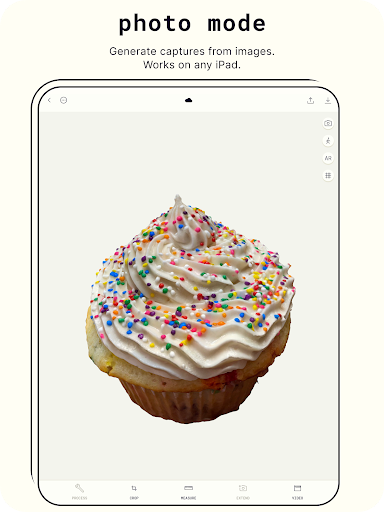
● Transform photos into 3D models with advanced photogrammetry
● Scan complex objects & scenes with intricate details
● Generate ready-to-use 3D assets for any computer graphics application
● Runs smoothly on any Android device with 2GB+ RAM
Advanced editing tools:
● Crop your 3D captures for the perfect composition
● Rotate to view from any angle
● Rescale to adjust the size of your 3D models
Export 3D models with Polycam Pro:
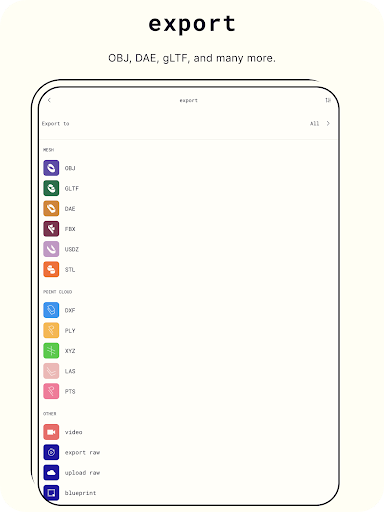
● Export mesh data in .obj, .dae, .fbx, .stl, & .gltf
● Export color point cloud data in .dxf, .ply, .las, .xyz, & .pts
● Export blueprints as .png images or .dae files
Connect & Share:
● Share 3D models with friends & colleagues with ease
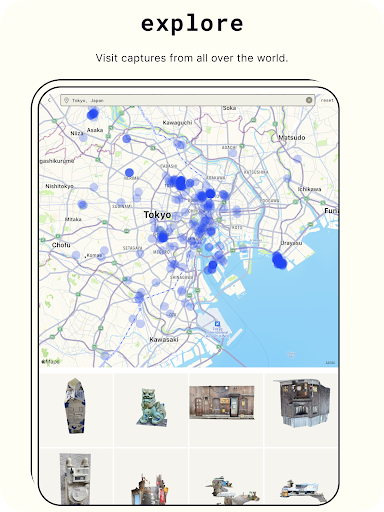
● Join the Polycam community & discover captures from around the world
● Showcase your 3D scanning skills & creativity by sharing with the community
Unleash your creativity and take your photography to the next level with Polycam, the best 3D capture app on the market. Download now!
Privacy Policy: https://polycam.ai/privacy_policy.pdf
Terms of Use: https://polycam.ai/terms_and_conditions.pdf
Privacy
Given Polycam's zero-permission policy, users can rest assured that their data is not being collected or shared without their consent. However, it is essential to note that the app's in-app purchases and online features may still collect anonymous usage data. To maintain optimal privacy, users should review the developer's privacy policy and terms of service before using the app.
Tips
To get the most out of Polycam, users should first familiarize themselves with the app's interface and editing features through the provided tutorials. Additionally, ensuring adequate lighting and camera calibration can significantly improve scanning accuracy. Regularly updating the app and restarting the device can also help maintain optimal performance and prevent potential bugs.
What's New
* Bug fixes
In-app purchases
$17.99 - $199.99 per item
Version Information
- Version
- 2.1.8
- Downloads
- 1M+
- Updated on
- Dec 17, 2025
- Released
- Apr 3, 2022
- Requires
- Android 10
Statistics
Google Play Rating History
Rating Distribution
Downloads Over Time
Polycam: 3D Scanner & Editor has been downloaded times. Over the past 30 days, it averaged downloads per day.
Shaded area shows 30-day prediction based on historical trends
Historical data collection started recently. More data points will be available over time.
Polycam: 3D Scanner & Editor - Google Play Rankings
Top Rankings
| Rank | Country | Category | List | Change |
|---|---|---|---|---|
| — |
Ranking History in
No ranking data available yet. Rankings are updated daily.
#40 in Top Grossing Photography in France
 Hair Styler App, AI Hairstyle
Polycam: 3D Scanner & Editor
Hair Styler App, AI Hairstyle
Polycam: 3D Scanner & Editor
 Fly App - Go for Drone models
#40 in Top Grossing Photography in Poland
 Reels Maker for Instagram BEAT
Polycam: 3D Scanner & Editor
Reels Maker for Instagram BEAT
Polycam: 3D Scanner & Editor
 Private Photo Vault - Keepsafe
#44 in Top Grossing Photography in Vietnam


Polycam: 3D Scanner & Editor users say on Google Play
 Dylan Avery
EDIT: YOU CAN LOG IN AGAIN Still can't log in. This app used to be great but Google sign in has been broken for months, the team is aware of it but told me the problem is on Google's side, which is strange because this is the only app on my phone that has that problem. Meanwhile I'm still paying them monthly hoping that they'll actually fix it someday.
 Harris Velvet
Quite impressed with this app... though documentation for android seems a bit slim ... it took me a while to realise that I wouldn't be able to use room mode in the free version... but hey.. it's free, and it gets quite nice results once you get the hang of it.
 Khadija Aljufri
Average but good
 Lance Warner
Forced to sign up as soon as you open the app, complete failure to scan correctly despite multiple attempts in a favorable environment. No guidance or information whatsoever as to what caused it to fail. Save yourself the trouble and just design it yourself before giving them your payment info. Extremely disappointed. 2 star due to the UI being smooth, but it's as a pretty car that doesn't drive.
 Luciano Ballista
free trial only on yearly subscription. for this reason I'm giving it 1 star. in my opinion, this is shady, feels like they count on the person forgetting to cancel subscription after trial period ends to charge a yearly subscription.
ApkTrusted Ratings & Reviews
Similar Apps

xOne: 3D Scanner & 3D Editor
Free

KIRI Engine: 3D Scanner App
Free
Moblo - furniture 3D modeling
Free
Creality Cloud - 3D Printing
Free

3D Modeling App: Sculpt & Draw
Free

Nomad Sculpt
Free

ArcSite
Free

AR Plan 3D Tape Measure, Ruler
Free
Ruler
Free

Fectar | Meet in AR Metaverse
Free

HomeByMe
Free
Prisma3D - Animation, Modeling
Free
ZWCAD Mobile - DWG Viewer
Free
AutoCAD - DWG Viewer & Editor
Free

magicplan
Free

Bambu Handy
Free
Scan this QR code to download

Forwarding you to the page at Google Play market in seconds...
Open Google Play market now