3D Object Maker v1.7.11
Leonardo Javier Russo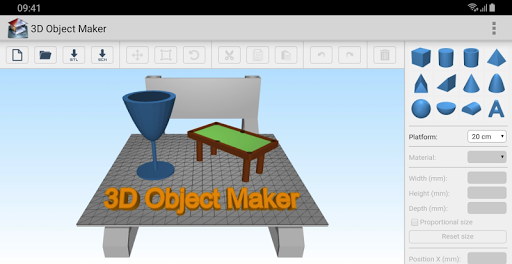
About this app
Developer Description
3D Object Maker in STL format
HOW TO USE THE APP:
Add geometric shapes (from the right panel) to the plataform to create your own object. Also you can import STL, OBJ and 3DS models to the plataform. Later, export the object as STL file (for 3D printing) or as a SCENE file (to keep working on it later).
HOW TO CUT OBJECTS:
1) Add object A to the plaform.
2) Add object B to the platform.
3) Select object B.
4) Select the material 'Hollow' (from the right panel).
5) Export the work as a STL file (the object B will erase every object, partially or entirely, that is within it's space). Depending of how complex are the objects, the device may take a few minutes to perform the task.
HOW TO FUSION OBJECTS:
1) Add object A to the plaform.
2) Add object B to the platform.
3) Select object B.
4) Select any material (except 'Hollow') from the right panel.
5) Export the work as a STL file.
HOW TO MOVE AROUND THE PLATFORM:
One finger to rotate, two fingers to zoom in and out and three fingers to move the camera.
What's New
Version Information
- Version
- 1.7.11
- Downloads
- 100K+
- Updated on
- Jul 12, 2025
- Released
- Jan 28, 2018
- Requires
- Android 5.0
Statistics
Google Play Rating History
Rating Distribution
Downloads Over Time
3D Object Maker has been downloaded times. Over the past 30 days, it averaged downloads per day.
Shaded area shows 30-day prediction based on historical trends
Historical data collection started recently. More data points will be available over time.
3D Object Maker users say on Google Play
 A Google user
It's great but it would be more great to have a larger than 50cm platform to work on or no platform at all. It was difficult to see the top of my design at times if it was taller than the platform. In a future update a larger variety of 'material' to work with would be really nice too. But this is a very good app and I will use it again.
 Kimberly Oxley
You can move items and change shape by inputting xyz or dragging with the controls. So that's nice. It would be great if you could lock an item in place once you get it where you want it, with the option to unlock it and move it again later. I say this because it's very easy to accidentally grab a object while trying to move another object. It happens almost automatically. I also wish I could pull the screen left or right with two fingers rather than only zoom to center. For that, I can't use
A Google user
Platform should be translucent so you can see the underside of your model, also not clear if you can remove an object from another (create cut outs).
A Google user
I tried it to see what it was about and it just had nothing but lag and terrible controlls. if i tried to move a shape it would move about 5 seconds after i touched the screen. when you put the shapes together they dont look like they are attached or even close to looking like they were put together, they dont line up at all! I do not reccomend this to anyone, do not even try it its a huge waste of time! it might slow down your device aswell.
A Google user
it's not working. either it's slow or not working at all
ApkTrusted Ratings & Reviews
More from Leonardo Javier Russo
See more apps

Similar Apps

DreamBuild: Sketch to 3D
Paid

Thingiverse Printables | 3Drop
Free

3D Photo: Imager
Paid
Handy Art Reference Tool
Paid

Logo Maker Design AI Generator
Free

Pawtist: Pet Travel Postcards
Free

Tattoo AI: Ink Design Try-On
Paid

Homestyler - Home Design Game
Free

Renovate AI : House Design
Free

Polycam: 3D Scanner & Editor
Free

House Design : AI Home Design
Paid

Nomad Sculpt
Free

Invitation Maker & Card Design
Free

Apowersoft Background Eraser
Free
Scan this QR code to download

Forwarding you to the page at Google Play market in seconds...
Open Google Play market now