
Auto Reply, Automation Tool v1.1.3
Droid-Developer



About this app
Developer Description
Auto Reply, Send Automatic reply to incoming messages in Multiple Messaging Apps
Features:
• Supports automatic reply in multiple messaging applications
• Direct Chat
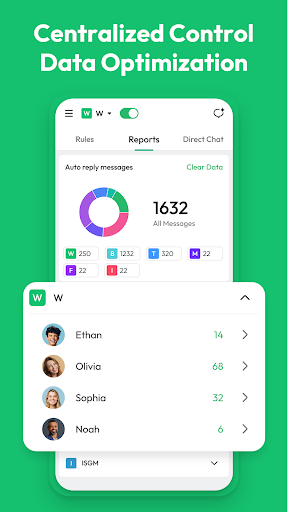
• Reports Management:
○ You can monitor and manage auto reply messages across multiple platforms for improved communication efficiency.
○ You can clear your data, which helps ensure your statistics are accurate and not corrupted by old data, especially before rolling out new autoresponder rules. Besides, accumulated data may slow down the app. Clearing redundant data improves speed and responsiveness.
How to Set Your Auto Reply Rules:
Step 1: Choose Your Message Type
• You can set up auto reply for all messages, messages that contain specific keywords, or those that fully match certain criteria.
Step 2: Choose Your Reply Type
• You can customize your reply content or create a menu of quick reply.
Step 3: Pick Who Gets Your Auto Reply
• Choose to auto reply to everyone, specific contacts, or exclude certain contacts. You can pick contacts from your address book or import a custom list.
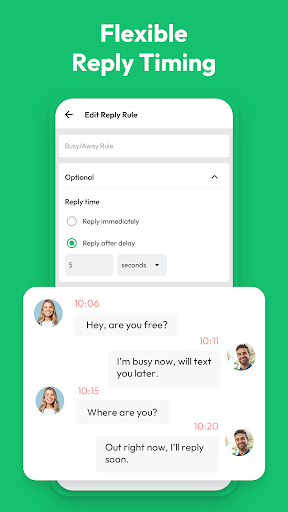
Step 4: Set Your Response Timing
• Decide whether to reply instantly, after a delay of a few seconds, or after a specified number of minutes.
Step 5: Schedule Your Active Times
• Select whether to auto reply daily, on weekdays (Monday to Friday), or on weekends. You can also define specific time periods for auto reply, such as 12:00 PM to 2:00 PM everyday.
Lastly, you can send your auto reply to incoming messages.
Tips:
• Please turn on Notification Permission to enable the rules you configured.
• You can stop any auto reply rule whenever you want and set an end date or message limit.
• You can copy your rules and use them with different apps.
• You can find the relevant rules you set by searching for keywords.
• Before the automatic reply takes effect, you can first test whether the rules you set are enforceable.
Disclaimer:
• We Will Not Collect Any Personal Information and Do Not Obtain Your Password in Any Way.
• Auto Reply is Not Affiliated With Any 3rd Party.
What's New
• Auto Reply messages across multiple platforms
• Supports automatic replies in multiple messaging apps
Version Information
- Version
- 1.1.3
- Downloads
- 50K+
- Updated on
- Dec 18, 2025
- Released
- Jun 12, 2025
- Requires
- Android 5.0
Statistics
Google Play Rating History
Rating Distribution
Downloads Over Time
Auto Reply, Automation Tool has been downloaded times. Over the past 30 days, it averaged downloads per day.
Shaded area shows 30-day prediction based on historical trends
Historical data collection started recently. More data points will be available over time.
Auto Reply, Automation Tool users say on Google Play
 Louis Don Fodio
very good app. simple and easy
 Ramawdh Mallah
not working
ApkTrusted Ratings & Reviews
More from Droid-Developer
See more apps
Web Scanner App
Free

Status Saver: Video Downloader
Free

Online Tracker, Last Seen
Free
GPS Speedometer and Odometer
Free

GPS Voice Navigation: Live Map
Free

Live Mobile Number Locator App
Free

Drink Simulator Games (Joke)
Free
Recover Deleted Messages
Free

Caller ID & Number Locator
Free
Time Bomb Broken Screen Prank
Free

Live Earth Map: Street View 3D
Free

Beard Man: Beard Styles Editor
Free
Similar Apps

Whatauto - Auto Reply
Free

WaStat - WatchApp tracker
Free

Status Saver App
Paid

iStatus: Video Saver Reposter
Paid

Chomp SMS
Free

WhatsGPS
Free

Pulse SMS (Phone/Tablet/Web)
Free

Business Bosses - Networking
Free
Wabi - Virtual Phone Number
Free

Call Blocker - Blacklist
Free

Workplace Chat from Meta
Free

Smart Video Downloader
Paid
WhatisRemoved+
Free

Voxer Walkie Talkie Messenger
Free

Linkfly - Build link site tree
Free

SeaTalk
Free
Scan this QR code to download

Forwarding you to the page at Google Play market in seconds...
Open Google Play market now