
Workplace Chat from Meta v532.0.0.46.108
Meta Platforms, Inc.



About this app
Workplace Chat from Meta solves the problem of team communication and collaboration by providing a platform for sending messages, sharing files, and making video calls anywhere, anytime. This app benefits businesses and organizations the most, particularly those with remote teams or multiple locations. Compared to alternatives in the Business category, Workplace Chat stands out with its seamless integration with other Meta services and its robust feature set. However, its success is heavily dependent on the user's existing investment in the Meta ecosystem.
Pros
- With over 5 million downloads and an excellent user rating of 4.8/5, Workplace Chat has demonstrated its reliability and effectiveness in meeting the communication needs of businesses and organizations.
- The app's free model with no ads or in-app purchases ensures a distraction-free experience, allowing users to focus on their work without interruptions.
- The absence of any permission requests is a significant advantage, as it alleviates concerns about data privacy and security, making it an attractive option for businesses handling sensitive information.
- The app's ability to facilitate video calls and file sharing makes it a versatile tool for team collaboration, and its offline capability ensures that work can continue even without a stable internet connection.
- Regular updates from the developer, Meta Platforms, Inc., ensure that the app stays secure and feature-rich, addressing any issues promptly and maintaining a high level of user satisfaction.
Cons
- One concern is that the app's functionality might be limited for users who are not already integrated into the Meta ecosystem, potentially making it less appealing to those who prefer a more standalone solution.
- The lack of a clear, detailed privacy policy within the app or on the developer's website might raise concerns among users who prioritize data privacy, despite the app not requesting any permissions.
- Some users might find the app's feature set to be less comprehensive compared to other business communication platforms that offer more advanced project management tools.
- The variability in Android requirements could lead to inconsistencies in performance across different devices, potentially affecting the user experience.
Best for: The ideal user for Workplace Chat from Meta is a professional or team leader within a business or organization that values seamless communication and collaboration, likely with some existing investment in the Meta ecosystem, and who requires a reliable, distraction-free platform for team messaging, file sharing, and video conferencing.
Developer Description
Send messages, share files or make video calls anywhere, anytime.
With messaging tools your teams already knows how to use, Workplace Chat lets you:
- Send messages to individual coworkers, or have group conversations.
- Share unlimited files, photos and videos.
- Make voice and video calls from your mobile or your desktop.
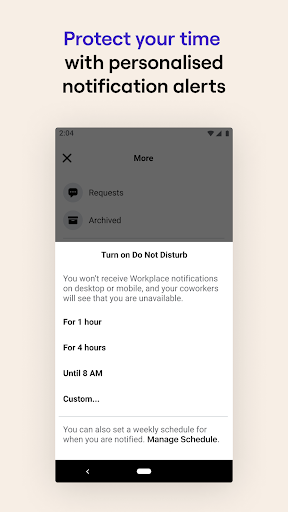
- Turn on "Do Not Disturb" when you're busy or away from work.
Workplace Chat is ad-free and totally separate from Facebook and Messenger, making it easier to balance your work and private lives.
Privacy
Given that Workplace Chat does not request any permissions, the risk of data leakage or unauthorized access is significantly minimized. However, users should still be cautious about the information they share through the app, especially in a business context. It's also advisable to keep the app updated to ensure the latest security patches are applied.
Tips
For the best experience, users should ensure they have a stable internet connection for video calls and file sharing. Setting up the app with an existing Meta account can streamline the integration with other services. Additionally, exploring the app's settings can help in customizing the notification preferences and data usage settings to optimize performance and battery life.
Version Information
- Version
- 532.0.0.46.108
- Downloads
- 5M+
- Updated on
- Nov 5, 2025
- Released
- Nov 19, 2015
- Requires
- Android Varies with device
Statistics
Google Play Rating History
Rating Distribution
Downloads Over Time
Workplace Chat from Meta has been downloaded times. Over the past 30 days, it averaged downloads per day.
Shaded area shows 30-day prediction based on historical trends
Historical data collection started recently. More data points will be available over time.
Workplace Chat from Meta users say on Google Play
 Trương Ngọc Định Ngô
For my fellow Samsung lovers, here's the solution for not getting notifications on your device. Go to Settings - Connections - Data Usage - Data Saver - Apps that can always use data - Find Workchat and turn it on. It works wonder for me and now I can get all the notifications. 👌
 Romeo Sabornay
good
 patnaik patnaik
sign up access code is required
 Georgina Batkin
don't get notifications even though they are all switched on....
 Jordan Boumadi
I haven't been getting notifications at all regardless of what settings I try to change, I was hoping the recent update would've fixed that, but notifications still aren't working at all. Considering this is an app I /need/ to use for work, this is very inconvenient and unacceptable
ApkTrusted Ratings & Reviews
More from Meta Platforms, Inc.
See more apps










Similar Apps

Signal Private Messenger
Free

Messenger SMS - Text messages
Free

Smartsupp chat
Free

Spike: AI Email & Team Chat
Free

Zoho Cliq - Team Chat
Free

Online chat, calls - Gem Space
Free

Glide - Video Chat Messenger
Free

GoTo
Free

Onoff Numbers
Free
textPlus: Text Message + Call
Free

Groundwire: VoIP SIP Softphone
Paid

Zangi Private Messenger
Free

Spoutible
Free
Bulk Sender for Marketing
Free

Marco Polo - Video Messenger
Free

Vidogram Lite
Free
Scan this QR code to download

Forwarding you to the page at Google Play market in seconds...
Open Google Play market now