AlfaOBD Demo v2.4.4.0
AlfaOBD Autodiag




About this app
Developer Description
Demo version of AlfaOBD software for Fiat Group cars native diagnostic
NOTE: if your Android device is not in the list of compatible devices on Google Play and you cannot install or upgrade your installation please contact info@alfaobd.com.
Make sure you have a compatible OBD interface. For the list of supported OBD interfaces see www.alfaobd.com.
NOTE: If AlfaOBD can not connect to a car ECU with the message "Interface reports NO DATA" or "Interface reports CAN ERROR" it most probably means your interface is not compatible or defective.
For the details of configuration of connection to interface and car see application help available on http://www.alfaobd.com/AlfaOBD_Android_Help.pdf
AlfaOBD features include:
- native support of Electronic control units used in Fiat group cars. Native support differs AlfaOBD from many other diagnostic applications providing only limited generic OBDII support of Fiat group cars.
- monitoring various dynamic parameters of engine, gearbox, ABS, climate control ECUs and graphical presentation as plots
- reading of static data: ECU identification, system status, fault codes with probable causes and environment information where applicable
- clearing of fault codes
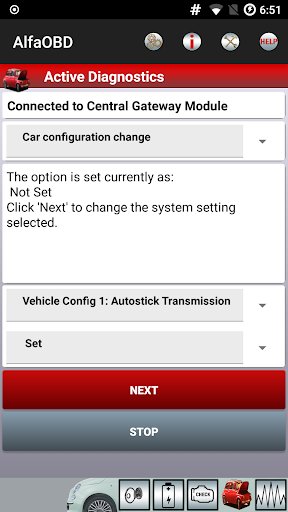
- (Full version only) active diagnostics and configuration procedures for various equipment controlled by engine, gearbox, body computer, climate control, ABS, airbag, code control and other ECUs
- (Full version only) electronic key and RF remote control programming
AlfaOBD supports ELM327 and OBDKey Bluetooth interfaces on all Bluetooth-enabled Android devices and ELM327/OBDKey WLAN interfaces on rooted devices only. For details of configuration of connection to interface and car see application help.
Application available in Czech, English, French, German, Hungarian, Italian, Polish, Portuguese, Russian, Turkish, and Spanish. Languages are selectable via Setting.
The limitations of the demo version are:
- Application run time limit of 15 minutes. Application reverts back to the first screen after 15 minutes of connection to a control unit.
- No active diagnostic procedures available
- The number of scanned gauges is limited by four
- The number of monitored parameters is limited by four
All other features are operational. No time limit is imposed on the application.
NOTE: If plots are not updated, make sure that "Force GPU rendering" is off in "Settings"->"Developer Option".
What's New
Version Information
- Version
- 2.4.4.0
- Downloads
- 100K+
- Updated on
- Aug 25, 2025
- Released
- Jun 24, 2012
- Requires
- Android 4.0.3
Statistics
Google Play Rating History
Rating Distribution
Downloads Over Time
AlfaOBD Demo has been downloaded times. Over the past 30 days, it averaged downloads per day.
Shaded area shows 30-day prediction based on historical trends
Historical data collection started recently. More data points will be available over time.
AlfaOBD Demo users say on Google Play
 A Google user
Amazing app. I have a new Chrysler Pcifica Hybrid, and it can drill down the high voltage system even better than the dealer's Witech tool. Most of aftermarket scan software is years behind and severely limited in functionality, but AlfaOBD has it all. If you don't need support for modules talking over MS CAN, any cheap ELM327 works fine.
A Google user
Just wondering if this is capable of doing oil change resets and service resets? I have purchased multiecuscan for the pc which is comprehensive and does all that but wondered if this might be a more portable option. Use mainly for fiat ducato.
 Isaac Schmitz
This app has a lot of functionality but... There is a lot of variations between vehicles. The car configuration changes list is not organized well for the dodge dart as it is for a ram 1500 or other vehicles which makes it difficult to find the right settings. Is there any intention of adding LED headlight settings for a dodge dart? Right now there is only front / rear LED turn signal options. No interior or headlight settings.
 Nicholas Smalley
Seems like a good app. But I can't connect it to my 2015 Ram.
A Google user
Guessing this doesn't work with an 05 ram 2500 with the Cummins. Hard to tell from their website. Least I tried the demo version. Have an MX OBDLink, so that isn't the issue. Works fine with Torque Pro
ApkTrusted Ratings & Reviews
More from AlfaOBD Autodiag
See more apps
Scan this QR code to download

Forwarding you to the page at Google Play market in seconds...
Open Google Play market now