
LineLearner v6.8.0.9
AlldayApps



About this app
Developer Description
LineLearner, the quick way to learn lines.
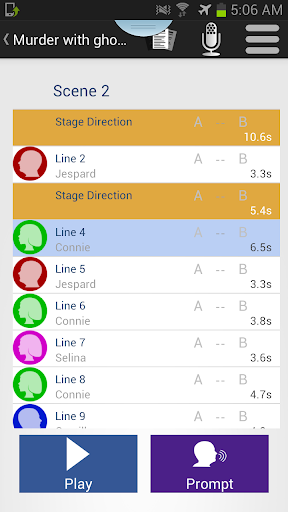
LineLearner enables you to record scenes from plays. It then allows you to listen to the full recording which you learn your part. You can then turn off your part of the recording leaving just the other parts, and the gaps into which you say your lines.
You still have a prompt button to remind you of your lines if you forget. You can repeat individual lines, or the whole play at the touch of a button.
Used by thousands of actors all over the world, LineLearner helps you to memorize lines really quickly and be off script before you know it.
Version 6 of LineLearner is a complete rewrite from the ground up featuring many new features, and a new screen design.
"With LineLearner I can memorise my lines before the first rehearsal, so that I can concentrate of my performance, not on reading the script"
New features include:
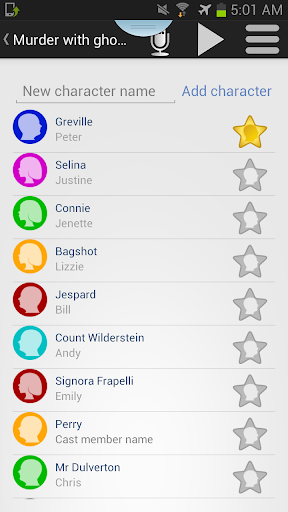
Giving lines to characters
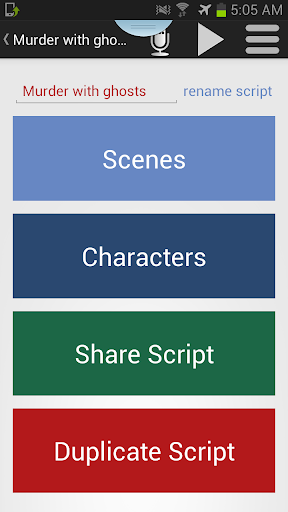
Sharing scripts with other users on both Android and iOS
Splitting recording into Days for filming
Rerecord, play and delete from the recording screen
Easier editing
Adding stage direction
Loading script PDFs
and many more...
If you have any problems with the app at all, then please contact support at support@alldayapps.com and we will help you fix any issues that you have.
What's New
Version Information
- Version
- 6.8.0.9
- Downloads
- 10K+
- Updated on
- Oct 6, 2025
- Released
- May 12, 2013
- Requires
- Android 6.0
Statistics
Google Play Rating History
Rating Distribution
Downloads Over Time
LineLearner has been downloaded times. Over the past 30 days, it averaged downloads per day.
Shaded area shows 30-day prediction based on historical trends
Historical data collection started recently. More data points will be available over time.
LineLearner - Google Play Rankings
Top Rankings
| Rank | Country | Category | List | Change |
|---|---|---|---|---|
| — |
Ranking History in
No ranking data available yet. Rankings are updated daily.
#26 in Top Paid Lifestyle in United States
![Magnifier & Microscope+ [Cozy]](https://play-lh.googleusercontent.com/gYn90JPsD2vQcJyODiS3tJ4MIFFfjfeEXAf1d0Wicsiri_ViuhgF869glBk7kJUJl-w)
#8 in Top Paid Lifestyle in United Kingdom

#15 in Top Paid Lifestyle in Germany

#20 in Top Paid Lifestyle in Netherlands

LineLearner users say on Google Play
 Adam DeFord
This app is simple and functional in both layout and purpose. Recording a new script is fast and easy. Playback can be easily modified to meet your needs. Note: this app is great for auditory learners and for learning cues. The focus is on recordings, not written text. This is what I was looking for, and it worked great for me. If you need something else, this may not be the app for you. Second note: I haven't experienced any of the problems mentioned in other reviews. -Android user.
 Jay Kavanagh
Great app, I use it for learning all my lines! And an option has been added to allow louder recording volume on Samsung phones, something I had an issue with previously. Nice job guys! There is, however, one bug that is quite prominent and gets in the way: when my phone goes asleep while learning lines, the lines will stop playing at random and I'll have to wake my phone to get them to play again. Not huge, but it happens a lot and becomes very annoying after a while. Any chance of a fix?
 Othello
I really wish you could drag the lines up or down, rearranging them. Instead, if you made a mistake on line 15, you have to delete EVERY line after it and re-record them, making sure the order is correct. OR delete the line and try to figure out how to insert a new recording between two lines (it's possible, but not intuitive). Also, if you do the latter (easier), then it LineLearner still labels it the last line. E.g., Line 4, 5, 6, 52, 7, 8, 9.
 Michael James Vargas
I can hardly hear anything on my samsung s9 even with head phones and my volume maxed out and the setting turned on for samsung and pixel phones. There isn't an easy way to skip back or ahead on lines. When I try to open the full instructions I get an error message saying the page is missing, same with the FAQs page. So far very unimpressed.
 Fergal Coghlan
Not recommended - on the basis that the time for your recorded lines is much faster, which is a big problem when you have long lines. E.g. my line takes 12s to deliver and I record it that way, but when I play back for learning purposes, it only gives me 7s. I'm constantly re-recording my lines to guess what the time gap will actually give me. Meanwhile, the speed meter only adjusts the speed of your co-stars' lines, not yours. Interface isn't great as others have said, you get used to it but...
ApkTrusted Ratings & Reviews
More from AlldayApps
See more apps


Similar Apps


Scan this QR code to download

Forwarding you to the page at Google Play market in seconds...
Open Google Play market now