ArtRage Vitae Mobile Painting v1.1.5
Ambient Design Ltd.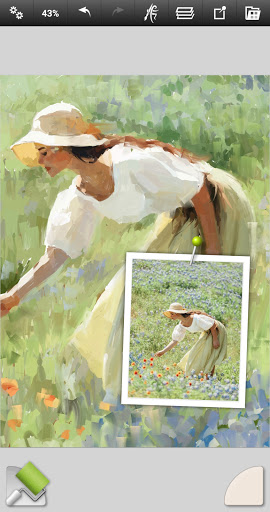


About this app
Developer Description
Paint with oils and sketch with natural tools on a realistic virtual canvas.
ArtRage Vitae is our Premium Natural Painting application for mobile devices.
• Real color blending for natural paint mixing
• New Cloner tool
• Professional tool options
• More layer options for exporting and merging, and layer effects
• Tool size up to 500%
• Maximum canvas size on all devices now increased to 4096px x 4096px
• And much more
Try out realistic painting and drawing in an app filled with tools that work just like the real thing! Mix oil paints on textured canvas, draw with pencils or pastels on realistic paper, or blend watercolors to create delicate gradients. Unlock your creativity with an easy to use art app that’s great for everyone from kids to professionals.
You also get powerful digital utilities like Layers and Blend Modes, Tracing and Reference Images to act as guides while painting, and Tool Presets for storing all your favorite settings. All this also comes with support for the Android sharing systems so you can show off your art to your friends.
Join the ArtRage community:
Forums: forums.artrage.com
Features:
• Easy to use, intuitive interface.
• Paint looks and reacts like real-world paint.
• All the natural and digital tools you need to create amazing art
• Share your art with your friends, or finish with the desktop ArtRage
Tools:
• 16 tools with countless variations via Presets and Settings.
• Natural Painting Tools: Oil Brush, Watercolor, Palette Knife, Paint roller, Paint tube.
• Sketching & Drawing Tools: Airbrush, Ink Pen, Felt Pen, Pencil, Wax / Chalk Pastel, Eraser.
• Utility Tools: Flood Fill, Color Sampler.
• Special Effect Tools: Cloner, Glitter Tube, Gloop Pen.
• Tool settings reflect natural properties like paint thickness or pencil softness.
• Tools can apply texture and blend under the digital brush.
• Store your own favorite settings as custom Presets.
• Canvas texture can be adjusted to create coarse surfaces, smooth papers, and more.
• Real color blending option.
• Layer Effects let you add highlights, shadows, and 3D effects to individual layers.
Utilities:
• Store Preset combinations of tool settings for your favorite tools.
• Import images to use for Tracing or References.
• Add transparent Layers to your painting with opacity control.
• Supports industry standard Layer Blend Modes.
• Unlimited Undo / Redo.
Interface:
• Designed to be easy to understand and natural to use, like real art tools.
• Maximizes creative space without hiding critical functions by getting out of the way as you paint.
• Multi-Touch canvas manipulation.
• Supports keyboard shortcuts.
• Supports stylus only mode.
Files & Scripts:
• Manage paintings in the ArtRage Vitae™ Gallery.
• Export and share as JPG or PNG via Android's sharing system
• Compatible with desktop versions of ArtRage™.
• Record scripts of your paintings to play back in a desktop version.
Technical Info:
Includes a built in manual. Free product support available via our Forums or by email to our support team. Please contact us if you encounter any issues.
Support: https://www.artrage.com/support
Permissions
ArtRage Vitae™ for Android requires access to storage on your device in order to open and save files. Camera and Media access may be required to import photos and other resources. It requires network and license connections for Play Store licensing.
Please Note: ArtRage Vitae™ can be used offline. If you are having license problems please contact us via our support form: https://www.artrage.com/get-support
What's New
Many bug fixes including color sampling speed issues and preview offset, grain and canvas preset crashes.
Version Information
- Version
- 1.1.5
- Downloads
- 10K+
- Updated on
- Apr 30, 2023
- Released
- Apr 11, 2021
- Requires
- Android 4.4
Statistics
Google Play Rating History
Rating Distribution
Downloads Over Time
ArtRage Vitae Mobile Painting has been downloaded times. Over the past 30 days, it averaged downloads per day.
Shaded area shows 30-day prediction based on historical trends
Historical data collection started recently. More data points will be available over time.
ArtRage Vitae Mobile Painting users say on Google Play
 BebéTechManiac 2018
I'm not a professional drawing and painting artist, but this app is easy to find the options and test them. It doesn't have a very complicated setup, the options are clear and easy to find. Is not overloaded of stuff that are not easy to understand or find out the purpose...I really like the layout.The paint brush, roller, the dry fast, auto clean, very nice options. I still learning it, but I am already enjoying the app a lot, and is working great. Just the color picker or drop tool has a delay
 Reid W.
One glaring flaw! Lost one star because unlike the last version, you can't start a line off the page and bring it onto the canvas. All lines must be started ON the canvas. This means you cannot have a straightforward from one end of a page to another. Other than that,it 88the app is fantastic. O please fix that little issue! Thanks! )
 Javier
I've been a fan of artrage since the first version on desktop. I've since used up to artrage 5 and have also used the first mobile version of artrage. So, normally I'm very pleased. However, this new version is very buggy, adding/orienting reference images is a headache, it constantly crashes, and despite that I'd still be fine with it if it offered an auto save feature that you can choose the frequency for, but it doesn't. Tool-wise, it's missing a selection tool.
 Tian Jing
I have the paid regular version and new Vitae version. Compared them both I can say Vitae has better blending but still should be a promised update instead of another purchase. The Vitae version still did not solve the lagging problem. Sometimes I put a few big stokes on, the app freezes 3 to 5 seconds and then shows the strokes. It really hurts the painting experience. I have the latest Samsung tab S7+ with snapdragon 865+/ 8gb ram. So I don't think dev can blame hardware for the lagging
 Darrell Watkins
What is the difference? I love Artrage but I have already purchased the original version. I bought this upset thinking I was robbed of updates only to realize it is the exact same app? This is wrong. Please tell me why this is better or different than the original version I have already purchased. And why I should have to pay yet again? Just seems shady to loyal paying customers.
ApkTrusted Ratings & Reviews
More from Ambient Design Ltd.
See more apps
Similar Apps

Easy Draw Animals
Free

Christmas Coloring Pages
Free

Kids Drawing Games & Coloring
Free

Finger Paint Coloring Book
Free

Nooksy: Childrens Story Time
Free
Rudolph: Coloring book
Free
Color Kids
Free

Little Monster Home
Free
Magic Mitten
Free
Custom Kids Flashcards: Speak
Free
Rito Kids: Learn to Write
Free

Your Little Hero: Kids Stories
Free
ABC Magic Writer: Trace, Write
Free
Coloring Pages for Kids
Free

The Circle of Giving
Free
One Story a Day -Early Readers
Free
Scan this QR code to download

Forwarding you to the page at Google Play market in seconds...
Open Google Play market now