
Attendium: Guest list app v2.4
Attendium AB




About this app
Attendium: Guest list app solves the problem of event organization by providing a comprehensive platform for managing guest lists, invitations, ticketing, and passes, benefiting event organizers and planners the most. Compared to alternatives in the Events category, Attendium stands out with its focused feature set and lack of aggressive monetization strategies. However, its relatively low download numbers and limited user ratings may indicate a need for further development and marketing efforts. Overall, Attendium's simplicity and ease of use make it a solid choice for small to medium-sized events.
Pros
- With a good user rating of 3.6 out of 5, Attendium demonstrates a positive user experience, indicating that the app is generally well-received by its users.
- The app's free model with no ads or in-app purchases ensures a distraction-free experience for event organizers, allowing them to focus on managing their events without interruptions.
- Attendium's developer, Attendium AB, provides a clear website and support email, offering transparency and a channel for user feedback and support.
- The app's small size and minimal Android requirements make it accessible to a wide range of devices, ensuring that event organizers can use it on various hardware configurations.
- The lack of permissions requested by the app suggests a focus on data privacy and security, which is a significant advantage in today's data-conscious environment.
Cons
- Despite its positive aspects, Attendium's limited download numbers and relatively low user ratings may indicate a lack of awareness or marketing efforts, potentially affecting its long-term viability and support.
- The app's simplicity, while beneficial for small events, might not be sufficient for larger, more complex events, which could require more advanced features and functionality.
- Attendium's update frequency and development pace are unclear, which may raise concerns about the app's future support and compatibility with upcoming Android versions.
- The app's limited feature set, while focused on guest list management, might not integrate well with other event planning tools or services, potentially limiting its usefulness in more comprehensive event planning scenarios.
Best for: The ideal user for Attendium is an event organizer or planner, likely in the age range of 25 to 50, with a moderate level of technical skill, who is looking for a straightforward, easy-to-use platform to manage guest lists, invitations, and ticketing for small to medium-sized events, such as weddings, conferences, or community gatherings.
Developer Description
Guest lists, invitations, ticketing & passes for event organizers
Search & manage tens of thousands of guests by name, guest list and custom fields at impressive speeds and ease of use.
All your devices are automatically kept up to date, and guests can even be checked in when in offline mode.
All functions are available for iOS, android & web. So you can set up and manage your event wherever you are.
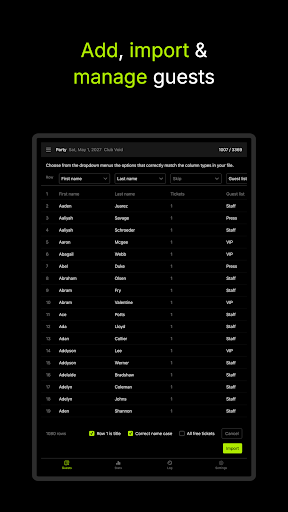
⭐️ Add, import & export
Add guests from excel, text files or just copy/paste.
Invite guests to add themselves by sending them links.
Download the full list of guests, or filter on things like just the checked in ones at any time during or after the event.
⭐️ Guest lists
Segment guests by adding them to any number of guest lists that you specify.
Per-event guest lists
Specific to one event. Adding a guest to one event will not make that guest visible to other events.
⭐️ Passes
Synchronized across multiple events. Great for lists of members or staff.
⭐️ Duplicate checking
Get actionable warnings about duplicates both within your uploaded files and guests already on your lists.
⭐️ Analytics
See how many guests you and your staff have added, invited and checked in.
Group by user, guest list or both and export to excel & csv.
⭐️ Team collaboration
Add your staff and specify what each user is allowed to do.
For example, limit promoters to only be able to add and see their own guests and door hosts to just check in guests.
You can also limit the amount of guests a user can add, and when.
⭐️ Light & dark mode
Don't get blinded by your guest list app.
Designed to save battery power on devices with OLED displays.
Turns on automatically, both on smartphones and in desktop browsers.
Privacy
Given that Attendium requests no permissions, users can be relatively confident in the app's data privacy and security. However, as with any event management tool, users should be cautious when handling sensitive guest information and ensure that their device and the app itself are updated regularly to maintain security. It is also advisable to review the developer's privacy policy for any data collection or sharing practices.
Tips
For optimal use of Attendium, users should first familiarize themselves with the app's intuitive interface and features, such as guest list management and ticketing. To get the most out of the app, users can also explore integrating Attendium with other event planning tools, such as calendar apps or communication platforms, to enhance their event organization capabilities. Regularly updating the app will also ensure access to the latest features and security patches.
What's New
Version Information
- Version
- 2.4
- Downloads
- 10K+
- Updated on
- Nov 17, 2025
- Released
- Apr 26, 2013
- Requires
- Android 8.1
Statistics
Google Play Rating History
Rating Distribution
Downloads Over Time
Attendium: Guest list app has been downloaded times. Over the past 30 days, it averaged downloads per day.
Shaded area shows 30-day prediction based on historical trends
Historical data collection started recently. More data points will be available over time.
Attendium: Guest list app users say on Google Play
 A Google user
I''ve been using this as as our guest list app at several event agencies for the last couple of years. Love the new version!
 Eri NODA
Everytime I press "check in" button, it registers for 2. I only want to check in 1. --- update: Attendium team quickly fixed the issue and the bug seems to be fixed. Thanks!
A Google user
The app forces you to sign up in order to use it. I don't want to sign up to anything just to create a simple guest list. Uninstalled.
A Google user
does not let me make a new event in which I can add my own guest list
ApkTrusted Ratings & Reviews
Similar Apps








Scan this QR code to download

Forwarding you to the page at Google Play market in seconds...
Open Google Play market now