
Autodesk Vault Mobile v1.13
Autodesk Inc.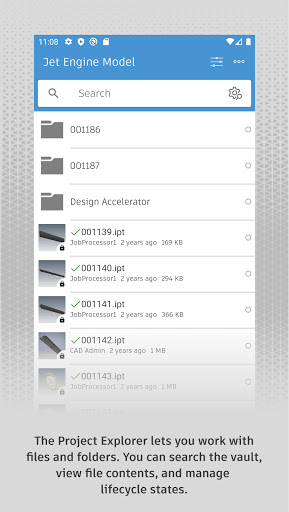




About this app
Autodesk Vault Mobile addresses the need for professionals to access and manage their vaulted data on-the-go, particularly benefiting those in the architecture, engineering, and construction industries who rely on Autodesk products. Compared to other business apps, Autodesk Vault Mobile stands out for its seamless integration with Autodesk's ecosystem, but falls short in terms of user reviews, which indicate some functionality and usability issues. The app's free model without ads or in-app purchases is a significant advantage, suggesting a commitment to user experience over monetization. However, the mixed user rating of 3.1/5 suggests room for improvement in terms of reliability and feature set.
Pros
- With over 10,000 downloads and a reputable developer like Autodesk Inc., users can trust the app's quality and support, which is a significant advantage in the business category.
- The absence of ads and in-app purchases ensures a distraction-free experience, allowing users to focus on their work without interruptions, which is a notable benefit for productivity.
- Autodesk Vault Mobile's integration with Autodesk's suite of products makes it an essential tool for professionals already invested in the ecosystem, enhancing their workflow and collaboration capabilities.
- The app's requirement for Android 8.0 or higher suggests a modern and secure development approach, which is reassuring for users handling sensitive data.
- Given its specific purpose, the app's small size and lack of permissions requests are indicative of efficient development and respect for user privacy.
Cons
- The mixed user rating and limited number of reviews raise concerns about the app's reliability and potential bugs, which could impact user experience and productivity.
- Some users may find the app's feature set limited compared to desktop versions of Autodesk products, which could hinder their ability to perform complex tasks on the go.
- The developer's email support, while available, may not be as responsive or comprehensive as expected for an app from a major developer like Autodesk, potentially leaving users without timely solutions to their issues.
- The lack of detailed information about the developer's website and privacy policy directly related to the app raises questions about data handling and security, which is a concern for any business app.
Best for: The ideal user for Autodesk Vault Mobile is a professional in the AEC industry, likely with intermediate to advanced technical skills, who frequently needs to access, manage, or collaborate on design and project data while away from their primary workstation, and values the convenience and security of mobile access to their vaulted files.
Developer Description
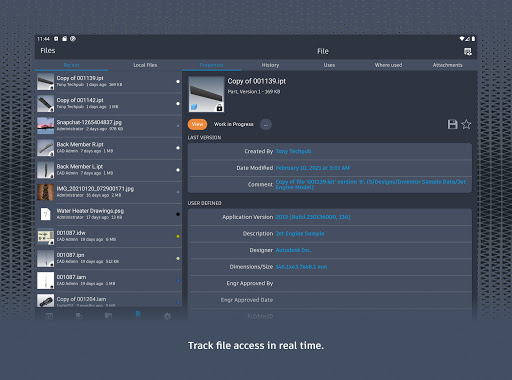
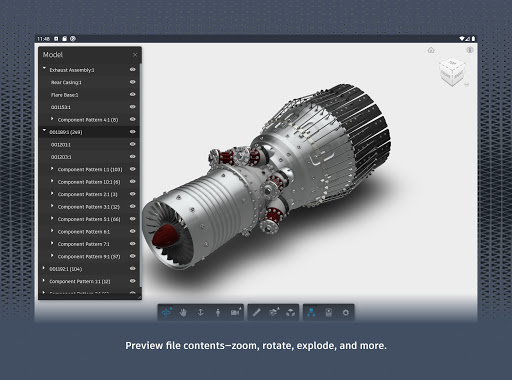
Autodesk Vault Mobile lets you work with your vaulted data on the go!
The mobile app works in conjunction with its companion desktop product, Autodesk® Vault product data management software.
To use the Vault mobile app for Android, you will need to sign in with your Vault account information.
Privacy
Given that Autodesk Vault Mobile requests no permissions, the risk of data collection or misuse appears minimal, but users should still be cautious when accessing sensitive data on mobile devices and ensure they are using the app over secure networks. It's also advisable to review Autodesk's general privacy policy to understand how data might be handled across their suite of products.
Tips
To get the most out of Autodesk Vault Mobile, users should start by ensuring their vaulted data is well-organized and accessible, then familiarize themselves with the app's navigation and features to streamline their workflow. Regularly checking for updates can also ensure users have the latest improvements and fixes, enhancing their overall experience and productivity.
What's New
Version Information
- Version
- 1.13
- Downloads
- 10K+
- Updated on
- Aug 28, 2025
- Released
- Feb 11, 2021
- Requires
- Android 8.0
Statistics
Google Play Rating History
Rating Distribution
Downloads Over Time
Autodesk Vault Mobile has been downloaded times. Over the past 30 days, it averaged downloads per day.
Shaded area shows 30-day prediction based on historical trends
Historical data collection started recently. More data points will be available over time.
Autodesk Vault Mobile users say on Google Play
 Ryan Goodwin
Interactive and probably a good re-elected of directories for files as a title
 Beno
Beno
Great tool, really needs to be updated along side the release of Vault Professional. Waiting months isn't acceptable.
 Monte Goodner (MCG)
Great, except I can't check in... PLEASE IMPLEMENT A CHECK IN FEATURE..
 Nick “cCcTOXICcCc” B
As of right now I am unable to login I click the "login" button and it takes me to settings, I tried reinstalling and everything else I can think of. As far as I can tell I just can not login via the app
ApkTrusted Ratings & Reviews
More from Autodesk Inc.
See more apps






Similar Apps
ZWCAD Mobile - DWG Viewer
Free

ConstructionOnline
Free

Thingiverse Printables | 3Drop
Free

DreamBuild: Sketch to 3D
Paid

ArcSite
Free

4ART
Free

KIRI Engine: 3D Scanner App
Free

BILT: 3D Instructions
Free

CMC Motorsports®
Free

NEC Electrician Exam Prep 2026
Free

Mergin Maps: QGIS in pocket
Free

magicplan
Free

AUTOsist Fleet Maintenance App
Free

PDFEsign.com PDF E-Sign
Free

Immortal Craft Barber Lounge
Free

Bambu Handy
Free
Scan this QR code to download

Forwarding you to the page at Google Play market in seconds...
Open Google Play market now