
Light Box(Tracing Light Table) v109
Barbecue Army


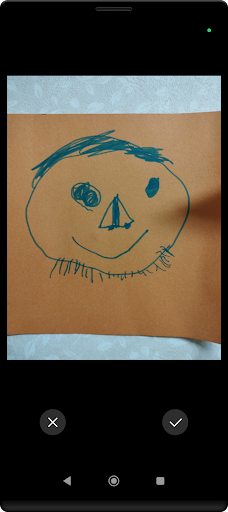


About this app
Developer Description
Turn your device into a tracing board! Perfect for artists and crafters!
Key Features and Fun Uses:
1. Fullscreen Magic:
The entire screen becomes a brightly lit canvas! Hide system bars and use every inch of your screen.
Example: Trace manga panels using the full extent of your screen!
2. Photographer's Dream Image Manipulation:
- Zoom, shrink, and rotate at will! Trace while checking the finest details.
- Snap a photo and start tracing immediately with the camera feature!
- Choose any photo from your gallery for inspiration.
Example: Select a landscape photo for quick sketching practice. Analyze photo composition like a pro!
3. Background Color Palette:
- Choose your background color with the color picker to match your mood.
- Smooth color transitions for an eye-friendly work environment.
Example: Use dark mode at night to protect your eyes while creating, switch to bright colors during the day for a change of pace!
4. User-Friendly UI for Comfortable Operation:
- Toggle button display on/off to maximize your workspace.
- Lock feature to prevent accidental touches. Safe to hand to children!
Example: Sketch on the train without worrying about sudden brakes causing misoperation!
5. Eye-Friendly Brightness Settings:
- Screen brightness automatically optimized. Bright yet gentle on the eyes, even in dark environments.
Example: When inspiration strikes at midnight, start sketching right away!
6. Privacy First:
- Clear explanation of our privacy policy upon first launch for your review.
Example: Immerse yourself in creative work with peace of mind!
Usage Tips:
- For Illustrators: Trace your rough drafts to create clean line art!
- For Photographers: Analyze the composition of your shots as reference for your next shoot.
- For Embroidery Enthusiasts: Enlarge patterns to trace even the finest details accurately.
- For Students: Perfect for rewriting notes or copying diagrams clearly!
- For Architects: Refine your sketches and draft plans with clarity.
Please note that disabling sleep mode and using maximum brightness may consume more battery.
(Some devices may experience significant battery drain)
We recommend using this app on larger screens like tablets. Enjoy a more professional work environment with a bigger display!
What is a Lightbox (Light Table / Tracing Board)?
Traditionally, it was a box containing high color rendering fluorescent lamps, covered with a translucent acrylic plate on top. This plate is illuminated from the inside, used for checking films with transmitted light. Also known as a "viewer," with larger types called "light tables."
This app digitally recreates the functionality of a physical lightbox, adding even more convenient and fun features. Try it now as a reliable digital tool to support your creative work! Experience the magic of a lightbox that sparks ideas, right on your device!
What's New
In-app purchases
$3.99 per item
Version Information
- Version
- 109
- Downloads
- 50K+
- Updated on
- Nov 9, 2025
- Released
- Jul 20, 2014
- Requires
- Android 5.0
Statistics
Google Play Rating History
Rating Distribution
Downloads Over Time
Light Box(Tracing Light Table) has been downloaded times. Over the past 30 days, it averaged downloads per day.
Shaded area shows 30-day prediction based on historical trends
Historical data collection started recently. More data points will be available over time.
Light Box(Tracing Light Table) users say on Google Play
 Jessie A
5 out of 5 review it's amazing and for all you guys out there who don't know what a light box is, it's a bright white screen that you get your OWN paper and your OWN pen and you trace stuff like flip books so don't tell me that it didn't load properly, that it was just a white screen because THAT IS THE POINT and don't tell me that you cant bring up any images to trace, well too bad, I don't remember it being anything but a light box, light boxes are not meant to have images on there already
 A Google user
Works well to backlight xrays except if you turn your phone off it makes the app to dark to see. Have to reopen and close the app every time.
 Brian House
Pixel 3 Problem? After installing, screen reduced to about 10% brightness after lightbox was in use for 10 to 15 seconds.
A Google user
The light lasts for about 2 min then gets dim and you have to rearrange everything... EPIC FAIL
A Google user
this is dumb I can use my screen if I want that amount of light
ApkTrusted Ratings & Reviews
More from Barbecue Army
See more apps
Birds Sounds for Bird
Free
Animal Sounds (Bird,Dog,Cat)
Free

Budgerigar Ringtones
Free

Dog Video Creator (Dog Sounds)
Free

Meow Maker: Cat Sounds for Cat
Free

Budgerigar Camera for Parakeet
Free

Dog Whistle Video Capture
Free

Headphone Left Right Mic Test
Free

Classic Music Ringtones
Free

Animal Ringtones 200
Free

Horse Sounds
Free

Funny Ringtones
Free
Create Bar Chimes (Chime tree)
Free

Kung Fu Sounds
Free

Dubstep Drum Pads
Free

Silent Ringtones
Free
Similar Apps

LiveMic: Bluetooth Mic Speaker
Paid

AR Drawing – Trace & Sketch
Paid

Video Recorder
Paid

Funny Ringtones - Ai Sound App
Paid

DreamBuild: Sketch to 3D
Paid

Qibla Direction- GPS Compass
Paid
All Smiles Shine
Free

AR Drawing - Paint and Sketch
Free

3D Photo: Imager
Paid

Chaos Audio
Free

Binaural Beats Brainwaves
Free

Flow : Music Therapy
Free

IMSLP
Free

Earth Map App - Live Cam View
Paid

Podcasts & Drama - RadioMe AI
Free

ZenAlarm: Smart Wake Up
Paid
Scan this QR code to download

Forwarding you to the page at Google Play market in seconds...
Open Google Play market now