Photo Measures v1.68
Cubent


About this app
Developer Description
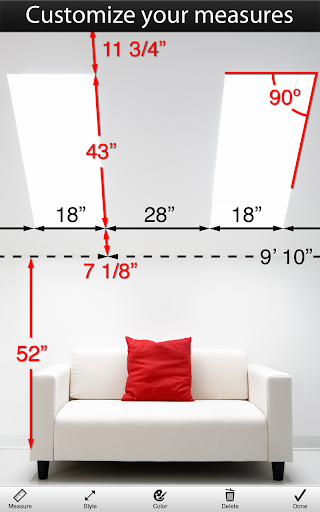
The easiest and most efficient way to save your measures on your own photos
Architectural Digest - "Very useful when shopping or meeting with contractors"
Tuaw.com - "It's perfect for your own work around the house, and is handy for creating plans to bring to a contractor."
AppSafari Rating: ★★★★★ - "So incredibly convenient"
Recommended by many reference magazines, websites and blogs all around the world: Architectural Digest, Tuaw.com, This Old House, AppOfTheDay.com, AppSafari.com, AppGefahren.de, etc...
◆◆◆◆◆
Constructing a house? Engineering a new project? Moving to a new place?
Take some photos and note down the dimensions on the photos to remember the exact layout, and to make sure that everything will fit easily.
Need to keep in mind the exact dimensions of an object? Just take a photo and quickly write them on it.
Are you decorating? Want to buy a new frame or a new furniture but not sure it will fit?
No problem since you can have all your house dimensions always with you!
◆◆◆◆◆
You are a real estate agent?
A contractor?
An engineer?
A designer?
Working in the construction industry?
Someone who wants to keep his house's measure easily accessible?
Whenever you need to save dimensions, sizes, angles or write down a detail you need to remember, Photo Measures will help you to be more efficient and more accurate.
◆◆◆◆◆
Photo Measures helps you to:
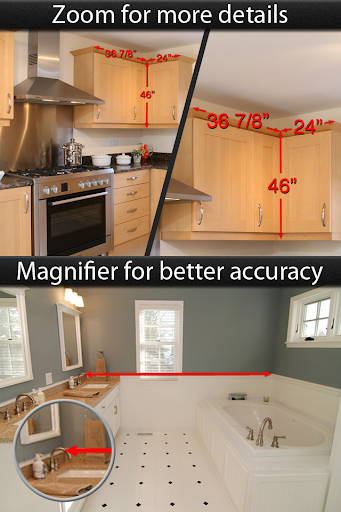
✓ Take a photo and directly draw measures on it
✓ Zoom into and out of your photo when you need more precision
✓ Edit your measures with a very intuitive interface
✓ Quickly add text as comments when measures are not enough
✓ Native support for angles
✓ Save your measures in imperial or metric units
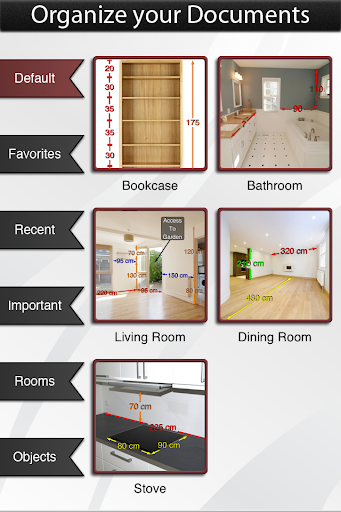
✓ Easily organize your photos by category
✓ Export your dimensions in high resolution
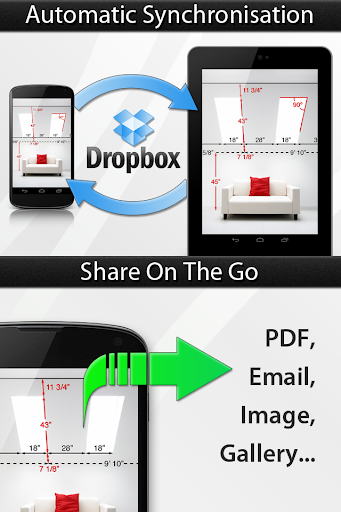
✓ Export as PDF or JPG
✓ Import photos of any size and aspect ratio
Keep posted, a lot of new features are planned for the next versions!
What's New
In this version:
- We added support for the latest version of Android
- We did a lot of minor improvements
Feel welcome to contact us if you have any comments!
Version Information
- Version
- 1.68
- Downloads
- 50K+
- Updated on
- Mar 4, 2024
- Released
- Oct 14, 2013
- Requires
- Android 6.0
Statistics
Google Play Rating History
Rating Distribution
Downloads Over Time
Photo Measures has been downloaded times. Over the past 30 days, it averaged downloads per day.
Shaded area shows 30-day prediction based on historical trends
Historical data collection started recently. More data points will be available over time.
Photo Measures - Google Play Rankings
Top Rankings
| Rank | Country | Category | List | Change |
|---|---|---|---|---|
| — |
Ranking History in
No ranking data available yet. Rankings are updated daily.
#11 in Top Paid Productivity in Australia


#11 in Top Paid Productivity in Brazil

#44 in Top Paid Productivity in Saudi Arabia

#44 in Top Paid Productivity in Thailand
Photo Measures users say on Google Play
 A Google user
Does all the dimensions and notes on photos I need it too. I do surveys of buildings and this helps me remember exactly what I saw. Plus, it looks classy when I share the pics. One problem was that when it syncs to DB, the file name gets lost and spits out some crazy alpha numeric file name. Even at that my photos are still safe, because I share them to my photo gallery on my phone. Easy peasy.
A Google user
Excellent App for what it can do. My requests to make this app better would be the following: 1. Allow integration with Adobe Acrobat/pdf editing function to add a page and text before sending. 2. Provide a feature to change the file name of the pdf being exported. In this way, the user won't have to go to a PC afterwards to do more work. 3. There is no material which describes the difference between the Lite and the paid version. Unless I missed it..
A Google user
Used to work always very well till I installed it on my Galaxy S10, the small window to adjust the arrow is not working precisely anymore
A Google user
has issues on S10+ touch screen calibration is off so arrows dont go precisely where you want. small magnifying window sometimes doesn't work. This App was amazing on my S7 it needs to be updated. Dont buy until fixed.
A Google user
Had this app on iPhone worked great but I now have a android and the app is shocking when you hold the arrows to accurately put the arrow to what you're measuring you let go and it's miles away from where it says you left the arrow Iv asked for a refund or something to sort my problem out and iv had now response what so ever very disappointed and dissatisfied!
ApkTrusted Ratings & Reviews
More from Cubent
See more apps
Similar Apps

ConstructionOnline
Free

DreamBuild: Sketch to 3D
Paid

MTailor
Free

HydroJug
Free

CompanyCam
Free

Renovate AI : House Design
Free

Applied Ballistics Quantum
Free
Ring Sizer by Jason Withers ©
Free

Thingiverse Printables | 3Drop
Free

CamCard-AI Scanner, Transcribe
Paid

magicplan
Free

Ref Tools
Free

Magnifier
Free
Scan this QR code to download

Forwarding you to the page at Google Play market in seconds...
Open Google Play market now