
Magnifier vVARY
Google LLC





About this app
Developer Description
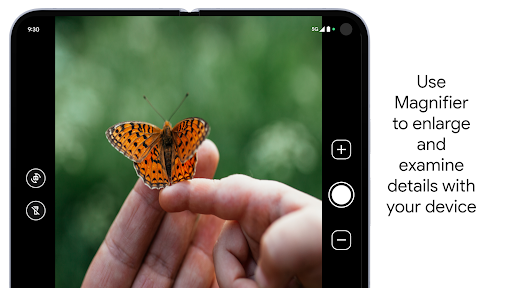
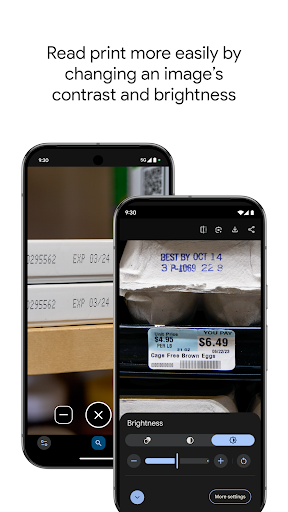
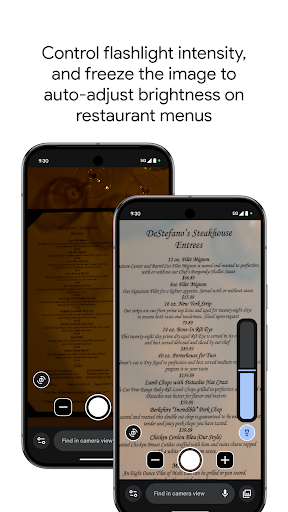
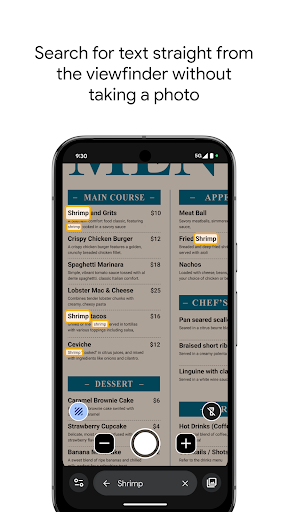
Zoom in, brighten, and find words to aid your vision when you need it.
Get started:
1. Download Magnifier from the Play Store.
2. (Optional) Set up Magnifier to easily open via Quick tap:
a. Open your phone's Settings app.
b. Go to System > Gestures > Quick tap.
c. Turn on Use Quick tap.
d. Choose open app. Next to "Open app," tap Settings. Then select Magnifier.
e. To open Magnifier, tap twice on the back of your phone.
Magnifier requires Pixel 5 or later model.
What's New
You can now take advantage of the bigger unfolded screen to view the world around you in even more detail.
Version Information
- Version
- -
- Downloads
- 1+
- Updated on
- Jan 20, 2026
- Released
- Oct 4, 2023
- Requires
- Android Varies with device
Statistics
Google Play Rating History
Rating Distribution
Downloads Over Time
Magnifier has been downloaded times. Over the past 30 days, it averaged downloads per day.
Shaded area shows 30-day prediction based on historical trends
Historical data collection started recently. More data points will be available over time.
Magnifier users say on Google Play
 Steven Gates
Great visual aid. It 'clearly' serves its purpose - to bring things to greater visual clarity by magnification and/or by making things brighter. There is also image stabilization - VERY helpful. (But for the reviewer thinking about using this to help walk at night, this app probably won't help. Great idea though! 😃👍) This app will remain close at hand on my main screen! NOTE: There is a little icon at the bottom-left. This control has lots of useful additional settings (brightness, etc.).
 Ace Mccloud
I would give five stars if the option to enable geolocation data was available. Occasionally close up images will not focus accurately. Also a few times the color of an object on the screen was significantly different than the actual color of the object with my eyes. Otherwise a great app.
 Davin Sneed
Although this app works for it's intended purposes, using the standard Camera app works just as well for me. Some reviewed that this app is clearer than the default Camera app, but for on my device this app fails to auto focus. Camera app always focuses for me, so thanks for the idea, but I'll keep the space used by this for something else.
 Timothy Cohen
Would be nice if this was available for the P9PF. Not exactly sure why it isn't. Other than not being accessible to all "Pixel 5 & newer phones" as stated it's a great app.
 Christopher Kania
I dislike the magnifier because I cannot disable it. It comes on everytime when I double tap the screen for other applications. It makes me want to toss the phone at a brick wall and go buy another brand.
ApkTrusted Ratings & Reviews
More from Google LLC
See more apps
Chrome Beta
Free

Chrome Dev
Free

Chrome Canary (Unstable)
Free

Fitbit
Free

Lookout - Assisted vision
Free

Test DPC
Free

Google Chrome
Free

Accessibility Scanner
Free

Compose Material Catalog
Free

Action Blocks
Free

Sound Amplifier
Free
Voice Access
Free

Switch Access
Free

Reading mode
Free

Pixel Camera
Free

Android AICore
Free
Similar Apps
Ruler
Free
![Magnifier & Microscope [Cozy] icon](https://play-lh.googleusercontent.com/d4aBMNK0YMNJf8Ua4icPNDGw3Ho2LAVn1nTNSkM2uAq1qClaLxROK4y2hOSxhfpRHXPx)
Magnifier & Microscope [Cozy]
Free
Lenovo
Free

Camera Scanner
Free

Photone - Grow Light Meter
Free

Home Assistant
Free
Color Grab (color detection)
Free
Building Tools
Free
CompanyCam
Free

Ref Tools
Free

Tooly All Tools In One Toolbox
Free

Envision
Free

Magnifying Glass
Free

AR Plan 3D Tape Measure, Ruler
Free

GSMArena
Free

One Hand Operation +
Free
Scan this QR code to download

Forwarding you to the page at Google Play market in seconds...
Open Google Play market now