
Pixel Camera vVARY
Google LLC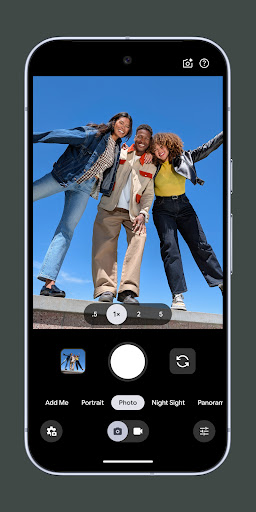






About this app
Developer Description
Camera app for Pixel
Take stunning photos
• HDR+ with Exposure and White Balance Controls - Take incredible photos using HDR+, especially in low-light or backlit scenes.
• Night Sight - You’ll never want to use your flash again. Night Sight brings out all the details and colors that get lost in the dark. You can even take photos of the Milky Way with Astrophotography!
• Camera Coach - Get suggestions and guidance with the help of Gemini models to take better photos
• Auto Best Take - With a single shutter button press, never miss the moment of all your friends
• Super Res Zoom - Get way close from far away. Super Res Zoom makes your pictures sharper when you zoom in.
• Pro Res Zoom - Zoom up to 100x, powered by an advanced generative imaging model
• Add Me - Get the whole group in your pics, even the person taking the photograph
• Long Exposure - Add a creative blur to moving subjects in the scene
• Action Pan - Add a creative blur to the background while keeping your subject in focus
• Macro Focus - Vivid color and striking contrast in even the smallest subjects
• Pro Controls - Unlock advanced camera settings like shutter speed, ISO, and more
Incredible videos on every take
• Video Boost - Get ultra sharp video through AI processing in the cloud
• Night Sight Video - Relive that perfect moment, even after dark
• Record fluid high fidelity videos in stunning resolution with crisp audio, even in crowded places
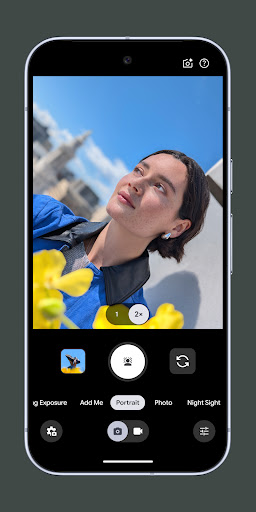
• Cinematic Blur - Create a cinematic effect by blurring the background behind your subject
• Cinematic Pan - Slow down your phone’s panning movements
• Long Shot - Take casual, quick videos by simply long-pressing the shutter key while in the default photo mode
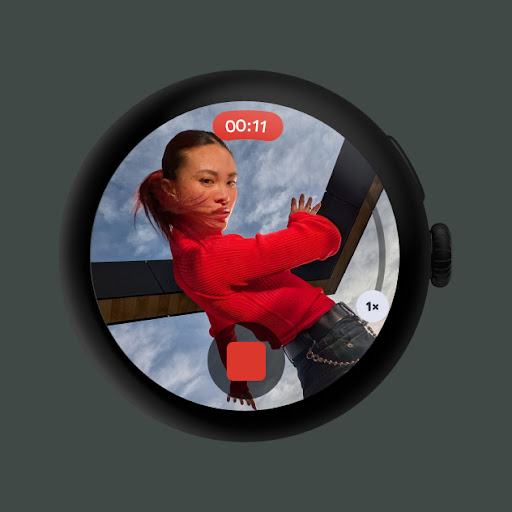
Requirements - The latest version of Pixel Camera only works on Pixel devices running Android 16 and above. The latest version of Pixel Camera for Wear OS only works on Wear OS 5.1 (and above) devices connected to Pixel phones. Some features are not available on all devices.
Version Information
- Version
- -
- Downloads
- 1+
- Updated on
- Jan 20, 2026
- Released
- Apr 16, 2014
- Requires
- Android Varies with device
Statistics
Google Play Rating History
Rating Distribution
Downloads Over Time
Pixel Camera has been downloaded times. Over the past 30 days, it averaged downloads per day.
Shaded area shows 30-day prediction based on historical trends
Historical data collection started recently. More data points will be available over time.
Pixel Camera users say on Google Play
 Scott kupper
Seriously? You Silicon Valley Ignorants decided to require Microphone Perms again to take still pictures. What H1B made that moronic decision. This is the last Pixel I every buy
 David Ralph
My one ask... Please add saved modes that we can setup, save and toggle to. As an example I like taking night sky shots and sports action shots. Every time I have to manually set ISO and Exposure and then if I accidentally tap the wrong thing or swap mode temporarily, I then have to go through changing all the settings again and possibly miss a potential shot.
 Carlos Parrodi
PLEASE BRING BACK PHOTO SPHERE! I really don't understand why would you remove such an amazing feature. I used it a lot for my travels and it's closest we have to capture the real moment. I really don't get why remove it if it's not a problem to the user or the phone itself. The camera interface is really basic compared to many other apps and not that visually attractive. I really love the photos the Pixel takes, but the camera app needs to be on the same level of the quality of the photos.
 Y B
Y B
Feb 2026: brightness/contrast adjustment doesn't work. June 2025: panorama mode crashes, inaccurate skin tone on P9 is UNACCEPTABLE and all over the range, never correct, unwelcome skin wrinkles smoothing, wrong focus points. I use my work iPhone 14 for family photos from now on. March 2024, Pixel 7: Autofocus struggles in the dark. Flash photos come out pitch black. It looses RAW files at random: saves JPG but not DNG for some photos. The new UX is awful: impossible to find important buttons.
 Syafik ulanam
ini bukan upgrade tapi downgrade semakin diupdate kamera semakin buruk pudar tidak ada warna hasilnya sangat mengecewakan
ApkTrusted Ratings & Reviews
More from Google LLC
See more apps
Chrome Beta
Free

Chrome Dev
Free

Chrome Canary (Unstable)
Free

Magnifier
Free

Fitbit
Free

Lookout - Assisted vision
Free

Test DPC
Free

Google Chrome
Free

Accessibility Scanner
Free

Compose Material Catalog
Free

Action Blocks
Free

Sound Amplifier
Free

Voice Access
Free

Switch Access
Free

Reading mode
Free

Android AICore
Free
Similar Apps
IP Camera Viewer
Free

Calculator
Free

GeoGebra Graphing Calculator
Free

Home Assistant
Free

Samsung Calculator
Free

Camera FV-5 Lite
Free
Cameringo Lite. Filters Camera
Free

Find My: Phone, Watch, Earbuds
Free

Calculator
Free
HD Camera
Free

Samsung Global Goals
Free

Samsung Internet Browser
Free

Stellarium Mobile - Star Map
Free
Camera - Fast Snap with Filter
Free
HD Camera 2025 for Android
Free

Canon Camera Connect
Free
Scan this QR code to download

Forwarding you to the page at Google Play market in seconds...
Open Google Play market now