
Sound Amplifier vVARY
Google LLC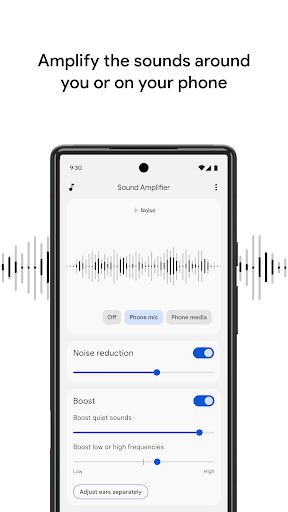
About this app
Developer Description
Filter, augment, and amplify the sound around you and on your device.
Features
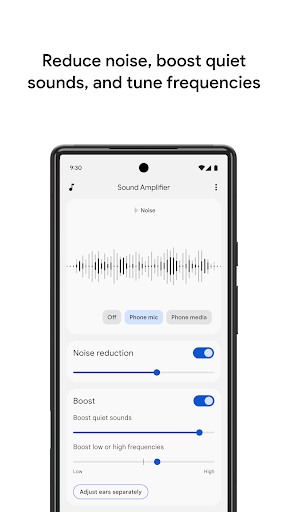
• Reduce unwanted noise to recognize speech better.
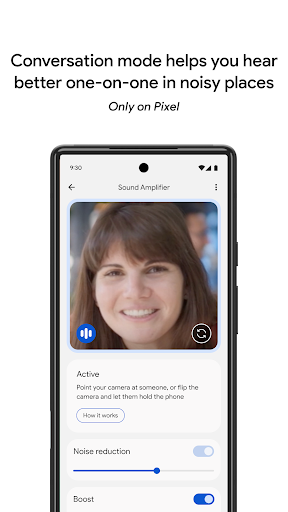
• Focus on a speaker’s voice in noisy environments with conversation mode. (Available for Pixel 3 and above.)
• Listen to conversations, TV, or lectures. For audio sources that are farther away, Bluetooth headphones are recommended. (Bluetooth headphones might have delayed sound transmission.)
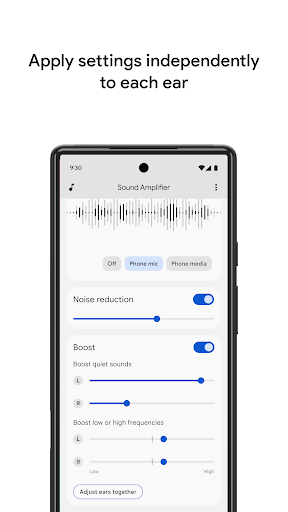
• Personalize your listening experience for surrounding conversation or media playing on your device. You can reduce noise or boost low frequency, high frequency, or quiet sounds. Set your preferences for both ears or separately for each ear.
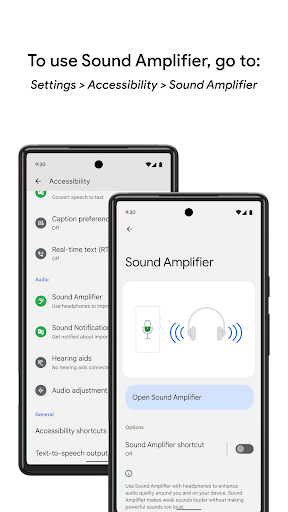
• Turn Sound Amplifier on and off using the accessibility button, a gesture, or Quick Settings. Learn more about the accessibility button, gesture and Quick Settings: https://support.google.com/accessibility/android/answer/7650693
Requirements
• Available for Android 8.1 and later.
• Pair your Android device with headphones.
• Conversation mode is currently available on Pixel 3 and above.
Send us your feedback on Sound Amplifier by emailing: sound-amplifier-help@google.com. For help using Sound Amplifier, connect with us at https://g.co/disabilitysupport.
Permissions Notice
• Microphone: Access to the microphone will allow Sound Amplifier to process the audio for amplification and filtering. No data is collected or stored.
• Accessibility Service: Since this app is an accessibility service, it can observe your actions, retrieve window content, and observe text that you type.
Version Information
- Version
- -
- Downloads
- 100M+
- Updated on
- Aug 6, 2025
- Released
- Feb 4, 2019
- Requires
- Android Varies with device
Statistics
Google Play Rating History
Rating Distribution
Downloads Over Time
Sound Amplifier has been downloaded times. Over the past 30 days, it averaged downloads per day.
Shaded area shows 30-day prediction based on historical trends
Historical data collection started recently. More data points will be available over time.
Sound Amplifier users say on Google Play
 Ian
Ian
im not sure why so many bad reviews but this is hands down 10x better than the paid versions that want something insane like 30 dollars weekly to use it. plus this has fine tuning simplified instead of trying to tweak it using 300 different possible combinations this just has 3 combos. i guess this came built into some phones but surprisingly this is a google fi Motorola and i had to look it up and install it myself 🤷
 DaveB
DaveB
Instructions in app do not match screen. Come-on folks, this is basic stuff.
 Kyle Nix (Nixspeed)
works with headphones now just need to have a button so it will work with speakers. That makes it worth the rest for the full 5 stars
 Brandon Gastelum
It's terrible and makes audio sound awful. Podcasts and music sound super funny and it's unbearable.
 Ve Macrinnon
It does not allow control of left/right sound balance which is what I need due to hearing loss in left ear. No use at all for rebalancing sound from calls and phone music. Hence 1 star. No Devs seem to think of people with uneven hearing acuity. There are millions of us.
ApkTrusted Ratings & Reviews
More from Google LLC
See more apps
Chrome Beta
Free

Chrome Dev
Free

Chrome Canary (Unstable)
Free

Magnifier
Free

Fitbit
Free

Lookout - Assisted vision
Free

Test DPC
Free

Google Chrome
Free

Accessibility Scanner
Free

Compose Material Catalog
Free

Action Blocks
Free
Voice Access
Free

Switch Access
Free

Reading mode
Free

Pixel Camera
Free

Android AICore
Free
Similar Apps
Frequency Sound Generator
Free

Frequency Sound Generator
Free
AmpMe - Speaker Booster
Free

Sound Sampler Lite
Free

Dolby On: Record Audio & Music
Free

Volume Booster - Sound Booster
Free
Voice Recorder & Audio Editor
Free

ASR Voice Recorder
Free

JBL Headphones
Free

Sound meter : SPL & dB meter
Free
Voice Recorder
Free
Voice Recorder Audio Sound MP3
Free

PodsLink - AirPods Battery
Free

NebulaBuds
Free

Soundbooth
Free
Signal Detector
Free
Scan this QR code to download

Forwarding you to the page at Google Play market in seconds...
Open Google Play market now