Voice Access vVARY
Google LLC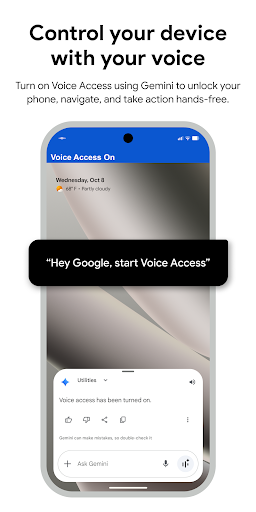


About this app
The Voice Access app solves the problem of limited mobility or dexterity by providing hands-free control over Android devices, benefiting individuals with disabilities or those who need to interact with their device while performing other tasks. Compared to other tools in the category, Voice Access stands out due to its seamless integration with the Android operating system and its ability to perform a wide range of actions, from basic navigation to complex tasks. However, its effectiveness can be hindered by background noise or complex commands. Overall, it's a valuable tool for enhancing accessibility, but its utility may vary depending on the user's specific needs and environment.
Pros
- With over 1 billion downloads and a 3.7-star rating, Voice Access has demonstrated its reliability and effectiveness in providing hands-free mobile computing, making it a trusted choice for those seeking accessibility solutions.
- The app's lack of permissions requests is a significant advantage, as it ensures that user data remains private and secure, aligning with the high standards expected from a developer like Google.
- The app's offline capability allows users to control their device even without an internet connection, which is particularly useful in areas with poor network coverage or for users who prefer to minimize data usage.
- Voice Access is regularly updated by Google, which ensures that the app stays compatible with the latest Android versions and incorporates user feedback, contributing to its overall performance and feature set.
- The app's integration with other Google services and Android features enhances its functionality, allowing for a more streamlined and accessible user experience across the device.
Cons
- One concern is the app's dependency on clear voice commands, which can be affected by background noise or the user's accent, potentially leading to frustrations with inaccurate interpretations.
- Some users may find the initial setup and customization of Voice Access to be somewhat complex, requiring patience and practice to fully utilize its capabilities.
- The app's performance can be impacted by the device's hardware capabilities, with older or lower-spec devices potentially experiencing slower response times or difficulties with voice recognition.
- While Voice Access is designed for accessibility, it may not fully meet the needs of users with severe mobility or speech impairments, who might require more specialized solutions tailored to their specific requirements.
Best for: The ideal user for Voice Access is an individual with mobility or dexterity impairments, or anyone seeking to enhance their device's accessibility features, including older adults, people with disabilities, and those who frequently engage in activities that require hands-free interaction with their device, such as drivers, athletes, or individuals working in environments where hands-free operation is beneficial or necessary.
Developer Description
Provides accessibility by voice for hands-free mobile computing.
Voice Access provides many voice commands for:
- Basic navigation (e.g. "go back", "go home", "open Gmail")
- Controlling the current screen (e.g. "tap next", "scroll down")
- Text editing and dictation (e.g. "type hello", "replace coffee with tea")
You can also say "Help" any time to see a short list of commands.
Voice Access includes a tutorial which introduces the most common voice commands (starting Voice Access, tapping, scrolling, basic text editing, and getting help).
You can use the Google Assistant to start Voice Access by saying "Hey Google, Voice Access". To do this, you’ll need to enable "Hey Google" detection. You can also tap either the Voice Access notification or a blue Voice Access button and start talking.
To pause Voice Access temporarily, just say "stop listening". To disable Voice Access completely, go to Settings > Accessibility > Voice Access and turn off the switch.
For additional support, see Voice Access help.
This app uses the AccessibilityService API to help users with motor impairments. It uses the API to collect information about the controls on the screen and activate them based on the user’s spoken instructions.
Privacy
Given that Voice Access requires no permissions, the risk of data collection or privacy breaches is significantly minimized, making it a secure choice for users. However, users should still be cautious when using voice commands in public or shared spaces to avoid unintentionally sharing personal information. Regularly reviewing and updating the app can also help ensure that any potential security vulnerabilities are promptly addressed.
Tips
For the best experience with Voice Access, users should start by thoroughly exploring the app's settings and customization options to tailor the voice commands to their preferences and needs. Regularly practicing voice commands in a quiet environment can also improve the app's accuracy. Additionally, users can enhance their productivity by learning the specific phrases and commands that trigger common actions, allowing for more efficient hands-free control.
What's New
Version Information
- Version
- -
- Downloads
- 1.0B+
- Updated on
- Dec 4, 2025
- Released
- Sep 25, 2018
- Requires
- Android Varies with device
Statistics
Google Play Rating History
Rating Distribution
Downloads Over Time
Voice Access has been downloaded times. Over the past 30 days, it averaged downloads per day.
Shaded area shows 30-day prediction based on historical trends
Historical data collection started recently. More data points will be available over time.
Voice Access users say on Google Play
 Derek Gilgannon
QUICK PSA FOR EVERYBODY TO USE THIS APP YOU HAVE TO TURN ON THE PERMISSION IN ACCESSIBILITY SETTINGS I was trying to use this app for a while and it was just not working at all, not with the hey Google command, not from opening from a settings page, or even a special app to manage other apps. To fix this problem all you have to do is go into accessibilities go on installed apps find voice access and turn it on then it works like a charm.
 Richard
Bloatware? Maybe, however, it's vital For Accessibility; imagining you can't see to the best of your abilities and try to use your phone with foggy swimming goggles? Simply delete or disable; most Android devices 15 plus will allow to stop the use of this app if you're worried about bloatware, I'd be more worried about security if it's not needed or used; but this is the users responsibility, partly! I've not used it but it seems people have good experiences.
 Dzs Labor contacting
I would never used voice access to open my devices or commands I use key board
 Simon Edward Kazman Kasalu
language is not downloading.
 Umesh Sawale
Commands are often misinterpreted, response times are slow, and many core system functions are unsupported. Compared to Samsung and OnePlus voice control tools, it feels unreliable, half-baked, and frustrating to use daily. For a Google flagship, this level of poor functionality is unacceptable.
ApkTrusted Ratings & Reviews
More from Google LLC
See more apps
Chrome Beta
Free

Magnifier
Free

Chrome Dev
Free

Chrome Canary (Unstable)
Free

Lookout - Assisted vision
Free

Fitbit
Free

Test DPC
Free

Google Chrome
Free

Accessibility Scanner
Free

Compose Material Catalog
Free

Action Blocks
Free

Sound Amplifier
Free

Switch Access
Free

Reading mode
Free

Pixel Camera
Free

Android AICore
Free
Similar Apps

Text reader - text and voice
Free

Hi Translate - Chat translator
Free

TECNO SPOT
Free

Voice Recorder
Free
Microsoft SwiftKey AI Keyboard
Free
Voice Recorder & Voice Memos
Free

AI Phone:Call&Voice Translator
Free
Easy Voice Recorder
Free

Voice Recorder
Free

Messages - SMS Texting App
Free

realme Link
Free

Spatial Touch™
Free

voice recorder - pro recorder
Free

DNA Launcher
Free
Super S9 Launcher for Galaxy S
Free

Gemmy AI: Chat & Assistant
Free
Scan this QR code to download

Forwarding you to the page at Google Play market in seconds...
Open Google Play market now