
Samsung Calculator vVARY
Samsung Electronics Co., Ltd.
About this app
The Samsung Calculator app solves the problem of providing a reliable and feature-rich calculation tool for Android users, with its engineering calculations and fundamental operations making it a valuable resource for students, professionals, and individuals who need to perform complex calculations on-the-go. This app benefits most those who require a straightforward, ad-free, and intuitive calculator experience. Compared to alternatives in the Tools category, Samsung Calculator stands out due to its simplicity, lack of permissions, and the reputation of its developer, Samsung Electronics Co., Ltd. However, it may fall short in terms of advanced features and customization options found in some other calculator apps.
Pros
- The Samsung Calculator app boasts a very high download count of over 1 billion downloads, which is a testament to its popularity and reliability, as well as its high user rating of 4.5 out of 5, indicating a well-received and satisfactory user experience.
- The app's lack of permissions is a significant advantage, ensuring that users' data and device security are not compromised, which is particularly important for a calculator app that may be used to input sensitive information.
- The app's offline capability allows users to perform calculations without an internet connection, making it a practical tool for everyday use, especially in areas with poor network coverage.
- The developer's reputation, Samsung Electronics Co., Ltd., adds to the app's credibility and trustworthiness, as Samsung is a well-established and reputable technology company.
- The app's simplicity and intuitive interface make it accessible to a wide range of users, including those who may not be tech-savvy or prefer a straightforward calculator experience.
Cons
- One concern is that the app may lack advanced features and customization options compared to other calculator apps, which could limit its appeal to power users or those with specific calculation needs.
- The app's limited functionality, while making it easy to use, might not be sufficient for users who require more complex calculations or specialized tools, such as graphing or scientific calculations.
- The app's version and size varying with the device could potentially lead to inconsistencies in user experience across different devices, which might affect performance or functionality.
- Some users may find the app's design and layout to be somewhat basic or outdated compared to more modern calculator apps, which could affect user engagement and overall satisfaction.
Best for: The ideal user for the Samsung Calculator app is likely a student, professional, or individual who requires a reliable, easy-to-use, and feature-rich calculator for everyday calculations, and values simplicity, privacy, and offline capability, with a medium to high level of technical skill, as they need to navigate the app's features and understand the calculations being performed.
Developer Description
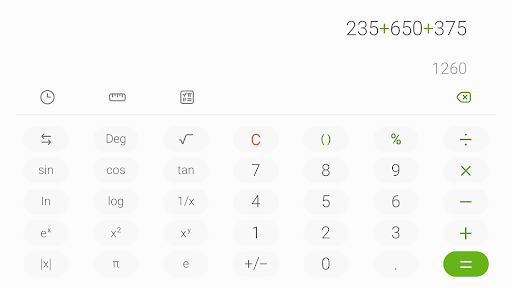
This app provides the four fundamental operations and engineering calculations.
Perform four fundamental operations and engineering calculations.
To start the engineering calculator, tap the engineering calculator icon.
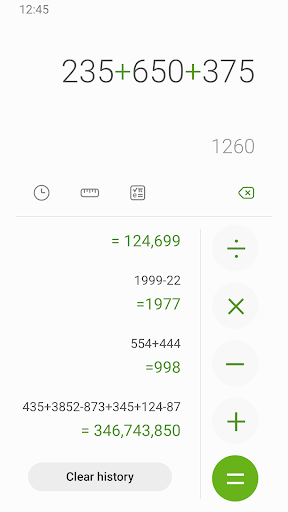
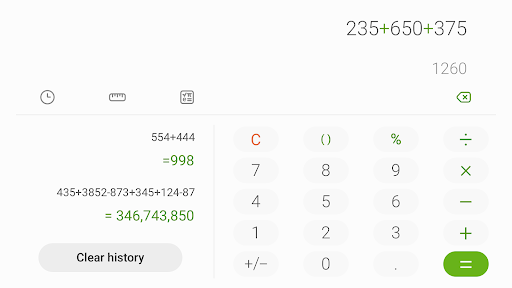
To check the calculation history, tap the calculation history icon. To close the calculation history panel, tap the keypad icon.
You can use the previously inputted formulas. Tap the formula you need from the calculation history.
[Additional features]
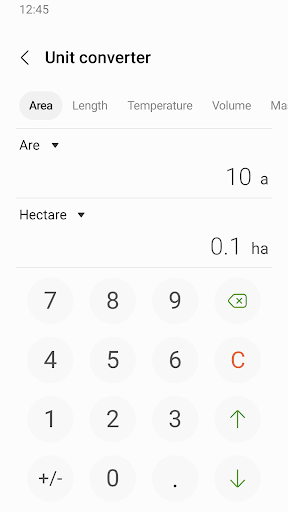
To convert units, tap the unit calculator button. You can easily convert various types of units, such as area, length, and temperature.
This software uses the Apache License 2.0. The details can be found at http://www.apache.org/licenses/LICENSE-2.0.
Privacy
Given that the Samsung Calculator app requests no permissions, it is a relatively safe and private calculator option, as it does not collect or transmit any user data, which is a significant advantage over other apps that may request excessive permissions. Users should still be cautious when using any app, especially if they are performing sensitive calculations, and ensure they download the app from a trusted source like the Google Play Store or ApkTrusted.com to avoid any potential malware risks.
Tips
To get the most out of the Samsung Calculator app, users should explore its engineering calculation features, which can be useful for solving complex problems, and utilize its offline capability to perform calculations anywhere, anytime. Additionally, users can optimize the app's performance by ensuring they have the latest version installed and by restarting their device periodically to clear any cached data, which can help maintain the app's responsiveness and accuracy.
What's New
Version Information
- Version
- -
- Downloads
- 1.0B+
- Updated on
- Mar 31, 2025
- Released
- Feb 8, 2017
- Requires
- Android Varies with device
Statistics
Google Play Rating History
Rating Distribution
Downloads Over Time
Samsung Calculator has been downloaded times. Over the past 30 days, it averaged downloads per day.
Shaded area shows 30-day prediction based on historical trends
Historical data collection started recently. More data points will be available over time.
Samsung Calculator users say on Google Play
 Atefeh Moradi
عالییییییییییییییییی
 Brainy Lukas
It is great and all, but I have one complaint. You can put a minus at the start so I can't write -10, for example, instead I have to pit it inside brackets like (-10).
 Raihan Raj
Samsung Calculator is simple and reliable, but it’s missing a useful feature. I wish Samsung would add an Age Calculator (date of birth to age) in the calculator app. Many users need age calculation for forms, exams, jobs, and daily use. Adding this feature would make the app more complete and user-friendly. Hope Samsung considers this in future updates.
 Gideon Gidd
good
 Sialele Lightsy
why am I using a agreement to download so Google can just go in and charge my account? piss off.
ApkTrusted Ratings & Reviews
More from Samsung Electronics Co., Ltd.
See more apps
Smart Tutor for SAMSUNG Mobile
Free

POWERbot-S
Free

Samsung WE VoIP
Free

Galaxy Buds Core Manager
Free

Samsung Accessory Service
Free

Galaxy Buds+ Manager
Free

Galaxy Buds2 Pro Manager
Free

Galaxy Buds FE Manager
Free

Galaxy Buds Pro Manager
Free

Galaxy Buds2 Manager
Free

Galaxy Buds3 Manager
Free

Galaxy Buds Manager
Free

Samsung Plus 2
Free

POWERbot-E
Free

Galaxy Buds3 Pro Manager
Free

Galaxy Buds3 FE Manager
Free
Similar Apps

Calculator: Simple Calculator
Free

Calculator
Free
Simple Calculator
Free

ClevCalc - Calculator
Free

Calculator
Free
Calculator - Hide Photo, Video
Free
Calculator Lock - Hide Photos
Free
Scientific calculator plus 991
Free

Microsoft OneDrive
Free

GeoGebra Graphing Calculator
Free

Microsoft Outlook
Free
HiPER Scientific Calculator
Free

Microsoft 365 Copilot
Free

Calculator - Hide apps, Photo
Free
AppLock
Free

File Manager
Free
Scan this QR code to download

Forwarding you to the page at Google Play market in seconds...
Open Google Play market now