AppLock v6.0.3
PIPS Tech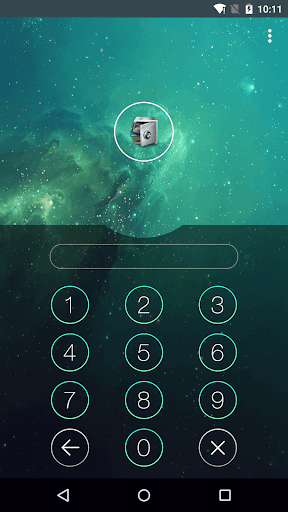

About this app
AppLock, developed by PIPS Tech, is designed to protect user privacy by locking apps, which is a significant concern for many Android users. This app benefits individuals who share devices or have sensitive information stored in various apps, providing them with an additional layer of security. Compared to other tools in the category, AppLock stands out with its high download numbers and good user rating, indicating its effectiveness and user satisfaction. However, its lack of permissions raises questions about its functionality and how it achieves its purpose without accessing sensitive data.
Pros
- With over 100 million downloads, AppLock has demonstrated its popularity and effectiveness in protecting user privacy, which is a significant advantage in terms of social proof.
- The app's good user rating of 4.2 out of 5 indicates a well-received product that meets the needs of its users, suggesting a high level of satisfaction with its features and performance.
- The developer, PIPS Tech, provides a professional website and contact email, showing a level of transparency and commitment to user support, which is crucial for an app dealing with security and privacy.
- AppLock's ability to operate without requiring any permissions is a significant pro, as it alleviates concerns about data privacy and security, though it also raises questions about its effectiveness in achieving its stated goals.
- The app's free version with optional in-app purchases offers flexibility for users, allowing them to choose the level of protection and features they need without a significant upfront cost.
Cons
- The absence of any permissions requested by the app might limit its functionality or effectiveness in locking down sensitive information, potentially relying on less secure methods to achieve its goals.
- The presence of ads in the free version could be intrusive and detract from the user experience, especially for an app focused on security and privacy, where a seamless experience is crucial.
- Some users might find the in-app purchase model aggressive, especially if essential features are locked behind a paywall, which could limit the app's usefulness for those who cannot or do not want to pay.
- The lack of detailed information about how the app protects privacy without accessing any permissions could lead to skepticism about its efficacy and might deter some potential users.
Best for: The ideal user for AppLock is likely an individual who values privacy and security, possibly sharing a device with others or storing sensitive information in various apps, and is looking for an easy-to-use, additional layer of protection without needing to delve into complex security settings, suggesting a user who is concerned about privacy but not necessarily tech-savvy.
Developer Description
Protect privacy.
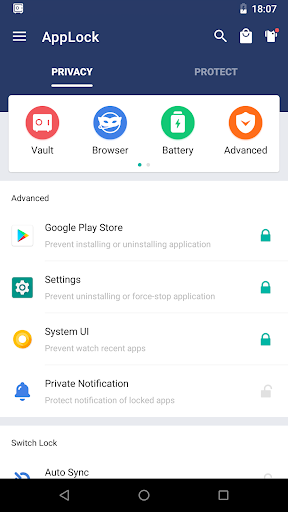
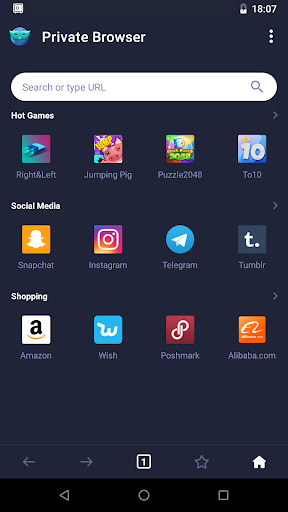
☞ AppLock can lock Facebook, WhatsApp, Gallery, Messenger, Snapchat, Instagram, SMS, Contacts, Gmail, Settings, incoming calls and any app you choose. Prevent unauthorized access and guard privacy. Ensure security.
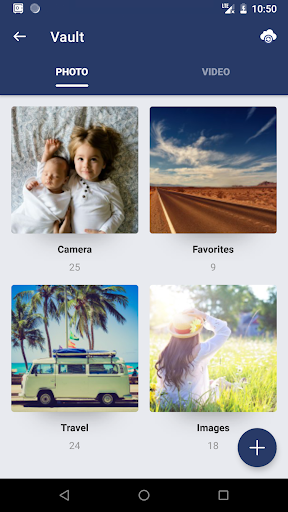
☞ AppLock can lock pictures and videos. Hidden pictures and videos are vanished from Gallery and only visible in the photo and video vault. Protect private memories easily. No pin, no way.
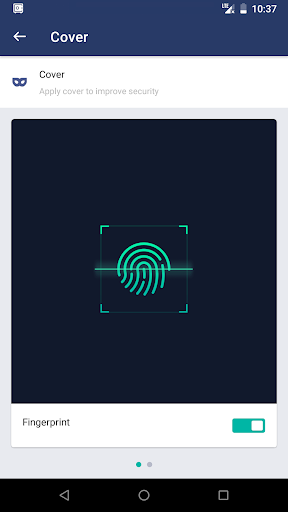
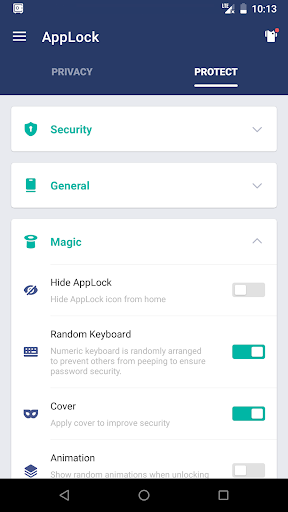
☞AppLock has random keyboard and invisible pattern lock. No more worry people may peep the pin or pattern. More safe!
★ With AppLock, you will:
Never worry about parents check your Snapchat, TikTok!
Never worry about friends borrow your phone to play games with mobile data again!
Never worry about a workmate gets your phone to look the gallery again!
Never worry about someone reads private data in your apps again!
Never worry about kids mess up Settings, send wrong messages, paying games again!
---FAQ---
1)How to change password?
Open AppLock, Protect, Unlock Settings
2)How to open hidden AppLock?
Please update to the latest version and then try the following four methods to open hidden AppLock:
1. Gallery
Open your Gallery, select a picture, click the share button. Find "Open AppLock" and click it.
2. Widgets
Long press the home screen, click Widgets. Find "Open AppLock" and drag it to the home screen.
3. Dial pad
Enter *#*#12345#*#* in your dial pad.
4. Browser
Open any link in the browser:
① openapplock.com
② domobile.com/applock
3)How to stop uninstalling AppLock?
Please enable Advanced Protection in Protect of AppLock, so nobody can uninstall or kill AppLock without password. You can disable Advanced Protection when you don't want it.
4)I forgot my password, How to find it?
Update to the latest version first. And then tap AppLock icon, click the icon at top right corner of lock page, tap 'forgot password'.
1. Security answer: enter security answer, click 'reset password'.
2. Security email: click 'send code to security email', input reset code, click 'reset password'.
AppLock uses the Device Administrator permission.
To enable Advanced Protection, please activate AppLock as "device administrator". It's only used for preventing intruders uninstalling AppLock.
AppLock uses Accessibility service.
To enable Power saving mode, please allow Accessibility services. The service is only used to reduce battery usage, improve unlocking efficiency, and ensure AppLock works stably.
Please be assured that AppLock will never use these permissions to access your private data.
Feel free to send your feedback to us! support@domobile.com
Official SNS account
Facebook: http://www.facebook.com/bestapplock
Twitter: https://twitter.com/bestapplock
Website: https://www.domobile.com
Privacy
Given that AppLock does not request any permissions, users should be cautious about how their data is being protected and consider the potential limitations of this approach. It is essential to review the app's privacy policy to understand what data might be collected and how it is used. Users should also be aware of the potential for less secure methods of app locking that do not rely on system permissions.
Tips
To get the most out of AppLock, users should start by setting up the app with a secure password or pattern, ensuring that the locking mechanism is as secure as possible. Additionally, exploring the app's settings to understand its features and limitations can help in optimizing its performance and effectiveness. Regularly reviewing the apps that are locked and adjusting settings as needed can also enhance the overall security provided by AppLock.
What's New
In-app purchases
$1.99 - $11.99 per item
Version Information
- Version
- 6.0.3
- Downloads
- 100M+
- Updated on
- Jan 7, 2026
- Released
- Oct 31, 2013
- Requires
- Android 6.0
Statistics
Google Play Rating History
Rating Distribution
Downloads Over Time
AppLock has been downloaded times. Over the past 30 days, it averaged downloads per day.
Shaded area shows 30-day prediction based on historical trends
Historical data collection started recently. More data points will be available over time.
AppLock - Google Play Rankings
Top Rankings
| Rank | Country | Category | List | Change |
|---|---|---|---|---|
| — |
Ranking History in
No ranking data available yet. Rankings are updated daily.
#4 in Top Free Tools in Pakistan


#21 in Top Free Tools in Egypt


#29 in Top Free Tools in Saudi Arabia


#23 in Top Free Apps in Pakistan


AppLock users say on Google Play
 dsv khan
it is very good app easy used and better for all and save all deta unfortunately delete this app my forgetting problem but don't delete of all deta in this app or reinstall please install this app and recover all feta
 Shahzad Ali
I love this app lock 🔒 this app lock has so much feature It's help me a lot
 Shahid Mehmood
is app Mai ye system ni hona chahiya k pehla memory clean mrain. I request you ye system khtam ker dain please
 Alexander Boykins
app does not work, the lock is delayed so you can still access the apps that are locked and use them don't recommend.
 Zarina Bano
some people wrong useful please Pakistan country blocked mujh is app ki Waja sai black milling kar rah hai wo please Pakistan country blocked this app
ApkTrusted Ratings & Reviews
More from PIPS Tech
See more apps
Similar Apps
Photo Lock App - Hide Pictures
Free
Photo Lock: Hide Videos, Pics
Free
AppLock
Free
App Lock - Applock Fingerprint
Free

Private Photo Vault - Keepsafe
Free

Gallery - Album, Photo Vault
Free
Calculator - Hide Photo, Video
Free
LOCKit: App Lock, Photos Vault
Free
Calculator Lock - Hide Photos
Free
AppLock Pro - App Lock & Guard
Free

Gallery- Photo Gallery & Album
Free

Gallery - Photo Gallery, Vault
Free
Hide Photo Vault &Videos
Free
LockMyPix Safe Photo Vault
Free

Photo Gallery - Album, Vault
Free
Calculator - Hide apps, Photo
Free
Scan this QR code to download

Forwarding you to the page at Google Play market in seconds...
Open Google Play market now