
Navigation for KTM (Gen 3) vVARY
BikeConnect App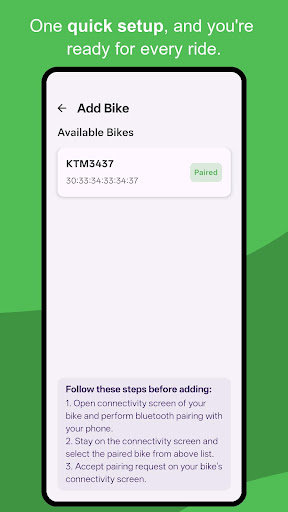


About this app
Developer Description
Google Maps navigation on your KTM / Husqvarna TFT screen.
Key Features
🗺️ Universal Navigation: Suport for popular navigation apps like Google Maps, OsmAnd, Waze, Kurviger.🤖 AI-Powered Smart Recognition: Uses custom trained AI models to read and understand turn icons from notifcations of Google Maps, Kurviger, and OsmAnd.
🧠 Machine Learning for Waze: Waze doesn’t use notifications for turns. Our app uses on-device Machine Learning to read directions directly from your screen when Waze is running, just by watching the interface.
🔗 Seamless Bluetooth Integration: A stable, low-energy connection that keeps navigation data perfectly synced without draining your phone’s battery.
⚡ Instant Auto-Connect: Automatically connects in the background as soon as your motorcycle is powered on — no need to open the app.
💬 Notification Alerts: See incoming alerts from WhatsApp, Gmail, SMS, and Waze right on your motorcycle’s screen.
🌦️ Live weather: See live temperature, humidity, altitude, and air quality (AQI) information on your motorcycle’s screen.
Getting Started
Bluetooth pairing:• On your bike, go to Settings → Connectivity → Phone pairing.
• On your phone, open Bluetooth settings and pair with your motorcycle.
App pairing:
• Keep the bike’s Connectivity screen open.
• In the app, tap "Add Bike" and choose your paired bike.
• Confirm the pairing request popup on your motorcycle’s screen.
Navigation:
• For Google Maps, OsmAnd, or Kurviger: Simply start your navigation. Make sure the TBT navigation notification is visible on your phone.
• For Waze: Start navigation,then switch to our app and grant the requested permissions for it to work.
Supported Models
🏍️ KTM Duke Series• 125 Duke (2024–2025)
• 160 Duke (2025)
• 200 Duke (2024–2025)
• 250 Duke (2023–2025)
• 390 Duke (2024–2025)
• 790 Duke (2025)
🏍️ KTM RC Series
• 160, 200 RC (2025)
🏍️ KTM Adventure Series
• 250, 390, 790 Adventure (2025)
🏍️ Husqvarna Vitpilen / Svartpilen
• Vitpilen 125, 250, 401 (2024-2025)
• Svartpilen 125, 250, 401 (2024-2025)
🚨 PLEASE NOTE (IMPORTANT)
Third-Party App: This is an independent application and is not affiliated with, endorsed by, or sponsored by KTM or Husqvarna Motorcycles.Companion required: Requires a supported navigation app (e.g., Google Maps) to provide navigation data.
100% Safe: This app uses the official, built-in communication methods approved by the manufacturer. It never modifies your motorcycle’s software or systems in any way.
In-app purchases
$3.99 per item
Version Information
- Version
- -
- Downloads
- 100+
- Updated on
- -
- Released
- Oct 31, 2025
- Requires
- Android Varies with device
Statistics
Google Play Rating History
Rating Distribution
Downloads Over Time
Navigation for KTM (Gen 3) has been downloaded times. Over the past 30 days, it averaged downloads per day.
Shaded area shows 30-day prediction based on historical trends
Historical data collection started recently. More data points will be available over time.
Navigation for KTM (Gen 3) - Google Play Rankings
Top Rankings
| Rank | Country | Category | List | Change |
|---|---|---|---|---|
| — |
Ranking History in
No ranking data available yet. Rankings are updated daily.
#61 in Top Grossing Travel And Local in Indonesia

#94 in Top Grossing Travel And Local in India


Navigation for KTM (Gen 3) users say on Google Play
 Roy Samuel
It works great! Thanks to the developer!
 Prasannajit
I used this app and connected for a ride of 10 Kms. Post this Bike got struck and didn't start. Also connectivity warning shown in console. Is it something problem by using this App in new Duke gen 3? Developer reply once, is it safe to use as complete ECU is the console in 3rd Gen Duke.
ApkTrusted Ratings & Reviews
Scan this QR code to download

Forwarding you to the page at Google Play market in seconds...
Open Google Play market now