
Bitdefender SecurePass v1.5.0
Bitdefender




About this app
Developer Description
Vault-like protection for passwords and sensitive data across all your devices.
Key Features:
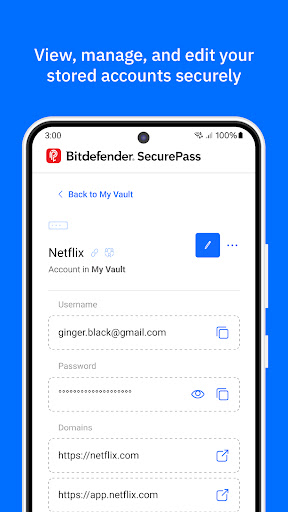
🔐Complete Protection : Secure your passwords and sensitive data with end-to-end encryption, keeping your online accounts and personal information completely private.
🛡️Password Generator & Strength Advisor: Create strong, complex passwords with just one click. Use the built-in advisor to check if any of your existing passwords are weak or require attention.
📲Multi-platform Synchronization: Save and sync your passwords across multiple platforms, including Android, iOS, Windows, macOS, and all major browsers like Chrome, Firefox, Safari, and Edge. Access your password manager vault anytime, anywhere.
🔑Master Password Convenience: Manage all your accounts with just one Master Password. SecurePass eliminates the need to remember dozens of login details by centralizing everything in one secure password manager.
💳Secure Credit Card Management: Protect your payment details for online shopping. Autofill your credit card information on websites safely, knowing that your sensitive data is encrypted and stored locally on your device.
🖥️Easy Import/Export: Transitioning from another password manager? SecurePass makes it easy to import your data from 1Password, Dashlane, LastPass, Chrome, Firefox, and more. Supported file formats include JSON, CSV, and XML.
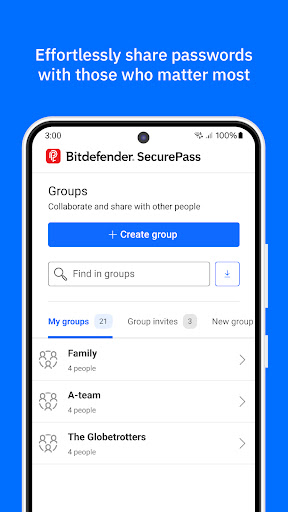
👥Share Passwords Safely: Need to share passwords with family or colleagues? Use SecurePass to share credentials securely, thanks to encrypted password sharing.
🔔Password Leak Alerts: SecurePass constantly monitors data breaches to alert you if any of your credentials are exposed, giving you a chance to update your passwords before it’s too late.
Additional Features:
• Two-Factor Authentication: Add an extra layer of security to your password vault.
• Secure Notes: Store sensitive information like documents, personal notes, or PIN codes with color-coded organization.
• Identities Management: Manage multiple online identities with ease, autofilling your details for fast form completion.
• Auto-Lock & Secure Me Feature: Automatically log out or lock your vault after inactivity or on shared devices.
• Face & Fingerprint Unlock: Quickly access your vault with biometric authentication on supported devices.
Why Choose Bitdefender SecurePass?
Bitdefender SecurePass is designed for users who value privacy and need top-tier protection for their online identities. As a powerful and intuitive password manager, SecurePass offers a seamless way to manage your digital life without compromising on security. Whether you’re shopping online, managing work accounts, or simply keeping track of personal passwords, SecurePass has your back!
What's New
Version Information
- Version
- 1.5.0
- Downloads
- 50K+
- Updated on
- Nov 14, 2025
- Released
- Oct 23, 2024
- Requires
- Android 9
Statistics
Google Play Rating History
Rating Distribution
Downloads Over Time
Bitdefender SecurePass has been downloaded times. Over the past 30 days, it averaged downloads per day.
Shaded area shows 30-day prediction based on historical trends
Historical data collection started recently. More data points will be available over time.
Bitdefender SecurePass users say on Google Play
 Hugo Coetzee
I LOVE all Bitdefender applications this one is no exemption. In my case I just need to get used to using it! Also got a cool Chrome add on! Thank you to the Team
 I Am A Child Of God
I just changed over from BitDefender pass manager after it failed my password multiple times, including my master password. My frustration is having to re-enter my pass key so often on my android if I have multiple screens open and try to bounce between them when I'm trying to input a site's information. This is taking time to get used to, but I think it will be even better. I really love all of my Bitdefender security products and feel safer online with their protection.
 Alexander Kantolinsky
Not streamlined. There are too many clicks to get to the password.
 Jess Lafreniere
The original Password Manager was easy to use and interact with. Update now allows for modification of old entries, but rarely will the option pop-up to use the keeper to enter credentials, even with the default set to the keeper and not Chrome, and I have to manually launch the app and search for the credentials.
 M Marconi
Last update made useless for autofill. I log in and select credentials, takes me back to the page and credential fields are blank. Did it twice in a row. It made me go manually into the app and copy/paste credentials. Absolutely useless at this point!
ApkTrusted Ratings & Reviews
More from Bitdefender
See more apps




Similar Apps

Aegis Authenticator - 2FA App
Free
2FA Authenticator (2FAS)
Free

Avira Security Antivirus & VPN
Free

Proton Pass: Password Manager
Free

F-Secure: Total Security & VPN
Free

Lib of Dev
Free

Avast One – Privacy & Security
Free

CompTIA Security+ Exam Prep
Free

Lumo by Proton
Free

Proton Wallet: Secure Bitcoin
Free

CompTIA Security+ Prep 2026
Free

Cloaked: Protect your privacy
Free
Scan this QR code to download

Forwarding you to the page at Google Play market in seconds...
Open Google Play market now