
Boat Browser: Web & Tools v1.3.9.1012
Adblock – Rocketshield Browser Technology Limited


About this app
Boat Browser: Web & Tools solves the problem of providing a private and fast browsing experience, benefiting users who prioritize their online security and simplicity. Compared to alternatives in the Business category, it stands out with its minimalistic approach and lack of permissions, but falls short in terms of feature richness. With a good user rating and over 1 million downloads, it has established a reputation as a reliable option. However, its simplicity may not appeal to power users seeking more advanced features.
Pros
- The app's minimalistic design and lack of permissions make it an attractive option for users concerned about their privacy and security.
- With over 1 million downloads and a good user rating, the app has demonstrated its reliability and performance.
- The developer's reputation, as evident from their website and email support, suggests a commitment to user satisfaction and feedback.
- The app's small size and lightweight design make it accessible to a wide range of devices, including those with limited storage capacity.
Cons
- The app's simplicity may be a turn-off for users who are accustomed to more feature-rich browsers, such as those with built-in ad blockers or password managers.
- The presence of ads may be annoying for some users, and the lack of in-app purchases or premium features limits the app's monetization options.
- Some users may find the app's lack of customization options and settings to be limiting, particularly in terms of appearance and behavior.
- The app's compatibility with certain devices or Android versions may be limited, as it requires Android 7.0 or higher.
Best for: The ideal user for Boat Browser is likely an individual who values simplicity, privacy, and security in their browsing experience, such as a casual user who primarily uses their device for basic tasks like browsing, emailing, and social media, and is looking for a lightweight and easy-to-use browser that can provide a seamless experience without compromising on performance or security.
Developer Description
Private. Fast. Simple. Your all-in-one super privacy app!
Main Features Overview:
√ Latest News Updates
√ Incognito Browsing
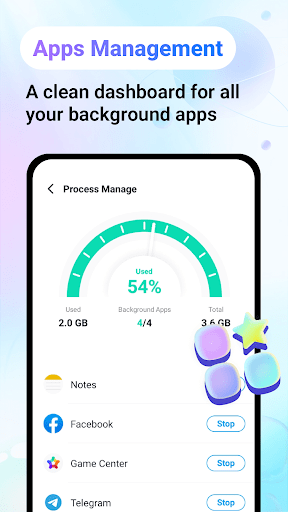
√ Process Management
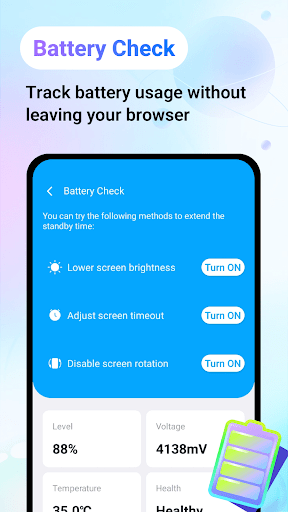
√ Battery Check
√ Network Traffic
√ Quiz Challenges
Boat Browser Offers You:
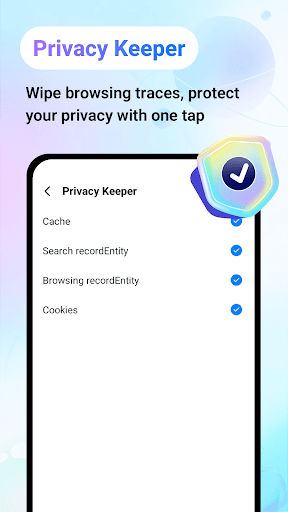
*Privacy Protection with Incognito Search:
Use Boat Browser's built-in private search feature to browse the web without leaving any traces.
*Simple and User-Friendly Interface:
Boat Browser features an intuitive interface for easy web navigation, enhancing your browsing experience.
*News Updates:
Stay informed with the latest and most relevant news content.
*Process Management:
View currently running applications and manually pause unnecessary ones.
*Battery Check:
Monitor your device's battery status with our battery check feature.
*Network Traffic:
Track your data usage while browsing with Boat Browser.
*Bookmarks:
Quickly save and manage your favorite websites for easy access anytime.
*Quiz Challenges:
Test your knowledge and learn more with Boat Browser's quiz challenges.
*Online Games:
Variety of Online Mini-Games. Click & Play in Seconds. No Downloads Needed.
Download Boat Browser now and enjoy a simple web browsing experience!
Privacy
Given the app's lack of permissions, it is likely that the data collected is limited to basic browsing information, and users should be aware that the developer may collect anonymous usage data to improve the app. However, the absence of sensitive permissions is a positive indicator of the app's commitment to user privacy. To further enhance security, users should be cautious when clicking on ads or visiting suspicious websites.
Tips
To get the most out of Boat Browser, users should take advantage of its private browsing mode, which can be enabled in the settings. Additionally, users can optimize performance by clearing the browser's cache and data regularly, and by disabling ads in the app's settings. By doing so, users can enjoy a faster and more secure browsing experience.
Version Information
- Version
- 1.3.9.1012
- Downloads
- 1M+
- Updated on
- Sep 3, 2025
- Released
- Jan 19, 2024
- Requires
- Android 7.0
Statistics
Google Play Rating History
Rating Distribution
Downloads Over Time
Boat Browser: Web & Tools has been downloaded times. Over the past 30 days, it averaged downloads per day.
Shaded area shows 30-day prediction based on historical trends
Historical data collection started recently. More data points will be available over time.
Boat Browser: Web & Tools users say on Google Play
 Brandon Huffman
There is so much to say about this app. I thought originally that I was getting a simple private browser, then I started to see that that was just one thing they made sure my battery was always good ( and i think thats why my battery is still in good shape) and made sure that I didnt have anything slowing down my phone.
 Claudiaa RozonVegaHurtado
👍
 ILa Smith
pretty dog gone good App
 David Poure
ads,ads,ads distractions very unnecessary
 Frank Korpan
Worst app ever can not even get to main page and it's over run by the same add for you to purchase over and over, Do not down load a waist of time and garbage .
ApkTrusted Ratings & Reviews
More from Adblock – Rocketshield Browser Technology Limited
See more apps
Similar Apps

Hermit — Lite Apps Browser
Free

Banana Browser: Adblock, Secur
Free

Brave Beta
Free

Stargon Browser
Free

Firefox Nightly for Developers
Free
Adblock Browser: Fast & Secure
Free

Power Browser-Block Ads & Earn
Free

Pure Web Browser-Ad Blocker
Free

Quetta - Video Adblock Browser
Free

Brave Nightly
Free
Microsoft Edge Beta
Free

InBrowser - Incognito Browsing
Free

Vivaldi Browser - Fast & Safe
Free

Video Downloader & HD Player
Paid

Seekly
Free

Apex News: Breaking & Local
Free
Scan this QR code to download

Forwarding you to the page at Google Play market in seconds...
Open Google Play market now