
Markup Calculator vVARY
Stage Coding

About this app
Developer Description
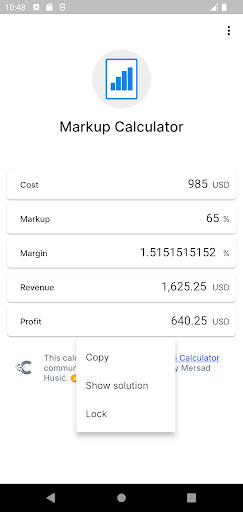
Easily calculate markup your product.
What is markup definition, and what is the difference between margin vs. markup?
Markup illustrates how much higher a firm’s selling price is over the item costs the company. In general, the bigger the markup, the more income a corporation makes. Markup is the retail price for a product less its cost, but the margin percentage is computed differently.
Profit margin and markup are two accounting words that employ the same inputs and evaluate the same transaction. However, they display different information: profit margin and markup use income and costs as part of their computations. The fundamental distinction between the two is that profit margin refers to sales minus the cost of products sold while markup to the amount by which the cost of a good is raised to get to the final selling price.
More extensive explanations of the margin and markup ideas are as follows:
Margin (sometimes known as gross margin) is sales less the cost of goods sold. So, for example, if a product sells for $100 and costs $70 to create, its margin is $30. Or, given as a percentage, the margin percentage is 30 percent (calculated as the margin divided by sales) (calculated as the margin divided by sales).
Markup is the amount by which a product’s cost is increased to calculate the selling price. To apply the prior example, a markup of $30 off the $70 cost generates the $100 pricing. Or, given as a percentage, the markup percentage is 42.9 percent (calculated as the markup amount divided by the product cost) (calculated as the markup amount divided by the product cost).
How to calculate markup?
The markup is the difference between the cost and the selling price and is calculated using a simple formula. To determine markup, follow these steps:
1. Go through the equation again.
2. Establish the markup
3. Subtract the markup from the cost.
4. Calculate as a percentage
Version Information
- Version
- -
- Downloads
- 1K+
- Updated on
- -
- Released
- Mar 8, 2022
- Requires
- Android Varies with device
Statistics
Google Play Rating History
Rating Distribution
Downloads Over Time
Markup Calculator has been downloaded times. Over the past 30 days, it averaged downloads per day.
Shaded area shows 30-day prediction based on historical trends
Historical data collection started recently. More data points will be available over time.
Markup Calculator users say on Google Play
 Arthur Pappas
Does what it's supposed to do.
 Bob Griffin
Tha app itself is fine, the only issue I'm having is it won't close when I'm done. Using Android Samsung A12. Needs a close button or something.
 Henry
Henry
To many ads. Can't do more than 1 calculation with out seeing ads
ApkTrusted Ratings & Reviews
More from Stage Coding
See more apps
CalCon Calculator
Free

Currency & Crypto Tracker Live
Free
Gross Profit Calculator
Free

Mean Calculator
Free

Coin Flip Probability
Free

CPC and CPM Calculator
Free

Adjusted Body Weight
Free

Geometric Mean Calculator
Free

Absolute Value Calculator
Free

Carpet Calculator
Free
mg to mL Calculator
Free

Percent Error Calculator
Free

Percentage Difference
Free

Pipe Volume Calculator
Free

Population Density Calculator
Free

TeamTune - AI Leadership Coach
Free
Similar Apps





Scan this QR code to download

Forwarding you to the page at Google Play market in seconds...
Open Google Play market now