Meteogram Weather Widget v5.5.6
Meteograms Ltd





About this app
Developer Description
Weather widget and app showing a graphical weather forecast... plus tide charts
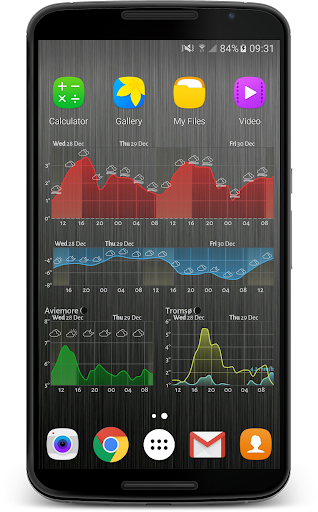
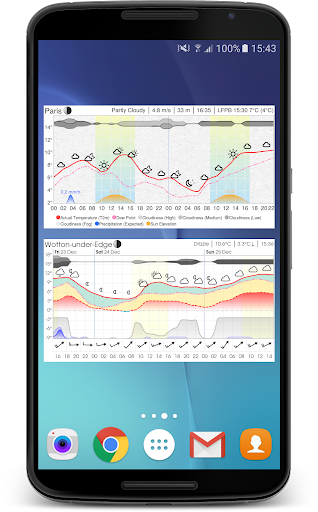
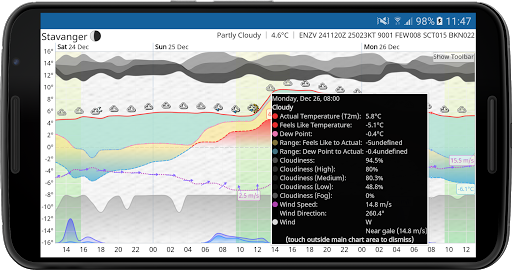
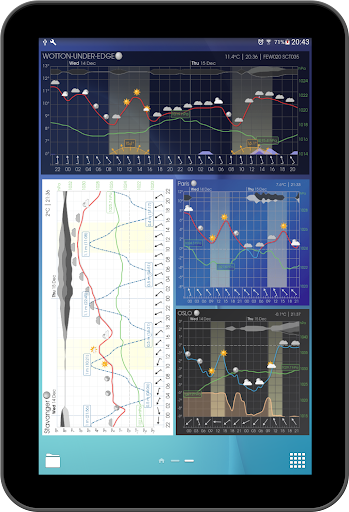
This resizable weather widget (and interactive app) provides a detailed and visually appealing weather forecast, allowing you very quickly to understand what to expect when you venture outdoors. The graphical format is commonly referred to as a 'meteogram'.
You can choose to display as little or as much information as you like, or you can set up multiple widgets showing different information (optionally for different places) in different widgets.
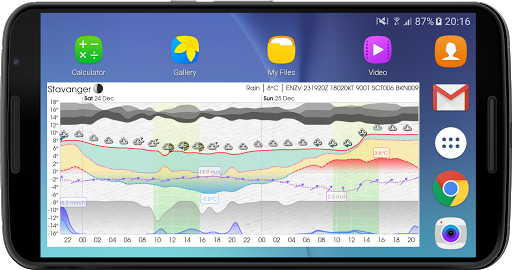
You can plot common weather parameters like temperature, wind speed and pressure, as well as tide charts, UV Index, wave height, moon phase, sunrise and sunset times, and much much more!
You can even display government-issued weather alerts on the chart, with coverage for at least 63 different countries.
The content and style of the meteogram is extremely configurable... with over 5000 options to set, your imagination is the limit!
The widget is also fully resizable, so make it however small or large you like on your home screen! And the interactive app is just a click away, direct from the widget.
Furthermore, you can choose where your weather data comes from, with over 30 different data sources.
Upgrade to Platinum
In addition to the great features available in the free version, an in-app platinum upgrade is available which will give you the following extra benefits:
★ use of all available weather data providers
★ use of tide data
★ higher spatial resolution used (e.g. nearest km vs nearest 10 km)
★ no adverts
★ no watermark on chart
★ favourite locations list
★ choice of weather icon set
★ change location (e.g. from favourites) direct from widget button
★ change data provider direct from widget button
★ link to windy.com direct from widget button
★ load settings from a local file and/or a remote server
★ show historical (cached forecast) data
★ show full days (midnight to midnight)
★ show twilight periods (civil, nautical, astronomical)
★ time machine (show weather or tides for any date, past or future)
★ greater choice of fonts
★ use of custom webfonts (choose any from Google Fonts)
★ notifications (including temperature in status bar)
Support and Feedback
We always welcome feedback or suggestions. Join one of our online communities:
★ Reddit: bit.ly/meteograms-reddit
★ Slack: bit.ly/slack-meteograms
★ Discord: bit.ly/meteograms-discord
You can also email us using the handy link in the settings page in the app. Also check out the help pages at https://trello.com/b/ST1CuBEm, and the website (https://meteograms.com) for further information and an interactive meteogram map.
Data Sources
The app receives data from the following government weather agencies:
★ Norwegian Meteorological Institute (NMI): https://www.met.no/
★ National Weather Service (NWS) of the National Oceanic and Atmospheric Administration (NOAA): https://www.weather.gov
★ European Centre for Medium-Range Weather Forecasts (ECMWF): https://www.ecmwf.int/
★ UK Meteorological Office (UKMO): https://www.metoffice.gov.uk/
★ German Weather Service (DWD): https://www.dwd.de/
★ Swedish Meteorological & Hydrological Institute (SMHI): https://www.smhi.se/
★ Danmarks Meteorologiske Institut (DMI): https://www.dmi.dk/
★ Koninklijk Nederlands Meteorologisch Instituut (KNMI): https://www.knmi.nl/
★ Japan Meteorological Agency (JMA): https://www.jma.go.jp/
★ China Meteorological Administration (CMA): https://www.cma.gov.cn/
★ Canadian Meteorological Centre (CMC): https://weather.gc.ca/
★ Finnish Meteorological Institute (FMI): https://en.ilmatieteenlaitos.fi/
Note that this app has no affiliation with nor does it represent any of the above government entities.
What's New
• internal improvements
5.5.5
• fix status bar icon visibility when using light theme
5.5.4
• fix location search crash
5.5.3
• the IFS model from ECMWF is now greatly improved...
• higher spatial resolution (9km vs 44km previously)
• more weather variables are available
• new AI model from ECMWF: AIFS (requires platinum)
• new units for Snow Depth: centimetres and inches
• NOTE: if your widget does not completely fill the space in Android 15... see https://trello.com/c/NMhU9kU4
In-app purchases
$0.49 - $34.99 per item
Version Information
- Version
- 5.5.6
- Downloads
- 100K+
- Updated on
- Dec 20, 2025
- Released
- Dec 5, 2014
- Requires
- Android 7.0
Statistics
Google Play Rating History
Rating Distribution
Downloads Over Time
Meteogram Weather Widget has been downloaded times. Over the past 30 days, it averaged downloads per day.
Shaded area shows 30-day prediction based on historical trends
Historical data collection started recently. More data points will be available over time.
Meteogram Weather Widget - Google Play Rankings
Top Rankings
| Rank | Country | Category | List | Change |
|---|---|---|---|---|
| — |
Ranking History in
No ranking data available yet. Rankings are updated daily.
#25 in Top Grossing Weather in Netherlands

#31 in Top Grossing Weather in Italy

#79 in Top Grossing Weather in United Kingdom


#83 in Top Grossing Weather in Turkey
Meteogram Weather Widget users say on Google Play
 Jeff Emtman
Definitely the weather app for those who like tweaking settings. I used the free version for years and recently bought a lifetime subscription. I've definitely wow'd some of my nerdier friends with it :). TY for the app!
 Chris Mazur
Infinitely customizable. Took quite a while to figure out many of the possibilities, but i finally got the perfect settings for me. This is a great replacement for the old weather underground widget that was deprecated. Now, after all that time spent setting it up perfectly, the widget disappeared, i guess because of an upgrade. Now it's back to square one. Not looking forward to having to set it all up again!--edit reply to dev--yes did try long press and app restart. Got message couldn't fetch
 Adam
Adam
Finds my location but defaults to Celsius when we use Fahrenheit. Changed this in Settings, but then when I select a different Option Set (I wanted a Dark graph; even though I chose Dark Mode it ignores this for graphs) and now I'm back to Celsius. No other weather app I've used (and I've used many) has these problems.
 Mike Savad
I have to bring this back to a 2 again. There are things I like about this. Like I can set weather info in the header. But the 3 biggest issues this has is: 1. It doesn't update itself. I have to do it manually. Or sometimes it does update itself. Its random. 2. There are a ton of settings, but everything is mixed up. The only way I knew to find rain was to make a review and get a snippy answer from the programmer, and the email help isn't really helpful. Considering this app is mostly designed to show the rain, putting the option between grass pollen and snow, seems like a weird place to put it. 3. There are no options for decimal points of rain, or a graph that shows me a square per inch like another app did. Instead I have to guess at what 3/64's looks like or what 5.6/100th's looks like. Or just know what mm's look like. All I want to see is -.5,.005 or just normal fractions down to say a 1/16th, that would make sense to me. Also the settings, while its nice that I can load up what my widget looks like with a setting, it only works if I am having that weather event. So like I can't adjust snow unless its snowing. It would be better to show me as an example what changed. Because a lot of these options don't show a change and there is no real help as to what they do. A lot of features are more for a programmer than a simple guy like me. And lastly, there are only 2 weather stations you can use for free. The rest you need to pay for I think? But they are mixed together, and they don't tell you its a pay for site until you click on it. And you have to click on all of them to see that only 2 are OK. And the 2 that are OK, aren't accurate. Noaa, and norwegian are the free ones.
 John
John
When the widget failed on weather update (probably due to no network access since a lot of Android 11 phones blocking data after screen off), the widget's time line doesn't even advance, so very often when you unlock the phone, you will see the widget still showing a few hours back weather. Response to Developer: after about an hour not touching the phone. The problem is the widget do not has logic to retry/refresh sooner than preset frequency whenever it failed on an update.
ApkTrusted Ratings & Reviews
More from Meteograms Ltd
See more apps
Similar Apps

WeatherX Forecast
Free
Windfinder Pro: Wind & Weather
Paid

Today Weather:Data by NOAA/NWS
Free
Weather Live
Paid
Weather Forecast Accurate Info
Paid
NOAA Weather Unofficial (Pro)
Paid

Foreca Weather & Radar
Free
Weather data & microclimate :
Free

Weather & Radar USA - Pro
Paid
Weather Forecast & Widget
Free

Mausam AI – Smart Weather App
Free

MyRadar Weather Radar
Free
Sunrise and Sunset Times
Free

MSN Weather - Forecast & Maps
Free
St. Cloud Live StormTRACKER
Free

Yahoo Weather: Forecast & Maps
Free
Scan this QR code to download

Forwarding you to the page at Google Play market in seconds...
Open Google Play market now