
Commerzbank photoTAN v15.1.0
Commerzbank AG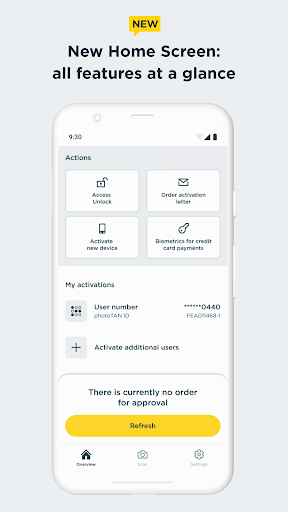


About this app
Developer Description
The photoTAN app: Commerzbank's convenient and free TAN procedure.
The right is absolutely necessary to use the app. Subsequent removal of the right can result in the app no longer being able to be used to control orders, as the keys are no longer available.
#######################
Hard-/software checks of your device: At runtime, we check known, security-relevant attack vectors (e.g. rooted/jailbreak, malicious apps, etc.) To do this, we need your consent.
If you do not agree to do such a security checks, we kindly ask you not to install our photoTAN app and instead to use our reading device to use the online banking offer on the Internet (https://www.commerzbank.de/). You can also revoke your consent at any time for the future by uninstalling our photoTAN app from your device.
#######################
The new photoTAN app from Commerzbank
Receive push message, check order, approve - with the new photoTAN push function you can approve orders quickly and securely with just one click. With the photoTAN scan function, you still have the option of scanning a photoTAN graphic to generate a TAN.
It is now possible to fully legitimize yourself from the comfort of your own home with the VideoIdent app. With our new feature, the digital first activation, you can after the legitimation with VideoIdent in the next 3 hours easily and quickly activate the photoTAN app with a code that you receive by SMS. This means you no longer have to wait for the activation graphic
The photoTAN app is our most innovative security method. The app offers the highest possible security through a modern and convenient TAN procedure - for all customers who use Commerzbank's online and / or mobile banking.
What do I need the photoTAN app for?
The photoTAN app is one of our security factors. The photoTAN is an important part of every login and transaction in your online and mobile banking. It is used to verify the order data you have entered and to generate the transaction number (TAN).
How does photoTAN-Push work?
The push function of our new photoTAN app is particularly convenient. As soon as a new order is available for you to approve, we send you a notification to your smartphone when you use photoTAN-Push. When you then open the photoTAN app, the order to be approved is displayed directly for you to check. If the data displayed is correct, you release the order with just one click.
How does photoTAN scan work?
After placing an order in Online Banking, a mosaic-like colorful graphic appears on the monitor. You scan this with the photoTAN app. A TAN is displayed immediately. You can then check the essential details of your order again in the app. If everything is correct, simply enter the TAN on the computer and the order is confirmed.
By the way: With our mobile banking, you can make transfers even faster and easier than on your computer. To do this, use the free Commerzbank banking app!
The advantages of the new photoTAN app at a glance:
• Security: Commerzbank's most innovative TAN procedure.
• Uncomplicated: You receive a notification on your smartphone when a new order is ready for approval.
• Fast: You can approve orders with just one click.
• Free of charge: The use of photoTAN is free of charge for you.
• Mobile banking: Quick order approvals via the banking app using the App2App function.
• Offline usability: If your smartphone is offline, you can continue to approve orders easily with the scan function.
For more information on the new photoTAN procedure, visit http://www.commerzbank.de/phototan.
What's New
Version Information
- Version
- 15.1.0
- Downloads
- 1M+
- Updated on
- Nov 4, 2025
- Released
- Nov 30, 2012
- Requires
- Android 7.0
Statistics
Google Play Rating History
Rating Distribution
Downloads Over Time
Commerzbank photoTAN has been downloaded times. Over the past 30 days, it averaged downloads per day.
Shaded area shows 30-day prediction based on historical trends
Historical data collection started recently. More data points will be available over time.
Commerzbank photoTAN users say on Google Play
 Sergey Afanasiev
It gives me a black empty screen since recently, so I can't confirm transactions. Please fix. UPD there are no updates available to me. The last version is from may 20th. But I was able to re-activate and it works so far UPD2 fixed, thanks!
 Chandan B S
Crashing everytime I open the app. Happened on 1st September morning. Resolved after few hours.
 Tee R
Tee R
Will not open on Samsung S24. Currently unable to make payments because of this. Please make more options to authenticate banking!
 Graham Heiner
Randomly buggy. The app decided one day simply to crash and not work. I had to reinstall and wait for a new activation letter, and could not bank in that time. I see no way to report bugs and ensure they can improve.
 Anton K
All of a sudden the app stopped working permanently. While trying to reinstall it, I was asked for a new activation letter, which (the old letter didn't work, app says it expired). In result, I effectively lost access to my bank account for an unknown period of time, as now I need to send a letter to the bank by post and wait for their letter (only to install the app, hoping it will start working afterwards).
ApkTrusted Ratings & Reviews
More from Commerzbank AG
See more apps

Similar Apps



Scan this QR code to download

Forwarding you to the page at Google Play market in seconds...
Open Google Play market now