
Video Compressor & Resizer v1.0.5
Wang YuFen

About this app
Developer Description
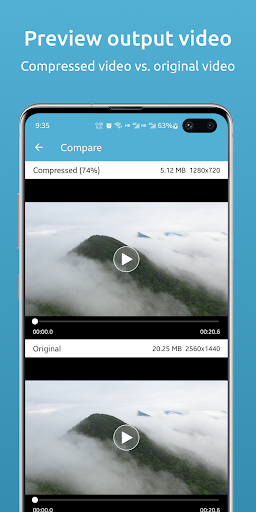
Video Compressor: Helps you compress and resize videos to save phone memory
Features:
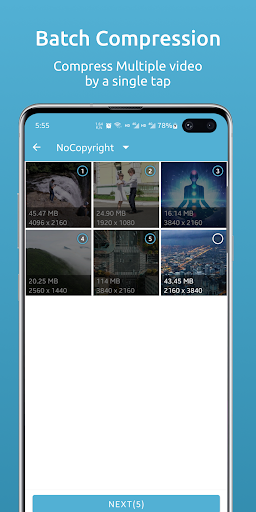
- Batch compress video: support single or multiple video batch compression
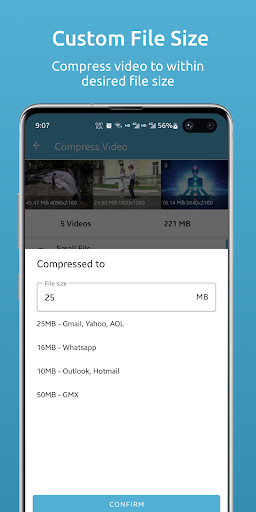
- Compress video to specified file size: for one or more videos
- Video size adjustment: Support single or multiple video size adjustment during compression (can be reduced or enlarged)
- Video proportional size adjustment: Keep the original video ratio when resizing
- Adjust the compression ratio: You can adjust the compression parameters to control the image quality
- Adjust the compression speed: You can adjust the compression speed, you can choose a faster speed to compress the video
Video Compressor can help you quickly compress video, adjust video size or resolution. Lets you compress large videos into smaller sized videos with little or negligible loss of image quality.
Video Compressor uses intelligent lossy compression techniques to reduce the file size of videos. Reduce video file size by controlling video bitrate and compression, ultimately requiring fewer bytes to store data.
Key Features of Video Compressor:
* Completely FREE
* Batch compression (compression of multiple videos)
* Video compression to specified file size
* Original video is unaffected
* Reclaim space taken by videos by using the "Replace" feature
* Save storage space on mobile phones and tablets
* Video size or resolution adjustment, you can shrink the video, you can also enlarge the video
* Keep the original ratio of the photo when the video size is adjusted
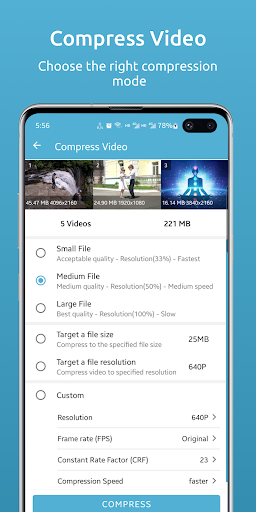
The video compression function provides several modes:
* The default recommended mode: small, medium and large three minimalist modes for video compression.
* Compress video to specified file size: You specify the video file size in KB or MB. This feature is recommended when you need a video with the exact file size.
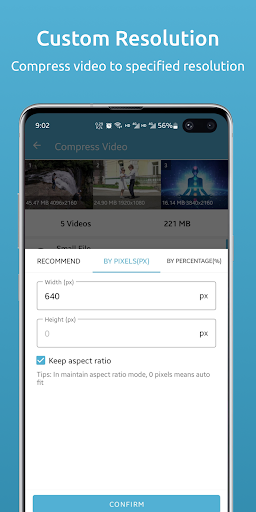
* Compress video to a specified resolution: You can choose a built-in common resolution (240p, 320p, 360p, 480p, 640p, 720p, 960p, 1080p, etc.) or use a custom resolution for compression.
* Custom mode: You can customize various parameters, such as adjusting resolution, frame rate (fps), constant rate factor (crf), compression speed and other parameters for video compression at the same time, so as to obtain ideal compression results. But it is recommended that you have a certain video knowledge and skills, and if you are not sure, you can use the other three modes.
Each mode provides batch compression and batch resizing.
If you have any questions please contact us, or rate us.
What's New
- Fix known issues
Version Information
- Version
- 1.0.5
- Downloads
- 10K+
- Updated on
- Oct 19, 2025
- Released
- Dec 22, 2022
- Requires
- Android 7.0
Statistics
Google Play Rating History
Rating Distribution
Downloads Over Time
Video Compressor & Resizer has been downloaded times. Over the past 30 days, it averaged downloads per day.
Shaded area shows 30-day prediction based on historical trends
Historical data collection started recently. More data points will be available over time.
Video Compressor & Resizer users say on Google Play
 Eberex Prankheiten
Very simple to use, but has more advanced options for those who want them, the "Compress to desired file size" option works well for getting around messaging services' video size limits. And it doesn't spam ads in your face.
 StimulateMySoul
This app is pretty good & simple to use. My only complaint is when it's done compressing & gives you an option to "replace" the original w/the compressed file, when I click on "replace" it gives a msg that the"delete failed.". It's a problem bc after it's compressed the file it changes the way the thumbnail looks on the new file, so it's not easy to find the original to go in and delete it manually.
 Kok Khai Tan
Great app to compress multiple videos at the same time. It's easy to use with lots of settings to tweak. However, using my Samsung S7 FE tablet often failed myteriously.
 The family
When i confirm to compress my videos, this app restarting and it's doesn't work. grrr
ApkTrusted Ratings & Reviews
More from Wang YuFen
See more apps




Similar Apps





Scan this QR code to download

Forwarding you to the page at Google Play market in seconds...
Open Google Play market now