
Super Cut:Video Cut,MP3 Cut v1.3.6
Wang YuFen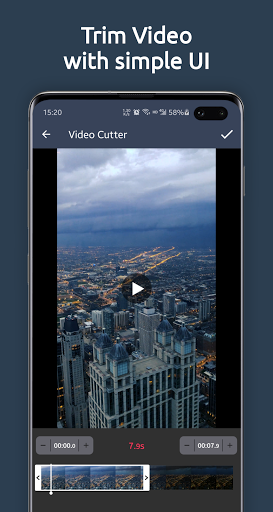


About this app
Super Cut:Video Cut,MP3 Cut solves the problem of cumbersome video and audio editing by providing a simple and intuitive interface for cutting and compressing media files. This app benefits most users who need to quickly trim or compress videos and audio files for social media or other online platforms. Compared to alternatives in the Video Players category, Super Cut stands out with its focus on editing rather than playback, and its excellent user rating of 4.7/5 suggests a high level of user satisfaction. However, the app's lack of advanced editing features may make it fall short for power users.
Pros
- With over 500,000 downloads and an excellent user rating of 4.7/5, Super Cut has demonstrated its usefulness and reliability to a large user base.
- The app's simple and intuitive interface makes it easy for users to cut and compress media files without requiring extensive video editing experience.
- The developer's reputation, as evidenced by the excellent user rating and moderate download numbers, suggests a commitment to delivering a high-quality user experience.
- The app's small size and lack of permissions requests make it a lightweight and secure option for users who are concerned about data privacy and security.
- The app's offline capability allows users to edit and compress media files without an internet connection, making it a convenient option for users who need to work on the go.
Cons
- The app's monetization model, which includes ads, may be intrusive or annoying to some users, potentially disrupting the editing experience.
- The lack of advanced editing features, such as multi-track editing or color correction, may limit the app's usefulness for power users who require more complex editing capabilities.
- The app's compatibility with only Android 7.0 and later may exclude some users with older devices, potentially limiting its reach and adoption.
- The developer's website and email support may not be sufficient for users who require more extensive support or have complex questions about the app's functionality.
Best for: The ideal user for Super Cut is a casual user who needs to quickly and easily cut and compress media files for social media or other online platforms, and values a simple and intuitive interface, offline capability, and a high level of user satisfaction, as evidenced by the app's excellent user rating.
Developer Description
Super Cut: Video Cutter ,MP3 Cutter, Compress Video
Super Cut is the most professional full-featured video editor and music editor on Android. With many powerful toolset, you can handle the best video and music like video cutter, mp3 cutter, speed video, movie editor, video to mp3 converter, audio converter, video compressor, video to gif... These features make the Super Cut application great and will make you happy to use.
✂️️Super Cut is FAST & FREE & No Watermark!
🔥🔥🔥Hot Features:
● Cut & trim video right on your device.
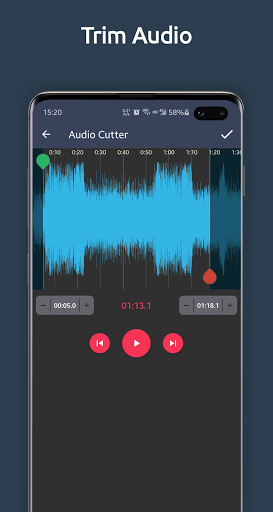
● Cut & trim audio right on your device.
● Convert video to MP3 in simple steps.
● Compress video clips of any size with high quality.
🎬🎬🎬Video Editor Features:
● Cut & trim video, millisecond-level perfect cutting.
● Can convert any video to GIF animated image
● Cut & trim the video before converting it to GIF
● Support high quality and resolution GIF
● Convert mp4 to mp3, video to audio, and save as music.
● Compress videos with high/normal/low quality
● Control video speed, customize fast motion / slow motion as you like, adjust video speed with different options.
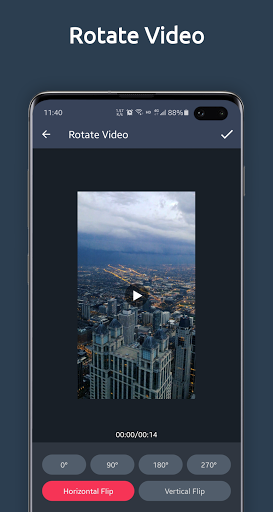
● Rotate Video: support 90°, 180°, 270° rotation, support horizontal flip and vertical flip
● Remove the sound in the video
🎵🎵🎵Music Editor Features:
● Audio cutter, millisecond-level perfect cutting.
● Support mp3, wav, ogg, m4a, acc etc.
● One tap to set Start & End time.
● Audio converter, support the mutual conversion between mp3, aac, ogg, m4a, wav music formats.
★Video cutter & video trimmer:
Cut and trim video according to the length you need. Output video to the best quality.
★Audio Cutter & MP3 Cutter:
This audio cutter identifies ALL audio files on your device and SD Card automatically.
★Video to MP3 Converter & MP3 Video Converter:
Convert mp4 to mp3, video to audio, and save as music. you can extract music from your favorite videos. It is the easiest-to-use mp3 converter and video converter.
★Video Compressor:
Compresses video files and reduce video size, shrink video, save your device's storage space. Compressing a video makes it much easier to share on social networks such as facebook , instagram, tiktok.
★Video to GIF Converter:
Trim a part of the video or convert the complete video to GIF animation. You can save as a high-quality GIF, and you can control the FPS and resolution.
★Control video speed
Customize fast motion / slow motion as you like, adjust video speed with different options.
Accelerate your video to create an interesting video.
Slow down your video for the best moments.
★No watermark:
As a powerful video editor and music video creator for YouTube, video editor will never add watermark and charge you for use.
★Other great points of Super Cut - video cutter & mp3 cutter, video to mp3 converter:
● The interface is simple, free and no watermark.
● No extra fees to use all the functions.
● This video cutter & mp3 cutter, video to mp3 converter supports more than 200 Android devices.
★Why Super Cut is a professional video converter, video compressor, video trimmer, video cutter, video cropper, mp3 cutter, video to mp3 converter, audio converter:
● Convert video and audio fast.
● Convert, crop, trim and cut video without losing video quality.
● Compress video to very small size, freeing up a lot of memory space on your device. No duration limit.
● Share videos to social media like Tiktok, Google+, YouTube, Instagram, Facebook, Twitter, WhatsApp, Line.
● Super Cut is compatible with Android 10 and Android 11.
If you have any questions about Super Cut (video cutter & MP3 cutter, video to Mp3 converter, video compressor,video to GIF converter), please email us: wanggodev@gmail.com
Privacy
Since Super Cut does not request any permissions, users do not need to worry about their data being accessed or shared without their consent. However, users should be aware that the app's ads may collect some data about their device and usage patterns. To minimize data collection, users can consider using a ad-blocker or limiting their app usage to offline mode.
Tips
To get the most out of Super Cut, users should first familiarize themselves with the app's simple and intuitive interface, which allows for easy cutting and compressing of media files. Users can also optimize the app's performance by closing other resource-intensive apps and ensuring their device has sufficient storage space. Additionally, users can take advantage of the app's offline capability by editing and compressing media files without an internet connection.
What's New
- Fix some bugs
Version Information
- Version
- 1.3.6
- Downloads
- 500K+
- Updated on
- Nov 24, 2025
- Released
- Feb 22, 2020
- Requires
- Android 7.0
Statistics
Google Play Rating History
Rating Distribution
Downloads Over Time
Super Cut:Video Cut,MP3 Cut has been downloaded times. Over the past 30 days, it averaged downloads per day.
Shaded area shows 30-day prediction based on historical trends
Historical data collection started recently. More data points will be available over time.
Super Cut:Video Cut,MP3 Cut users say on Google Play
 Alan I
7/31/24This app has got to be one of the most easiest, no non-sense video editing app that I luckily found and it does the job very well. No irritating ads or clickbait. Ads are very minimal and non-invasive at all. Keep in mind the edited files saved location is fixed. But really now, it's FREE and it shouldn't be a big deal for any new smartphone to move files around. I've been using this on my pixel 8 Pro for a little less than a year and it works great together! 2️⃣👍🆙 & THANK YOU! ❣️😁🤩
 josh wanner
So far, the best running video cutter available that runs smoothly. Use scrcpy or other phone mirroring software to fine tune your cuts (It's hard to do with your thumb or finger). So far, no annoying ads (pleaaaase keep it that way) or at the very least don't allow them to interfere and make me wait to use the app
 Rajasekhar S (SUNYA)
after cutting the unwanted part from the video, there is no option to save the video. the option was given to save the unwanted part, what we do with unwanted part of video. We have to save the video to which we made changes, that means the desired part not the unwanted part.
 Mohaila
Downloading this app has been data and time wasting. It does'nt go beyond giving it permission to files
ApkTrusted Ratings & Reviews
More from Wang YuFen
See more apps



Similar Apps

Smart Video Crop - Video Cut
Free

Video Converter Pro
Paid

Reels & Story Maker Storybeat
Free

BeatSync: Photo & Music Videos
Free

Add Music To Video & AI Editor
Free

JAMMATES
Paid

TraxMojo Music Streaming
Free

ActionDirector - Video Editing
Free
Music Audio Editor, MP3 Cutter
Free

MakerFlo
Free

Boosted Ad Maker by Lightricks
Free

LightCut -AI Auto Video Editor
Free

AZ Video Downloader
Paid

Focus Video - Video Compressor
Free

Reels Maker for Instagram BEAT
Free

Unfold: Story & Reels Maker
Free
Scan this QR code to download

Forwarding you to the page at Google Play market in seconds...
Open Google Play market now