
LightCut -AI Auto Video Editor v4.107.0
LightCut Inc.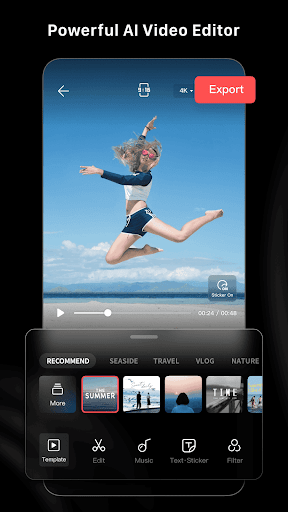


About this app
LightCut -AI Auto Video Editor solves the problem of tedious video editing by providing an AI-powered solution that allows users to edit videos in minutes, making it an ideal choice for vlog makers and social media enthusiasts. This app benefits users who need to quickly create professional-looking videos without extensive editing experience. Compared to alternatives in the Video Players category, LightCut stands out with its AI-driven editing capabilities and user-friendly interface. However, its lack of advanced features may fall short for professional video editors.
Pros
- With over 1 million downloads and a 4.7-star rating, LightCut has demonstrated its reliability and effectiveness in delivering high-quality video editing experiences to its users.
- The app's AI-powered editing capabilities make it easy for users to create professional-looking videos in minutes, saving time and effort.
- LightCut's free model with no ads or in-app purchases provides an uninterrupted user experience, allowing users to focus on their video editing tasks without distractions.
- The app's minimal permission requirements, with a total of 0 permissions, ensure that users' data and device security are not compromised.
- Regular updates, as indicated by the version number 4.107.0, suggest that the developer is committed to maintaining and improving the app's performance and features.
Cons
- One concern is that the app's AI-driven editing capabilities may not offer the same level of control and customization as manual editing tools, which could limit its appeal to professional video editors.
- The lack of advanced features, such as multi-track editing or color grading, may make LightCut less suitable for complex video editing projects.
- Some users may experience performance issues or crashes, particularly on lower-end devices, due to the app's resource-intensive AI processing requirements.
- The app's dependence on AI algorithms may also lead to inconsistent results, with some users reporting that the edited videos do not meet their expectations.
Best for: The ideal user for LightCut is a social media enthusiast or vlog maker who needs to create professional-looking videos quickly and easily, without requiring extensive video editing experience, and is looking for a user-friendly and efficient solution to enhance their online content.
Developer Description
Pro video editor & vlog maker, video templates: edit videos in minutes
Superfast Video editor with AI Powered
- Auto video creator to edit your videos and photos in seconds.
- You just select the videos clips and photos, after analyzing them in few seconds, the AI-powered One-Tap Edit feature will turn them into a high-quality video stories.
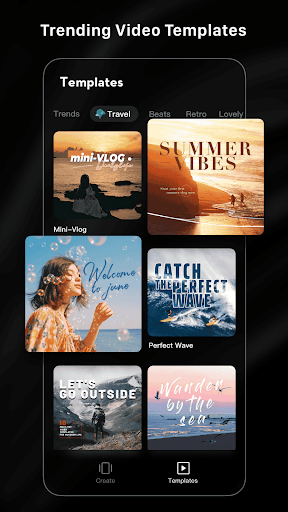
Trendy and Rich Video Templates
-Easy-to-use Templates: All you need to do is just choosing the template and tempo you like, then a trendy video will be made automatically.
-Multiple creative video template styles available: travel, road trip, nature, building & cIty, fashion, lifestyle vlog, sports and aerials etc. Stylish videos are available on this app in a minute.
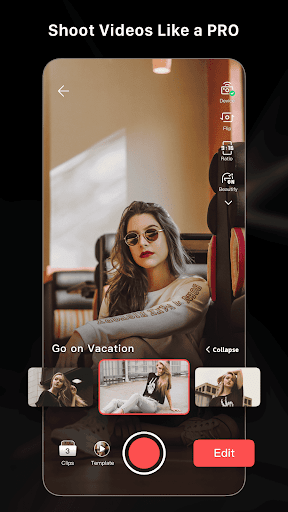
Inspire Cam Shooting Modes Makes You like a Pro
- Unsure about how to film or edit? Try it. Various creative shooting templates help you capturing fascinating footage. Step-by-step guide show you how to shoot, you just need to follow the tips.
- After shooting, a nice video will be made with simple steps. One-stop videp shooting and editing feature makes your videos eye-catching.
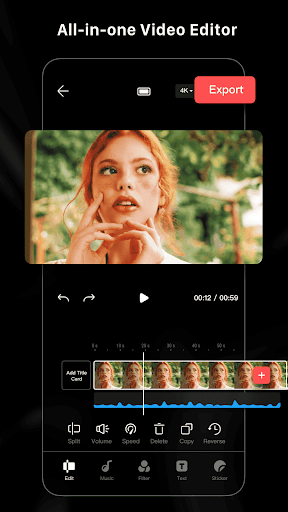
All-in-one Video Editor with Professional
- Professional editing tools with all features help you make extraordinary videos.
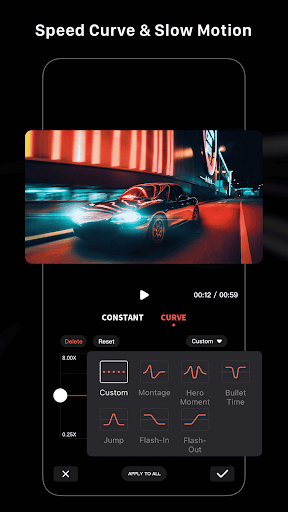
- All features like video trimmer, video cutter, slow/fast motion with adjustment make your video more attractive. Split video into multi clips
- Multiple stickers, font styles help you create awesome video anytime.
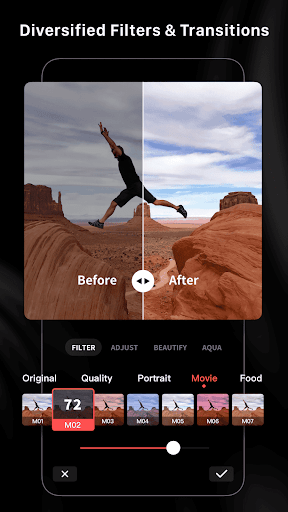
- Edit/combine videos with various filters, effects and transitions
- Free Video Editor and NO ads & watermark
-Hundreds of free music all fully licensed
Privacy
Given that LightCut requires no permissions, the risk of data collection or security breaches is minimal. However, users should still be cautious when sharing their edited videos online and ensure that they are not inadvertently sharing sensitive information. To maintain device security, users should only download the app from trusted sources, such as the official Play Store.
Tips
To get the most out of LightCut, users should start by exploring the app's various video templates and editing modes to find the one that best suits their needs. Additionally, users can optimize the app's performance by closing other resource-intensive apps and ensuring that their device has sufficient storage space. By following these tips, users can create high-quality videos quickly and efficiently.
Version Information
- Version
- 4.107.0
- Downloads
- 1M+
- Updated on
- Feb 16, 2025
- Released
- Aug 15, 2021
- Requires
- Android 7.0
Statistics
Google Play Rating History
Rating Distribution
Downloads Over Time
LightCut -AI Auto Video Editor has been downloaded times. Over the past 30 days, it averaged downloads per day.
Shaded area shows 30-day prediction based on historical trends
Historical data collection started recently. More data points will be available over time.
LightCut -AI Auto Video Editor users say on Google Play
 Reena Devi
it is the best app to help in transition and it is just like the second copy of filmora and capcut and bro this is a free app.
 A5 UPHOLSTERY
good experience, its not like capcut but it gets the job done so its a winwin because its free
 MplsErin
Loved this app when it first came out but the UI is not as intuitive as before. Feels overdesigned, bulky & clunky +it's HUGE! 280 MB I understand videos take up cache & data space on my phone or SD, so I auto upload to my cloud & delete cache & data. Would be nice if the system kept enough for AI to reference the past work to maintain character & design continuity. If I'm wrong or this changes, then I will edit this review. 3 Stars- market is flooded w AI vid gen apps!
 Nucleus Rhyme
a spam and tracking app. they start by saying how they value my privacy. next screen i find out i have downloaded one giga of data for nothing because you cannot use it unless you agree they sell your first born when they see it fit. and no, they only value your tracking data, it is the european law that makes them put that screen.
 Zylxa Gygra
The app description markets LightCut as a professional video editor for vlogs and creators, but all exported videos are restricted to personal use only — even without music, effects, or templates. That means you can’t legally use basic edits on YouTube Shorts, TikTok, or any video platform. The description is misleading. This is not a creator tool, only a private-use editor.
ApkTrusted Ratings & Reviews
Similar Apps

AI Video Maker - Renderforest
Free

Node Video - Pro Video Editor
Free

PowerDirector - Video Editor
Free

Videoleap: AI Video Editor
Free

GoPro Quik: Video Editor
Free

Splice - Video Editor & Maker
Free

PixelFlow: Intro Video maker
Free

Filmora: AI Video Editor&Maker
Free

ActionDirector - Video Editing
Free

GoCut - Effect Video Editor
Free

Flow Studio: AI Photo & Design
Free

Zeemo:AI video maker & Caption
Free

Reels Maker for Instagram BEAT
Free

Fliki - AI Video Editor
Free

Spring - Video Editor & Maker
Free

BeatSync: Photo & Music Videos
Free
Scan this QR code to download

Forwarding you to the page at Google Play market in seconds...
Open Google Play market now