
Stitch Studio - Cross stitchin vVARY
datscharf




About this app
Developer Description
Cross-stitch design tool and photo converter
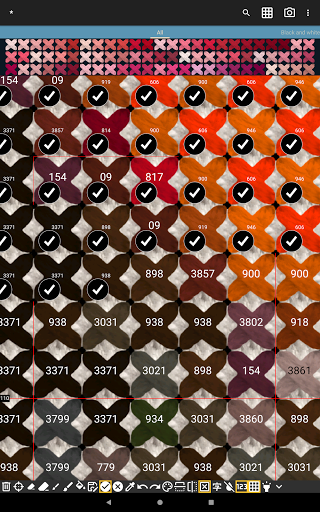
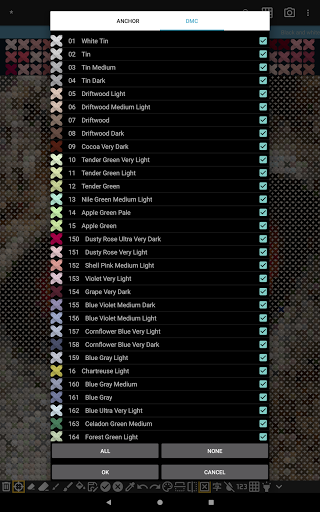
Stitch Studio converts photos to a cross stitch embroidery using a palette of your choosing. Use the built in palettes from the major floss manufacturers directly or create your own subsets with the possibility to mix colors from different manufacturers.
Stitch Studio supports the entire set of colors from the biggest manufacturers of floss and it will be expanded with more manufacturers in the future.
See your designs with real stitches and fabric or use the symbol mode to see the design using symbols and colors.
Export your designs to pdf files and share with your friends.
Stitch Studio is free to use with ads, but you can unlock the Pro Edition for a small fee disabling ads and enabling more functionality
• Custom palettes
• Color reduction tool
• Convert between palettes tool
• Highlight selected color
Stitch Studio is based on my experiences making Bead Studio for the last 10 years. Bead Studio is a design tool for making fusible bead patterns and has many similarities to cross stitching.
Stitch Studio requires the following permissions to run properly:
» Storage - for saving, loading and exporting designs
In-app purchases
$1.49 per item
Version Information
- Version
- -
- Downloads
- 10K+
- Updated on
- -
- Released
- Aug 29, 2020
- Requires
- Android Varies with device
Statistics
Google Play Rating History
Rating Distribution
Downloads Over Time
Stitch Studio - Cross stitchin has been downloaded times. Over the past 30 days, it averaged downloads per day.
Shaded area shows 30-day prediction based on historical trends
Historical data collection started recently. More data points will be available over time.
Stitch Studio - Cross stitchin users say on Google Play
 Victoria E. Collins
The look and feel of the app is exactly what I need. I initially had issues with being unable to select photos from a gallery and instead only camera was an available source, however the customer service with this app is first class - emailed the developer who was extremely helpful and friendly, and managed to solve the issue. Thanks so much, this app is going to be extremely useful to me!
 Kim Throckmorton
Almost perfect! I love being able to design on my tablet instead of my pc. I can't figure out how to add back stitching or half stitches. I'm not sure it's an option. I would love to be able to select a section and either cut or copy and paste it elsewhere. It would also be nice to be able to mirror selected stitches/elements. This app is very good but the features are limited. With a little more functionality, it would be perfect.
 Calix Fox
Taken a long time to get what I need out of this app. I also wasted 10months drawing patterns when I just now learned how the app auto makes them, I would love to limit the amount of colours used, over 100 is a lot in one pattern. I can use 1 colour. But that's still not what I want. Is there a way with me talking to a person about this application?
 Carrie Jones
Good potential but can you not put half stitch or a back stitch? As great as it is without those abilities it's not going to be what I need. So after getting the pro version, I'm regretting it because I just can't use the app. Hopefully you'll look at updating those features. But for now I'll uninstall and find another app. that has those functions.
ApkTrusted Ratings & Reviews
More from datscharf
See more apps
Scan this QR code to download

Forwarding you to the page at Google Play market in seconds...
Open Google Play market now