3D Flip Clock & Weather Pro v8.92.0
MACHAPP Software Ltd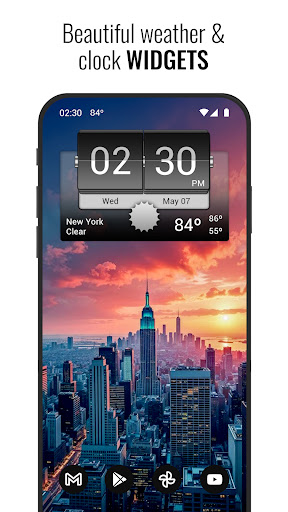




About this app
The 3D Flip Clock & Weather Pro app solves the problem of providing a visually appealing and informative weather forecast experience, benefiting users who value both form and function. Compared to other weather apps, it stands out with its unique flip clock style widgets, but may fall short in terms of advanced features. With a high user rating of 4.5/5, it demonstrates a strong reputation, but its relatively low download numbers may indicate limited social proof. Overall, it is a solid choice for those seeking a simple, ad-free weather experience.
Pros
- The app's high user rating of 4.5/5 indicates a well-designed and functional experience, with users praising its simplicity and effectiveness.
- The absence of ads provides an uninterrupted user experience, making it a great choice for those who value a clean and distraction-free interface.
- The developer's reputation, as evident from their website and email support, suggests a commitment to customer satisfaction and potential for future updates and improvements.
- The app's small size and lack of permissions suggest efficient coding and a low risk of privacy concerns, making it a good option for security-conscious users.
- The paid model, although pricey at $10.99, ensures a one-time payment with no in-app purchases, providing a predictable and ad-free experience.
Cons
- The app's limited download numbers, with only 1,000+ downloads, may indicate a lack of social proof and potentially limited community support.
- The high price point of $10.99 may be a deterrent for some users, especially considering the availability of free or lower-cost alternatives with similar features.
- The app's permission analysis reveals no requested permissions, which, while positive for security, may also indicate limited functionality or integration with other apps and services.
- Some users may find the app's feature set to be too basic, with limited options for customization or advanced weather forecasting features.
Best for: The ideal user for the 3D Flip Clock & Weather Pro app is a tech-savvy individual, likely between the ages of 25-50, who values a simple, ad-free, and visually appealing weather forecasting experience, and is willing to pay a premium for a high-quality, distraction-free app that meets their basic weather needs.
Developer Description
Flip clock style widgets and complete weather forecast app
Note: This version does not display ads. However, it still offers the option to get access to premium functionality via a subscription.
The weather app features the following:
- Local weather forecasts
- Weather radar (updated every 3 hours)
- Detailed current weather information
- 7 day and 12 hour forecasts
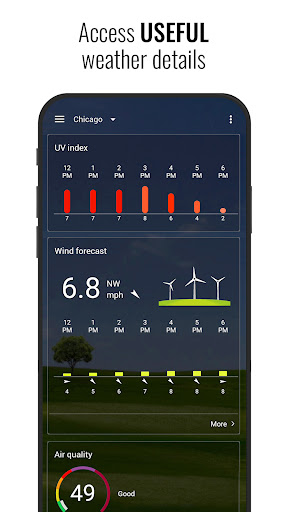
- 12 hour wind and UV index forecasts
- Extended daily and hourly forecasts
- Detailed extended weather graphs (temperatures, pressure, precipitation, wind)
- Phases of the moon
- Sun information
- 4x2 widgets
- Temperature notification and weather alerts
Widgets:
- 4x2 and 5x2 widgets (center on home screen or full width)
- Current weather conditions, time and date
- Useful hotspots
- Next scheduled alarm
- More than 30 different skins
- Additional skins (download them optional widget skin packs)
Subscribe to premium and get the following:
- Animated weather radar (with layers for temperature, rain, snow and wind)
- Hurricane/storm tracker
- Air quality
- Additional icons and weather backgrounds
- More weather forecast information
Website: https://www.machapp.net
Email us if you have any problems or suggestions. We are happy to help!
Privacy
Given the app's lack of requested permissions, users can be relatively confident in its security and privacy. However, as with any app, it's essential to monitor data usage and battery consumption to ensure the app is not unexpectedly accessing or transmitting data. Users should also review the developer's privacy policy, available on their website, to understand any potential data collection practices.
Tips
To get the most out of the 3D Flip Clock & Weather Pro app, users should explore the various widget customization options to personalize their home screen. Additionally, users can optimize performance by ensuring their device's location services are enabled for accurate weather forecasting. For first-time setup, users should review the app's settings to configure their preferred units and update frequency.
What's New
- Bug fixes
In-app purchases
$0.99 - $15.99 per item
Version Information
- Version
- 8.92.0
- Downloads
- 1K+
- Updated on
- Dec 17, 2025
- Released
- Oct 20, 2015
- Requires
- Android 6.0
Statistics
Google Play Rating History
Rating Distribution
Downloads Over Time
3D Flip Clock & Weather Pro has been downloaded times. Over the past 30 days, it averaged downloads per day.
Shaded area shows 30-day prediction based on historical trends
Historical data collection started recently. More data points will be available over time.
3D Flip Clock & Weather Pro users say on Google Play
 A Google user
Nice app. Just what i wanted, clock and weather widget for my home screen. Basic info at a glance. Its nice having all the other info just a tap away as well. Wish i'd bought this one to begin with instead of refunding/uninstalling several others first. The only suggestion i'd make would be to add a simple battery percentage monitor to the widget, then it would be perfect. Thank you!
 Daniel Soyer
This is the absolute best clock.weather widget, as usual, i've tried tons of them before finally picking this one. I will give it a four stars review only because i wish it had an option to display the seconds, but other than that, it's a five stars, easy !
A Google user
Good app, but it's displaying rather small on my Note 10+ screen. I'm using the largest widget, and have stretched it as big as possible. However, the flip clock number plates are designed small. They could be designed larger to fill in as wide as the border behind. Lots of wasted space.
 Steve B
Last update broke it. No weather info at all.
 JERRY INONG
Not accurate ,refresh does nothing
ApkTrusted Ratings & Reviews
More from MACHAPP Software Ltd
See more apps
3D Flip Clock & Weather
Free

Sleep sounds: Relax & Sleep
Free
Sense flip clock & weather Pro
Paid
Sense Flip Clock & Weather
Free
Transparent clock and weather
Free
3D Sense Clock & Weather
Free

Λέξεις - Παιχνίδι λέξεων
Free
Transparent clock weather Pro
Paid
Sense V2 Flip Clock & Weather
Free
Digital Clock & World Weather
Free

Alpha wallpapers HD
Free
Similar Apps
Weather for Wear OS
Free
Weather Forecast Accurate Info
Paid
Sunrise and Sunset Times
Free
Digital Clock Widget
Free
NOAA Weather Unofficial (Pro)
Paid

Windmate
Paid

WeatherX Forecast
Free

Mausam AI – Smart Weather App
Free
Weather Forecast & Widget
Free
Weather & Radar USA - Pro
Paid

Nothing Pomodoro Timer
Paid

Today Weather:Data by NOAA/NWS
Free

Shrimp Care Reminder
Paid
Weather Live
Paid

Hamster News
Paid

Weather App - Weather Forecast
Free
Scan this QR code to download

Forwarding you to the page at Google Play market in seconds...
Open Google Play market now