
Water Meter - Watch Face vVARY
EK Watch Faces™


About this app
Developer Description
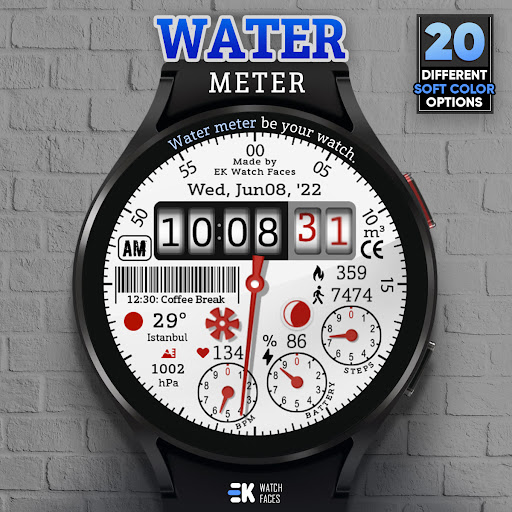
Water meter be your watch..
[ Only for Wear OS devices - API 33+ ]
📌 INSTALLATION NOTES:
1 - 🔗 Ensure your watch is properly connected to your phone. Open the Phone App on your phone and tap on "DOWNLOAD TO THE WATCH", then follow the instructions on your watch.
⌛ A few minutes after tapping the install button on your watch, the watch face will be installed. You can then select your new watch face!
📱 The phone app serves as a placeholder to make it easier to install and find the watch face on your Wear OS device.
⚠️ Note: If you find yourself stuck in a payment loop, don’t worry! You will only be charged once, even if prompted to pay again. Wait 5 minutes or restart your watch and try again. This could be a synchronization issue between your device and Google servers.
2 - 💻 Alternatively, you can try installing the watch face from a web browser on your PC.
⚠️ Please note that any issues on this side are NOT developer-dependent. The developer has no control over the Play Store from this side. Thank you.
💦 Water meter be your watch..
FEATURES
● 💧 Animated water meter
● 🎨 20 soft colours variants
● 🍂 Mud effect (Removable)
● 🌕 Live moon phases
● 🕒 12/24 H (Based on your phone time setting)
● 📊 Steps - Calories - Battery - Next Event - Heart rate (On wrist) - Calendar - 2 custom complications - 2 shortcuts
● 👀 Always on display supported
● ⚡ Charging animation
⚠️Note: 0 - 240 bpm range referenced for percent heart rate.
🔑 For full functionality, please manually enable Sensors & receive complication data permissions!
WEB
https://www.ekwatchfaces.com
https://www.instagram.com/ekwatchfaces
https://www.facebook.com/ekwatchfaces
https://twitter.com/ekwatchfaces
https://www.pinterest.com/ekwatchfaces
YOUTUBE
https://bit.ly/2TowlDE
What's New
- Security updates and improvements have been made.
- Heart rate shortcut issue fixed.
Version Information
- Version
- -
- Downloads
- 1K+
- Updated on
- Jul 30, 2025
- Released
- Aug 13, 2022
- Requires
- Android Varies with device
Statistics
Google Play Rating History
Rating Distribution
Downloads Over Time
Water Meter - Watch Face has been downloaded times. Over the past 30 days, it averaged downloads per day.
Shaded area shows 30-day prediction based on historical trends
Historical data collection started recently. More data points will be available over time.
Water Meter - Watch Face users say on Google Play
 Suprit Goud
enjoying
 Aku Pin Ini
I like the design but can't set the dial color to black as shown in the thumbnail photo. Black is missing. Ticwatch Pro 5
ApkTrusted Ratings & Reviews
More from EK Watch Faces™
See more apps
Information Tiles - Watch Face
Paid
Electricity Meter - Watch Face
Paid

Realistic Info - Watch Face
Paid

Rainbow Weather - Watch Face
Paid
Modular Colours - Watch Face
Paid

Paper of Time - Watch Face
Paid

Premium Info - Watch Face
Paid

Digi Dash Clock - Watch Face
Paid

Modular Arcade - Watch Face
Paid

Realistic Clock - Watch Face
Paid

BioSky-X - Watch Face
Paid
Chrono Core - Watch Face
Paid
Hybrid Power - Watch Face
Free

Circle Clock - Watch Face
Paid
Sudoku Time - Online Wear OS
Paid
Back to School - Watch Face
Paid
Similar Apps

Analog Watch Face
Paid

Cloud Elegant Watch Face
Paid

Fantasy Minimal Watch Face
Paid

Flip Clock MB366
Free

TODO Watch Face
Free

ARMY WATCH
Paid

H370 Watch Face
Free

DM004 Digital Watch Face
Paid

HSPSAYACB
Paid

JW203 jwstudio
Free

Love Time
Free
OT | Modern Analog Watch S
Paid

JND0120
Free

Watch Face WF145
Free

SamWatch Color Metal A
Paid

Classic Quartz clock
Free
Scan this QR code to download

Forwarding you to the page at Google Play market in seconds...
Open Google Play market now