Epson Projector Config Tool icon

Epson Projector Config Tool v1.2.1

Epson Projector Config Tool screenshot 0 Epson Projector Config Tool screenshot 1 Epson Projector Config Tool screenshot 2

About this app

The Epson Projector Config Tool solves the problem of cumbersome projector setup and configuration by providing a convenient Android app for Epson projector owners. This app benefits most those who frequently use Epson projectors in professional or educational settings, such as teachers, presenters, and IT administrators. Compared to other productivity apps, the Epson Projector Config Tool stands out with its specialized functionality, but may fall short in terms of broader applicability. Its high user rating and lack of ads or in-app purchases are notable advantages.

Pros

  • The Epson Projector Config Tool has a high user rating of 4.1 out of 5, indicating a well-received and reliable app, with over 10,000 downloads providing social proof of its effectiveness.
  • As a free app with no ads or in-app purchases, users can enjoy uninterrupted configuration and control of their Epson projectors without additional costs or distractions.
  • The app's developer, Seiko Epson Corporation, is a reputable company with a strong presence in the technology industry, which lends credibility to the app's quality and support.
  • The Epson Projector Config Tool requires no permissions, which is a significant advantage in terms of user privacy and security, as it does not collect or transmit any sensitive data.
  • The app's simplicity and specialized functionality make it easy to use, even for those with limited technical expertise, allowing users to focus on their presentations or lessons rather than struggling with projector settings.

Cons

  • One concern is the app's limited functionality, as it is primarily designed for configuring and controlling Epson projectors, which may not be useful for users with projectors from other manufacturers.
  • The app's compatibility is limited to Android 9 and above, which may exclude some users with older devices, potentially leaving them without access to this convenient configuration tool.
  • There is limited information available about the app's update frequency and long-term support, which could be a concern for users who rely on the app for critical tasks or presentations.
  • The app's lack of offline capability or advanced features may limit its usefulness in certain scenarios, such as areas with poor internet connectivity or complex presentation setups.

Best for: The ideal user for the Epson Projector Config Tool is a professional or educator who frequently uses Epson projectors in their work, such as a teacher, presenter, or IT administrator, and values a convenient and reliable app for configuring and controlling their projector settings, with a moderate to high level of technical skill and a need for efficient and streamlined presentation setup and management.

Developer Description

Change and check the EPSON projector settings by holding your Android device.

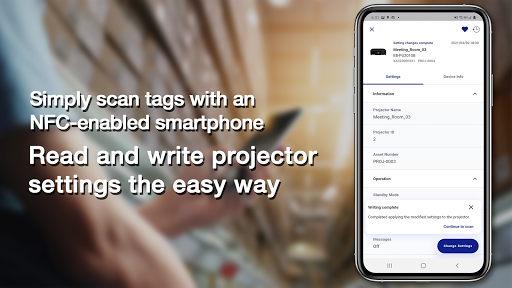
Epson Projector Config Tool is an app that allows you to change projector settings and check information using NFC wireless communications technology. By simply holding an NFC-compatible Android device over the NFC mark on the projector, you can obtain the information and change settings even when the projector is off. You can configure all the network and projection settings before the installation, which can greatly reduce the time and effort that required to install multiple projectors.

Main Features
1) Read/write function via NFC tag
You can read or write projector setting information simply by holding the Android device running this app over the NFC tag. NFC writing can be secured by setting password so that only the device administrator can change the settings.

2) Batch change function for setting up multiple projectors
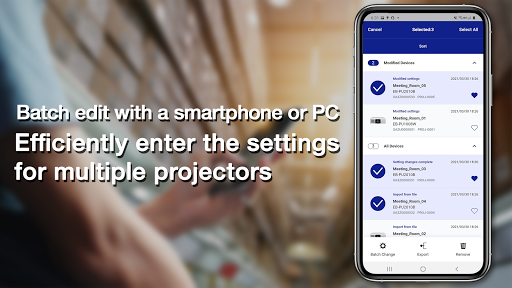
You can use the app to change the up to 1000 projector’s settings as a batch and apply them by holding your Android device over the NFC tags on each projector. In addition, you can export a CSV file to edit multiple projector information using spreadsheet software and then import it into the app to change projector's settings.

3) Projector management feature
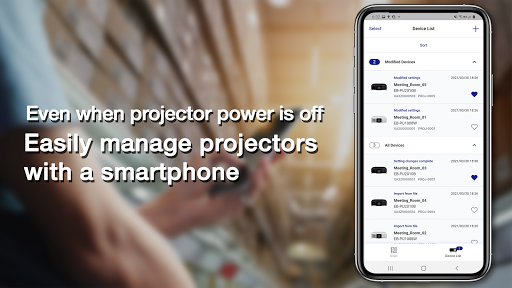
You can make the routine management of projectors a breeze, using information such as operation time and error logs read by NFC tag even when they are powered off.

Projectors that support the app:
Epson high-brightness projectors that support the NFC function
For details, please visit https://download2.ebz.epson.net/sec_pubs_visual/apps/config_tool/opeg/EN/.

We welcome any feedback you have that could help us to improve this app. You can contact us through
"Developer contact". Please note that we cannot reply to individual inquiries. For inquiries regarding personal
information, please contact your regional branch described in the Privacy Statement.

The screenshot is an example and may differ from actual specifications.

Privacy

Given the Epson Projector Config Tool requires no permissions, it is unlikely to collect or transmit sensitive user data, making it a relatively safe app to use. However, users should still be cautious when connecting their devices to projectors or other external devices, and ensure that their device and projector are properly secured and updated to prevent potential security vulnerabilities. Users should also review the developer's privacy policy to understand any data collection or usage practices.

Tips

To get the most out of the Epson Projector Config Tool, users should first ensure their projector is properly connected to their Android device, either through a wired or wireless connection. Users can then explore the app's various configuration options to optimize their projector settings for their specific use case, such as adjusting brightness or keystone correction. Additionally, users can refer to the app's documentation or Epson's support resources for troubleshooting and advanced configuration tips.

What's New

Added supported projectors.

Version Information

Version
1.2.1
Downloads
10K+
Updated on
Jun 27, 2025
Released
May 23, 2021
Requires
Android 9

Statistics

Google Play Rating History

Current
Average
Range

Rating Distribution

Total Ratings:

Downloads Over Time

Epson Projector Config Tool has been downloaded times.

Total Downloads
Last 30 Days
Avg Daily Est.

Shaded area shows 30-day prediction based on historical trends

Historical data collection started recently. More data points will be available over time.

ApkTrusted Ratings & Reviews

0.0
0 ratings
5
0
4
0
3
0
2
0
1
0
✓ Thank you! Your review has been submitted and will be published after admin approval.
Be the first to write a review...

More from Seiko Epson Corporation

See more apps

Similar Apps

Explore Tags

Browse all tags