
EasyViewer-epub,Comic,Text,PDF v26.01.02+1839
Cherie Soft











About this app
Developer Description
View OPDS,comics,novels,EPUB,Heic,Tiff,PDF,SVG,text,image without decompression!
💎 Features
✔️ File sync support
You can view the file in the same read position on different devices.
It supports almost all type such as Google Drive, Dropbox, OneDrive, FTP, SFTP, etc.
Look at it comfortably on your smartphone when you go out and on your tablet at home.
(This feature is supported by CherieViewer.)
✔️ OPDS (network library) support
Numerous network libraries around the world are at your fingertips.
✔️ Support EPUB⇒Text, PDF⇒JPG conversion
Convert epub, pdf files to text and image files.
Supports the option to zip the converted files to minimize wasted space.
(This feature is supported by CherieViewer.)
✔️ Support forced line break document conversion function
Converts forced line-break text to make it easier to read.
It also supports various functions such as removing whitespace, arranging paragraphs, etc.
✔️ Support title list feature
Even documents without a table of contents can conveniently use the table of contents with simple settings.
✔️ Everything is automatic.
The image is automatically detected and divided into 1 or 2 sheets, or displayed in webtoon mode.
There is no inconvenience to constantly change the split mode according to the image.
✔️ One touch run
There is no need to touch several times to change a specific function or setting.
It is convenient to be able to operate function with minimal touch.
✔️ Full support of e-books
E-books (EPUB, MOBI, FB2, Amazon Kindle(AZW,AZW3,AZW4), CBZ, CBR, MHTML, MD(MarkDown)) can be read immediately, and two pages on a screen like a paper book are convenient.
Not only the text but also the image is displayed properly.
✔️ FTP, SFTP, SMB, Dropbox, OneDrive, Google Drive, WebDAV supported
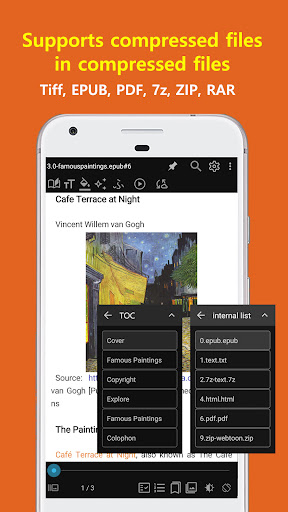
✔️ Supports unlimited multiple compressed files (zip、7z、rar、arj、cbz、cbr、tar、lzh)
Supports compressed files in compressed files, so you can view documents and images without extracting the compressed files.
Also, it provides more convenient by providing folder view function to navigate inside compressed file.
📚 text viewer
- Supports 2-stage split output
(Shows 2 pages per screen like a paper book)
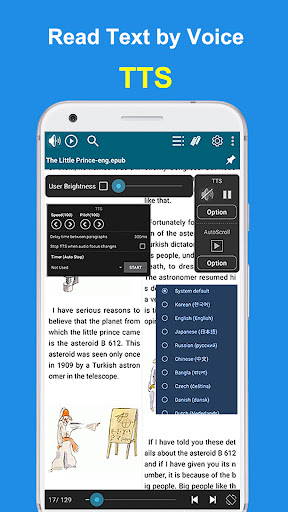
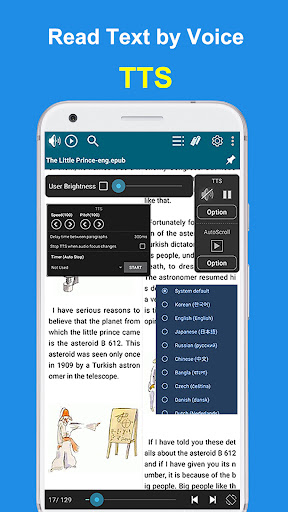
- Text to Speech support (TTS)
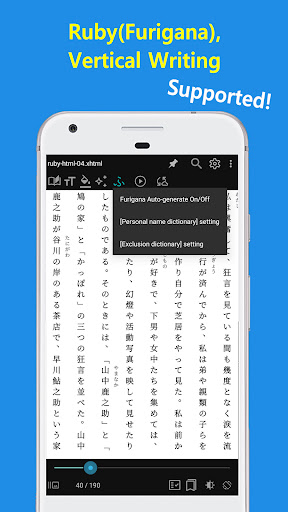
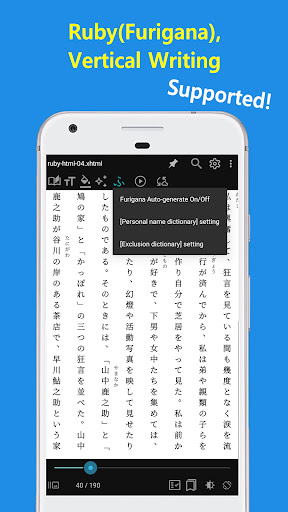
- Furigana (Ruby) support
- Vertical writing support
It supports vertical writing used in Chinese characters/Japanese books.
- Comment/hyperlink support
Supports comments/hyperlinks in e-books, so you can conveniently view the contents of comments by touching the comments.
- E-book support (EPUB, MOBI, FB2, Amazon Kindle(AZW,AZW3,AZW4), CBZ, CBR, MHTML, MD(MarkDown))
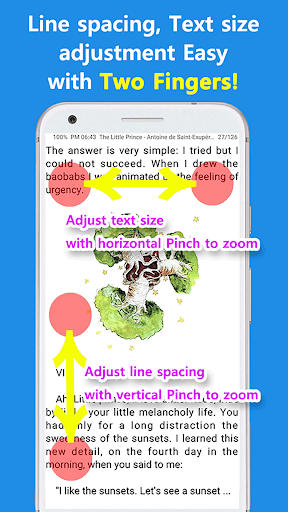
- Adjust font/size/line spacing/character spacing/left/right margin/upper and lower margins
🌄 Image Viewer
- Animated GIF support
- Support various image formats (webp, TIFF, PDF, HEIC, HEIF, SVG, ico, jpg, jp2, png, bmp, gif, pic, zip, 7z, cbz)
- Split, Auto Split, View Direction (Left-> Right, Right-> Left)
When set to Auto Split, the image is automatically detected and divided into 1 or 2 images.
- Webtoon View Support: You can conveniently view long vertical images.
- Support various effects (Inverse/Mono/Sepia/Sharp/Bold/Dark/Bright)
💎 Other features
- Google Drive, Google Team Drive, Shared Drive support
- Bluetooth devices support
- Create a shortcut icon on the home screen
- PDF to JPEG converter
* Permissions explained
- Access all files - Browse files and folders (required)
- Storage - View text/image files (required)
- Phone (state) - Used during TTS playback (optional)
- Bluetooth - Control the viewer function with the Bluetooth headset button (optional)
- Contacts - Permissions required by OneDrive/Google Drive (optional)
* Etc
- EasyViewer PC version can be downloaded from http://ezne.tistory.com/301.
- If you have any inconvenience or improvement while using it, please leave a comment at http://ezne.tistory.com.
What's New
Fix [Play selected language] bug
- Fix config file writing logic (Thanks to 책읽자)
- Image viewer (Thanks to Milan Kardoš)
Fix network file handling
Fix webtoon mode
- epub (Thanks to king marionette)
Fix chapter-info display
Fix table of contents list
- TTS options (Thanks to ws K)
Add [Exclude characters in brackets] option
- Bookmark (Thanks to 오태경)
Fix bookmark display in viewer mode
Fix bookmark display error when deleting or adding bookmarks
Version Information
- Version
- 26.01.02+1839
- Downloads
- 50K+
- Updated on
- Jan 2, 2026
- Released
- Nov 3, 2020
- Requires
- Android 6.0
Statistics
Google Play Rating History
Rating Distribution
Downloads Over Time
EasyViewer-epub,Comic,Text,PDF has been downloaded times. Over the past 30 days, it averaged downloads per day.
Shaded area shows 30-day prediction based on historical trends
Historical data collection started recently. More data points will be available over time.
EasyViewer-epub,Comic,Text,PDF - Google Play Rankings
Top Rankings
| Rank | Country | Category | List | Change |
|---|---|---|---|---|
| — |
Ranking History in
No ranking data available yet. Rankings are updated daily.
#88 in Top Free Books And Reference in South Korea


#146 in Top Free Books And Reference in Japan


EasyViewer-epub,Comic,Text,PDF users say on Google Play
 Fadi Mansour
The app is perfect to read scanned books. It supports right to left page order, so also perfect for Arabic books. The devoloper is very responsive and quickly answered and helped when reporting an issue. Thank you!
 jong gak park
good
 Andrew B
Almost perfect. Please provide a way to transition to the next file while zoomed in, such as sticking at the edge, but if at the edge and a swipe is observed then the move on. (Like the builtin gallery viewer.) Edit: when i double-tap with my thumb i get the settings menu, it doesn't zoom in. Apparently not usable with one hand (as evidenced by: two fingers while swiping for the next page, I think even while zoomed in)
 Vincent Hans
I appreciate that this app has no adds but the intrapage navigation on multipage tiff files should be way more touch screen centric with swipe left and right as well tap once left and right edge zones for next and previous file and swipe up/down for next/previous file. The slider control at the bottom to navigate pages harkens back to the pre-touch screen era of user interfaces. It is cumbersome and a therefore a very inefficient disreguard of the capabilites of most Android devices.
 Maria
Maria
why does an app solely for opening documents, needs permission to access my call logs
ApkTrusted Ratings & Reviews
More from Cherie Soft
See more apps

Similar Apps



Scan this QR code to download

Forwarding you to the page at Google Play market in seconds...
Open Google Play market now