
vFlat Scan - PDF Scanner, OCR vVARY
VoyagerX


About this app
The vFlat Scan app solves the problem of inefficient document scanning by utilizing advanced AI for fast and precise scanning, making it an ideal solution for individuals and professionals who frequently need to scan documents. Students, entrepreneurs, and office workers benefit most from this app, as it provides strong privacy protection and a user-friendly interface. Compared to alternatives in the Productivity category, vFlat Scan stands out with its high user rating and large download numbers, indicating a high level of user satisfaction. However, its limited free features and in-app purchase model may fall short for some users who prefer a one-time payment option.
Pros
- The vFlat Scan app boasts an impressive 4.6/5 user rating, indicating a high level of user satisfaction and trust in the app's functionality and performance.
- With over 10 million downloads, the app has demonstrated significant social proof, suggesting that it is a reliable and popular choice for document scanning needs.
- The app's advanced AI-powered scanning technology provides fast and precise scanning, making it a valuable tool for individuals and professionals who require efficient document scanning.
- The developer, VoyagerX, has established a reputation for providing strong privacy protection, which is essential for users who handle sensitive documents and information.
- The app's offline capability allows users to scan and edit documents without an internet connection, making it a convenient option for users who need to work on-the-go.
Cons
- The app's in-app purchase model, with prices ranging from $1.66 to $44.99 per item, may be perceived as aggressive or expensive by some users, potentially limiting its appeal to those who prefer a one-time payment option.
- Although the app has a high user rating, some users may experience issues with the app's performance or functionality, particularly if they have older devices or limited storage capacity.
- The app's lack of transparency regarding its data collection and storage practices may raise concerns among users who are sensitive about their privacy and security.
- The app's limited free features may not be sufficient for users who require advanced scanning and editing capabilities, potentially forcing them to purchase in-app upgrades or subscriptions.
Best for: The ideal user for the vFlat Scan app is a busy professional or student who frequently needs to scan and edit documents, such as contracts, receipts, or notes, and values a user-friendly interface, advanced scanning technology, and strong privacy protection, with a moderate level of technical skill and a willingness to invest in a reliable and efficient document scanning solution.
Developer Description
Fast, precise scanning with advanced AI. Strong privacy protection in a scan app
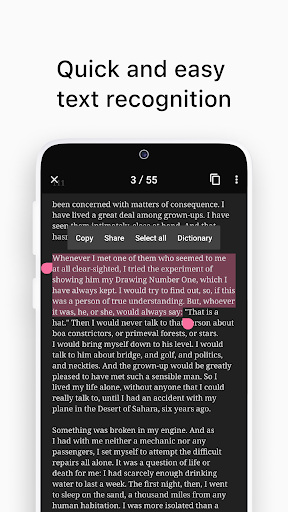
Convert images to text using vFlat Scan's text recognition (OCR) feature to copy, edit, and search for content in your documents.
Get unlimited scans without any annoying watermarks, ads, or sign-ins. Sounds too good to be true? Download vFlat Scan for free and start scanning right away!
NO ADS OR WATERMARKS
• Enjoy a complete ad-free UI with no sign-in required.
• vFlat Scan will not add watermarks to your scans.
CAPTURE DOCUMENTS
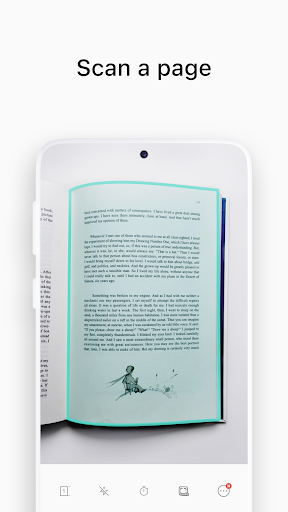
• Scan anything from receipts, books, forms, and notes without the need to manually crop them.
• Automatically detects document borders so you can get a clear-cut scan from any angle.
• Use Auto Scan to scan multiple pages in quick succession without needing to tap any buttons.
AUTO-FLATTEN & ENHANCE
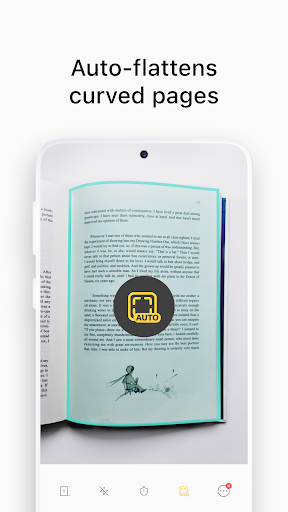
• Documents are automatically flattened, even for curved book pages.
• Enable enhanced colors to boost color saturation and contrast for improved text visibility.
• Hide visible fingers in scans when holding books or documents.
SCAN TWO-PAGE BOOKS
• Capture two pages at once for better efficiency. Pages are automatically divided and saved.
• You can change the scan order to right-hand page first for right-to-left language books.
EXTRACT & USE TEXT
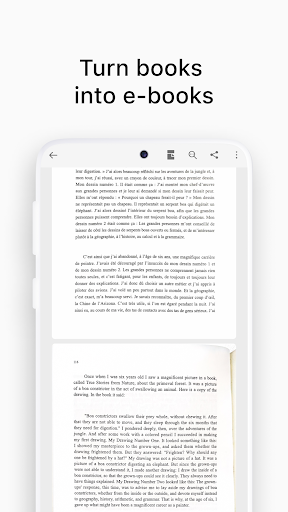
• Text recognition (OCR) allows you to extract text from any scanned image.
• Select, copy, and edit text directly in the app before sharing it as a Word or TXT file.
• Search for specific words or phrases across all your scans with extracted text.
TEXT TO SPEECH
• Text to speech (TTS) is also included. Play, pause, or skip to the next or previous sentence.
• Change the voice settings for faster or slower playback speed or different voice pitch.
ERASE HANDWRITTEN NOTES
• AI technology detects and removes all handwritten text or scribbles from books or other printed material so you can get a clean version of the document again.
SHARE FILES
• Scan, save, and share documents as PDF, JPG, Word, TXT, or ZIP files.
• Generate shareable URL links to view and download your scans via web browser.
vFlat does not collect your personal information or scans without your explicit consent.
Terms of Service - https://vflat.page.link/terms_en
Privacy Policy - https://vflat.page.link/privacy_en
Compatibility:
vFlat Scan is supported on devices running Android 8.0 or higher, with a minimum of 2 GB of RAM and OpenGL ES 3.1 or higher. Additionally, vFlat Scan is available for iPhone and iPad through the App Store.
If you enjoyed our app, please leave us a review.
We'd also love to hear your feedback. Please send us your comments and suggestions: support@vflat.com
Privacy
Given that the vFlat Scan app requests zero permissions, it is likely that the app is designed with user privacy and security in mind. However, users should still be cautious when scanning and storing sensitive documents, and consider using a secure cloud storage service or encrypting their files to protect against unauthorized access. Additionally, users should review the app's terms of service and privacy policy to understand how their data may be collected and used.
Tips
To get the most out of the vFlat Scan app, users should first familiarize themselves with the app's interface and features, including the advanced AI-powered scanning technology and editing tools. Users can also optimize the app's performance by regularly cleaning up their device's storage and closing unnecessary apps to free up resources. Furthermore, users can integrate the app with other productivity tools, such as cloud storage services or note-taking apps, to streamline their workflow and increase efficiency.
What's New
- Bug fixes and UI improvements
In-app purchases
$1.66 - $44.99 per item
Version Information
- Version
- -
- Downloads
- 10M+
- Updated on
- Dec 16, 2025
- Released
- May 8, 2019
- Requires
- Android Varies with device
Statistics
Google Play Rating History
Rating Distribution
Downloads Over Time
vFlat Scan - PDF Scanner, OCR has been downloaded times. Over the past 30 days, it averaged downloads per day.
Shaded area shows 30-day prediction based on historical trends
Historical data collection started recently. More data points will be available over time.
vFlat Scan - PDF Scanner, OCR - Google Play Rankings
Top Rankings
| Rank | Country | Category | List | Change |
|---|---|---|---|---|
| — |
Ranking History in
No ranking data available yet. Rankings are updated daily.
#12 in Top Grossing Productivity in South Korea


#31 in Top Grossing Productivity in Vietnam

#37 in Top Grossing Productivity in India
 Office App-Edit Word, PDF file
vFlat Scan - PDF Scanner, OCR
Office App-Edit Word, PDF file
vFlat Scan - PDF Scanner, OCR
 QuillBot: AI Writing Assistant
#42 in Top Grossing Productivity in Thailand
vFlat Scan - PDF Scanner, OCR users say on Google Play
 Mahdi Sadughi
Just great; do the job with no fault. and is generous enough in free version. the only little thing that can be considered, is the amount of contrast in the result. it can be something like "level adjustment" in adobe photoshop to show how much do you want your text to look bold or thin after the scan!
 Lucky
Lucky
wow
 gahininath phalke
Good
 Francois R Bosse, CMC
1. No refund policy 2. No flash or autoflash have a major defect 3. Auto edge doesn't auto crop like some other apps
 Malie Aki
Update: found a replacement, i really wonder if the 5 star rating are real users the app was as good as it lasted. uninstalled
ApkTrusted Ratings & Reviews
More from VoyagerX
See more apps
Similar Apps

PDF Scanner Plus - Doc Scanner
Free

Mobile Scanner App - Scan PDF
Free

Smallpdf: Scanner & PDF Editor
Free

PDF Scanner app - TapScanner
Free

PDF Merge: Scan, Sign & Edit
Free

iLovePDF: PDF Editor & Scanner
Free

PDFelement-PDF Editor & Reader
Free

Tiny Scanner - PDF Scanner App
Free

Genius Scan - PDF Scanner
Free

PDF Scanner - Document Scanner
Free

iScanner - PDF Scanner App
Free
Microsoft Lens - PDF Scanner
Free

CS PDF Reader - PDF Editor
Free

Adobe Scan AI PDF Scanner, OCR
Free

PDF Reader(KDAN PDF): Edit PDF
Free
Image to PDF - PDF Maker
Free
Scan this QR code to download

Forwarding you to the page at Google Play market in seconds...
Open Google Play market now