
Tiny Scanner - PDF Scanner App v8.9.9
TinyWork Apps






About this app
Developer Description
Scan, sign, and send documents on the go with high-quality mobile scanning.
Trusted by millions and crafted with ten years of experience, Tiny Scanner is the pocket scanner that fits right in your hand.
==KEY FEATURES==
High-Quality Scan
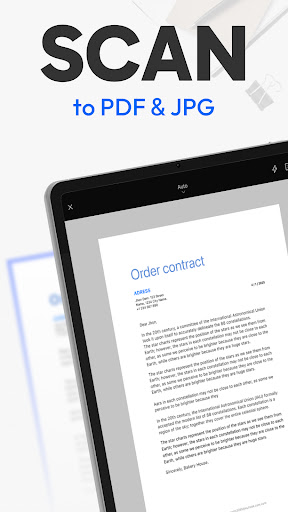
Capture documents with clarity and precision. Tiny Scanner automatically detects edges, removes shadows, and enhances text and images to deliver professional-quality scans every time.
Perfect for scanning homework, business contracts, receipts, travel documents, or handwritten notes with clear results.
Edit
Fine-tune your scans with cropping, rotation, filters, and contrast adjustments. Add signatures, annotations, watermarks, or custom notes directly on your documents for both personal and professional use.
Use it to highlight key points on a report, sign a contract on the go, or add notes to a lecture handout.
OCR (Text Recognition)
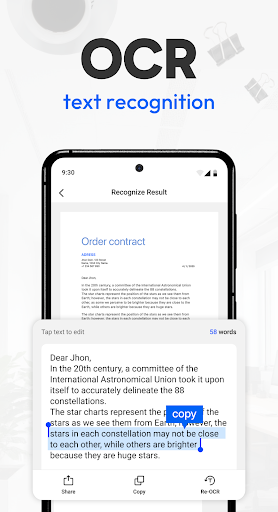
Extract text from scanned documents in multiple languages with the built-in OCR feature. Turn images or PDFs into editable and searchable content for easier study, work, or sharing.
Quickly convert meeting notes, invoices, or printed articles into editable text to save time and avoid retyping.
File Format Conversion
Export your scans into multiple formats such as PDF, JPG, TXT or Link. Convert documents effortlessly to fit your workflow, whether for work, school, or personal organization.
Share an expense report as PDF, send a photo receipt as JPG, or extract text from a scanned page as TXT for easy editing.
Multiple Scan Modes
Handle every scanning need with precision. Choose from multiple scan modes including QR Code, Book, Document, ID Card, Passport, Area Measurement, Object Counter, and Math Scanner.
Scan a multipage contract for work, quickly capture your ID card for digital filing, or measure the area of a project site.
Cloud Sync & Organization
Keep all your scans safe, accessible, and perfectly organized. Sync seamlessly with your preferred cloud storage, tag documents, create folders, and quickly find files whenever you need them.
Ideal for managing business receipts, school notes, or travel documents across all your devices.
Sharing & Export
Send scanned PDFs or images via email, messaging apps, or cloud services. Print or fax directly from your phone for maximum convenience.
Easily share a signed contract with colleagues, email homework to a teacher, or send a travel itinerary to a friend.
==CONTACT US==
We're glad to hear your feedback! For any questions or issues with Tiny Scanner, email us at support@tinyscanner.app. We’ll help you promptly.
What's New
Thanks for using Tiny Scanner! Here's what's new:
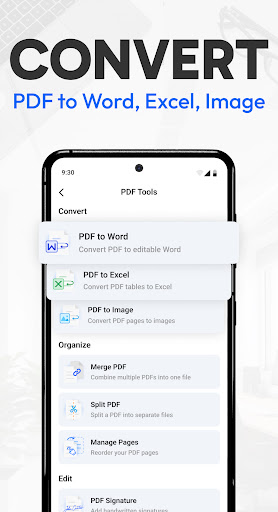
- Newly added PDF-to-Word and PDF-to-Excel conversion features.
We love hearing from you! Please leave a review or contact us at support@tinyscanner.app.
In-app purchases
$1.99 - $199.99 per item
Version Information
- Version
- 8.9.9
- Downloads
- 10M+
- Updated on
- Jan 13, 2026
- Released
- Jul 1, 2015
- Requires
- Android 7.1
Statistics
Google Play Rating History
Rating Distribution
Downloads Over Time
Tiny Scanner - PDF Scanner App has been downloaded times. Over the past 30 days, it averaged downloads per day.
Shaded area shows 30-day prediction based on historical trends
Historical data collection started recently. More data points will be available over time.
Tiny Scanner - PDF Scanner App - Google Play Rankings
Top Rankings
| Rank | Country | Category | List | Change |
|---|---|---|---|---|
| — |
Ranking History in
No ranking data available yet. Rankings are updated daily.
#27 in Top Grossing Business in United States
 Remote Jobs Search - FlexJobs
Tiny Scanner - PDF Scanner App
Remote Jobs Search - FlexJobs
Tiny Scanner - PDF Scanner App
 Wave: Small Business Software
#6 in Top Grossing Business in Italy

#9 in Top Grossing Business in Poland


#13 in Top Grossing Business in Netherlands

Tiny Scanner - PDF Scanner App users say on Google Play
 Dominic Baruzzini
Been using this app for almost 8 years now. It performs every time. It does exactly as advertised. I can't say enough.
 Shane
Shane
This app is great, I use it to turn pictures into PDFs. My only complaint is that I hate how it auto-crops pictures instead of keeping the original, this forces me to go back and manually make it show the full picture (for every picture!) I wish that was a setting you could turn off.
 Jagjivansingh Bedi
quality on curl documents is unacceptable.
 Francesco Scarito
I have used this app for a while and been happy but now on my new Xiaomi phone it only works with flash which over exposes. I've got the best camera I've ever had on this phone and yet if I use it with this app without a flash I get a black screen only. I'm having to used an alternative even though I'm paying for this app. I can't find a way of getting in touch with customer service so I'm writing here. If this is fixed then my review would be 5 starts but at the moment it's unusable for me.
 sairamakrishnapadamata padamata
waste asking about premium subscription
ApkTrusted Ratings & Reviews
More from TinyWork Apps
See more apps

Similar Apps

PDF Scanner Plus - Doc Scanner
Free

iScanner - PDF Scanner App
Free

Genius Scan - PDF Scanner
Free

Mobile Scanner App - Scan PDF
Free

PDF Scanner app - TapScanner
Free

PDF Scanner - Document Scanner
Free
vFlat Scan - PDF Scanner, OCR
Free

Samsung Print Service Plugin
Free

Adobe Scan AI PDF Scanner, OCR
Free

PDF Merge: Scan, Sign & Edit
Free

Smallpdf: Scanner & PDF Editor
Free

Regula Document Reader
Free

CSV File Viewer - Smart CSV
Free
RawBT inkless print service
Free
Photo to PDF Maker & Converter
Free
FAX App: Send Faxes from Phone
Free
Scan this QR code to download

Forwarding you to the page at Google Play market in seconds...
Open Google Play market now