
Mobile Scanner App - Scan PDF v2.13.1
Glority Global Group Ltd.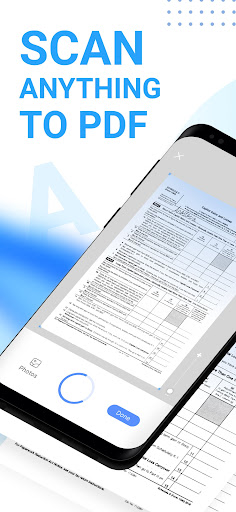



About this app
The Mobile Scanner App - Scan PDF effectively solves the problem of digitizing physical documents and photos, benefiting individuals and professionals who need to manage paperwork on the go. With its high user rating and significant download numbers, it stands out in the Productivity category for its reliability and user satisfaction. Compared to alternatives, it offers a straightforward scanning process and decent PDF management features. However, its lack of advanced editing features might make it fall short for power users.
Pros
- The app's excellent user rating of 4.6/5, combined with over 10 million downloads, indicates a high level of user satisfaction and social proof, suggesting that it is a reliable choice for scanning needs.
- The developer, Glority Global Group Ltd., provides a professional website and support email, which adds to the app's credibility and support infrastructure.
- The app's ability to scan documents and photos to PDF without requiring any permissions is a significant advantage, ensuring user privacy and security.
- The presence of in-app purchases offers users the flexibility to enhance their scanning experience with additional features, although the ads might be a drawback for some users.
- Regular updates, as indicated by the version history, suggest that the developer is committed to maintaining and improving the app.
Cons
- The presence of ads in the free version might be intrusive for some users, potentially disrupting the scanning experience and encouraging in-app purchases.
- The in-app purchase model, with prices ranging from $0.99 to $39.99, might be seen as aggressive or expensive by some users, especially if they are not aware of the value added by the premium features.
- The app's lack of advanced PDF editing features, such as annotation or form filling, might limit its usefulness for users who require more than basic scanning capabilities.
- Some users might find the app's interface or feature set to be less intuitive or comprehensive compared to other productivity apps in the same category.
Best for: The ideal user for the Mobile Scanner App is an individual or professional who frequently needs to digitize documents, receipts, or photos for personal or business purposes, values ease of use, and requires a reliable, no-frills scanning solution with basic PDF management features, likely including students, freelancers, and small business owners.
Developer Description
The Cool Mobile PDF Scanner App to scan documents, photos to PDF in 2022
Get the Mobile Scanner app now and turn your phone into a powerful digital office.
Ultra-fast Scanning
- Scan anything - receipts, pictures, notes, business cards, contracts, fax papers, and books with precision and turn them into PDF, Word, or JPEG files.
- Batch scanning - scan as many as you like and save the files as one PDF.
Smart Image Optimizing:
- Automatic border detection and cropping.
- Preview, crop, rotate, adjust color and resize the PDF or photos you scan.
- Remove and edit imperfections, erase stains, marks, creases, and even handwriting.
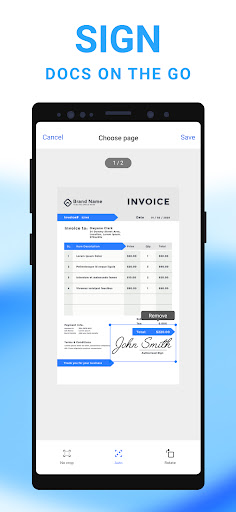
- Sign your scans manually or add signatures for the document.
- Generate perfect quality docs with advanced picture processing filters.
Text Extracting & Editing
- Built-in OCR (optical character recognition) technology to recognize any text from your scans.
- Edit the text as you want.
- Export texts as TXT.
Organize & Share Files
- Organize your files with custom folders, drag & drop to reorder.
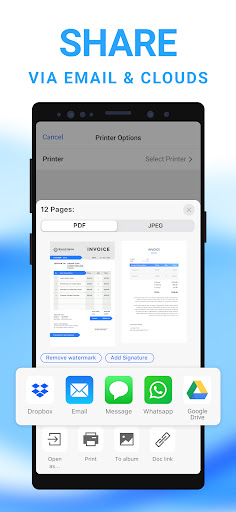
- Share documents by email attachments.
- Upload scanned files to cloud services like Dropbox, Google Drive, and OneDrive.
- Print PDF files, such as contracts and invoices, right from the scanner app.
Secure Important Documents
- Ensure privacy by setting passwords to lock confidential documents and folders.
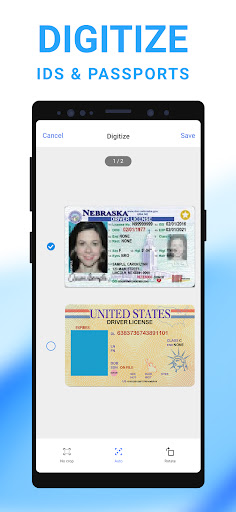
- Keep all your personal information like contracts, bank cards, and tax documents secure.
Download the free Mobile Scanner app to convert documents and photos into PDFand JPEG files. With the Mobile Scanner app, you will be more efficient in work and life!
Contact us
Chat with us about your experience, suggestions, or any questions you encounter while using Mobile Scanner.
You can reach us at
support@mobilescanner.com
https://www.mobilescanner
Privacy
Given that the app requires no permissions, it poses minimal risk to user privacy and security. However, users should still be cautious when scanning sensitive documents and consider using a secure method to store or share the resulting PDFs. It is also essential to review the terms of service and privacy policy provided by the developer to understand any potential data collection practices.
Tips
To get the most out of the Mobile Scanner App, users should ensure their device has sufficient storage space for scanned documents and consider organizing their scans into folders for easier access. Additionally, users can optimize the app's performance by regularly cleaning up unnecessary scans and avoiding excessive use of the in-app camera feature, which might drain the battery.
In-app purchases
$0.99 - $39.99 per item
Version Information
- Version
- 2.13.1
- Downloads
- 10M+
- Updated on
- Dec 24, 2025
- Released
- Dec 27, 2019
- Requires
- Android 9
Statistics
Google Play Rating History
Rating Distribution
Downloads Over Time
Mobile Scanner App - Scan PDF has been downloaded times. Over the past 30 days, it averaged downloads per day.
Shaded area shows 30-day prediction based on historical trends
Historical data collection started recently. More data points will be available over time.
Mobile Scanner App - Scan PDF - Google Play Rankings
Top Rankings
| Rank | Country | Category | List | Change |
|---|---|---|---|---|
| — |
Ranking History in
No ranking data available yet. Rankings are updated daily.
#38 in Top Grossing Productivity in United States

#17 in Top Grossing Productivity in Philippines
 PDF Editor: Edit PDF, Sign PDF
Mobile Scanner App - Scan PDF
PDF Editor: Edit PDF, Sign PDF
Mobile Scanner App - Scan PDF
 Office Reader - WORD/PDF/EXCEL
#21 in Top Grossing Productivity in Mexico


#22 in Top Grossing Productivity in Pakistan

Mobile Scanner App - Scan PDF users say on Google Play
 ipeleng phiri
Truly amazing and a great life saver when you have urgent paperwork to scan when you do have the luxury of a physical scanner near by. Perfect for travelers. I highly recommend this app 👌
 burnard medina
initial still analyzing
 Anthony Martin
It appears to be fast and simple. First time I'm using it. I'll use the trial period to test its functionality.
 Manny Retonda
don't want it
 Mandy Loves Mondays
I availed weekly premium, that costs 120 php per week and automatically gets deduced from my online bank app. I was surprised to get emails from google play telling me that i availed it again during THE SAME WEEK. Within just TWO DAYS, from the same app and company. And it did deduct from my account. How do you think you can resolve this? it may be a small amount for some, but technical mishaps like this makes you untrustworthy. You only provide small priveleges and this happens too?
ApkTrusted Ratings & Reviews
More from Glority Global Group Ltd.
See more apps



Similar Apps

PDF Scanner app - TapScanner
Free

PDF Scanner Plus - Doc Scanner
Free

PDF Scanner - Document Scanner
Free

vFlat Scan - PDF Scanner, OCR
Free

Smallpdf: Scanner & PDF Editor
Free

iLovePDF: PDF Editor & Scanner
Free
Photo to PDF Maker & Converter
Free

iScanner - PDF Scanner App
Free
Image to PDF - PDF Maker
Free

Adobe Scan AI PDF Scanner, OCR
Free

Mobi PDF・Editor・Scanner・Reader
Free

Genius Scan - PDF Scanner
Free

Tiny Scanner - PDF Scanner App
Free

PDF Reader Zone
Free

PDF Reader(KDAN PDF): Edit PDF
Free
PDF AI Reader: Editor, Scanner
Free
Scan this QR code to download

Forwarding you to the page at Google Play market in seconds...
Open Google Play market now