Planner Pro - Daily Calendar v8.1.6
TinyWork Apps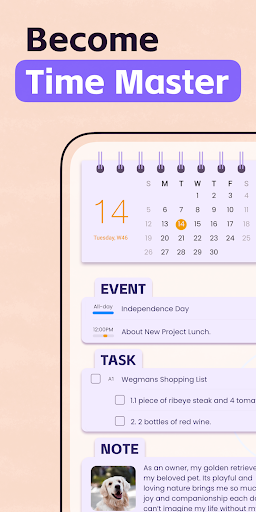







About this app
Developer Description
A daily organizer app to sync with google calendar and supports tasks & notes.
Planner Pro provides kinds of settings for different requirements from kinds of people. You’ll find the best way to meet your requirements in our app. Also, if you have any other great ideas or suggestions to make this app better please contact us with an email, which will be very appreciate.
Events
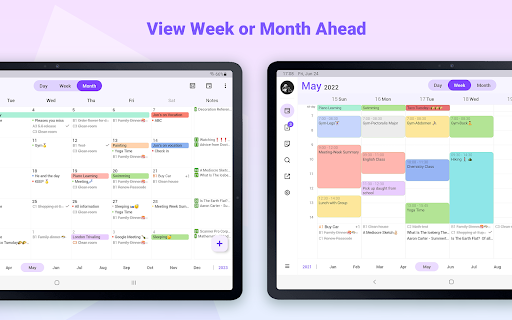
- Sync with Google calendar and events
- Show or hide calendars as you want
- Add, edit or delete events easily
- Supports full recurring period
- Manually time slot
- Supports all-day & cross-day events
Tasks
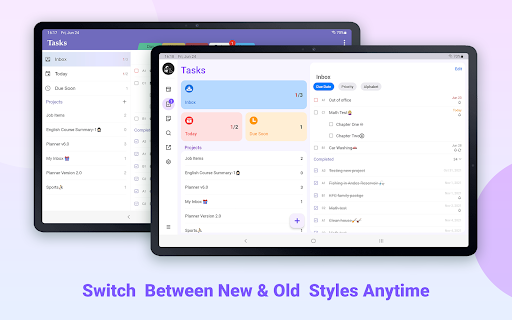
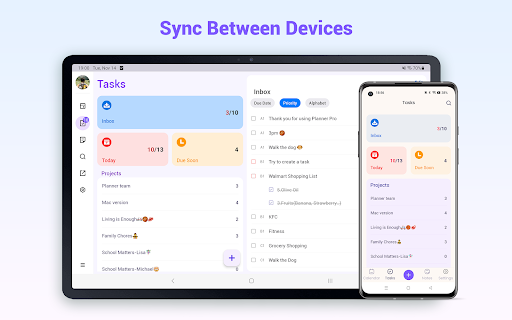
- Supports tasks and projects with sub-tasks
- Supports recurring tasks and projects
- 5 different status for tasks and projects
- 25 priorities for tasks and projects
- System reminder for each task
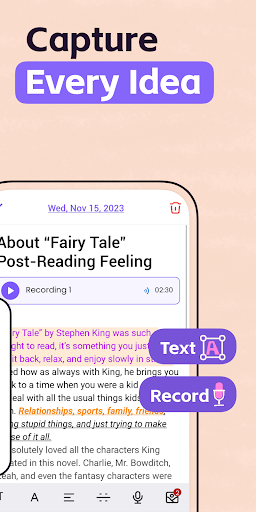
Notes
- Unlimited number of notes for each day
- Manage notes in day, week and month view
- Easily to add, edit and delete notes
Pomodoro
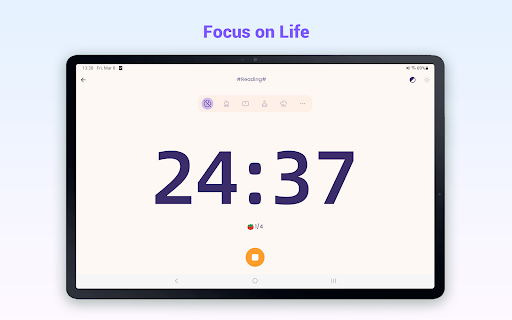
- Add any activities you want to focus on
- Study, work, fitness, entertainment and other categories for activities
- Add reminders for each activity
- Multiple white noise and alert tones to choose from
- Supports quick focus
- Supports continuous timing or manual timing
Other Key Features
- Day, Week, Month and Tasks modules for better management
- Very well designed user interface
- Full records searching including events, tasks and notes
- Set the first day of week manually
- Select the launch view as you want
This version is an ad-supported version and has some function restrictions, we also offer an ad-free version which is available as subscription.
Payment models for Premium Subscription:
- $3.99/month
- $19.99/year
Please note the subscription is automatically renewed unless you choose to cancel the subscription at least 24 hours before the end of the current period in Subscriptions on Google Play.
Permissions Used in Planner Pro:
1. Calendar: Planner Pro needs this permission to read events from local calendars.
2. Contacts: Planner Pro needs this permission to read contact from local device when you choose to invite an attendee from local contacts.
3. Files and media: Planner Pro needs this permission to read photos from Gallery when you choose to upload a photo.
4. Microphone: Planner Pro needs this permission to record audio and directly add audio files to the note.
We're glad to hear your feedback. If you have any problems or suggestions please send a mail to planner.a@appxy.com, you’ll get a response in a short time.
What's New
The new version improves the app stability and fixes some minor bugs to help us serve you better.
We're glad to hear your feedback. If you have any questions or suggestions please feel free to contact us at planner.a@appxy.com .
In-app purchases
$2.99 - $94.99 per item
Version Information
- Version
- 8.1.6
- Downloads
- 1M+
- Updated on
- Oct 28, 2025
- Released
- Jun 18, 2014
- Requires
- Android 5.0
Statistics
Google Play Rating History
Rating Distribution
Downloads Over Time
Planner Pro - Daily Calendar has been downloaded times. Over the past 30 days, it averaged downloads per day.
Shaded area shows 30-day prediction based on historical trends
Historical data collection started recently. More data points will be available over time.
Planner Pro - Daily Calendar users say on Google Play
 Ed-G
Ed-G
I started using it two weeks ago and so far it's working great. I needed something integrated that I could just take notes with for the day. *update* beware if you sync across multi devices that when you add an event, make sure you are consistent with the calenders. I have multiple emails and then for some reason, I have 2 "family" calendars. If you add an event, make sure you're aware what calendar you are using! I'm still happy but it caused me some issues before I realized what was happening.
 Daniel Vandeberg
Excellent app for scheduling/keeping track of appointments. Would like to see the ability for my phone to attach private contact to an appointment such as some competitor apps have.
 Yoel Oz
Been using this for years. Had a problem syncing. It happened on a weekend, so it took two days to fix, but they ended up fixing the problem. It's a great app, but they need someone to check on it faster.
 Avalanche Designs
Promising but disappointing. Doesn’t sync with Google Calendar—only the phone’s calendar—so schedules don’t show on other devices. Task syncing constantly fails across platforms. No web version, and requires separate purchases for Mac and Android. Pricing is inconsistent—$14.99 on the site, $19.99 at checkout. Reached out about double charges for each device and got no response. Hoping for improvements, but can’t recommend it right now.
 Elisa P.
This app is not syncing properly on my tablet. Unable to get a good idea of how it works. I guess I'll be canceling my 3-day trial which is sad because I hoped it would be the solution to my planning problems. I'm willing to try it again, if they get the bugs fixed.
ApkTrusted Ratings & Reviews
More from TinyWork Apps
See more apps


Similar Apps
Structured - Daily Planner
Free
Weekly Planner - Diary, Notes
Free

Life Organizer - Journal it!
Free
DigiCal Calendar Agenda
Free

Daily Planner Organizer: Brite
Free
Diarium: Journal, Diary
Free

Perfect Day: Organize Your Day
Free

Cozi Family Organizer
Free

Business Calendar 2 Planner
Free

Time Planner: Schedule & Tasks
Free

WaterDo:To Do List & Schedule
Free

Daybook - Diary, Journal, Note
Free
Tasks: To Do List & Reminders
Free

Student Calendar - Timetable
Free

TimeTune - Schedule Planner
Free
SupaTask - Daily Planner, Todo
Free
Scan this QR code to download

Forwarding you to the page at Google Play market in seconds...
Open Google Play market now