
SupaTask - Daily Planner, Todo v1.0.34
Tip Tap Apps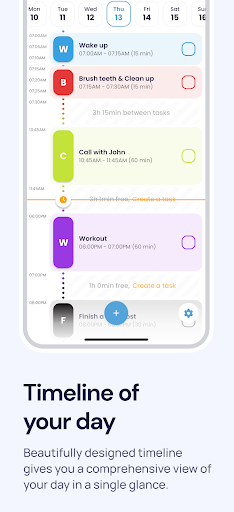
About this app
SupaTask - Daily Planner, Todo is a highly-rated productivity app that solves the problem of disorganized daily routines by providing a comprehensive task tracker, schedule planner, and habit tracker. This app benefits individuals who struggle with time management and goal setting, particularly students, professionals, and anyone seeking to boost their productivity. Compared to alternatives in the Productivity category, SupaTask stands out with its user-friendly interface and robust feature set, although its relatively new version may raise concerns about long-term stability. With a top-tier rating and moderate download numbers, SupaTask demonstrates significant potential as a go-to daily planner.
Pros
- With an excellent user rating of 4.7/5 and over 100,000 downloads, SupaTask has established a strong reputation for reliability and effectiveness, making it a trustworthy choice for users seeking a daily planner.
- The app's comprehensive feature set, including task tracking, scheduling, and habit monitoring, provides users with a holistic approach to managing their daily routines and achieving their goals.
- The absence of ads and minimal in-app purchases ($1.99 - $29.99 per item) suggests a considerate monetization strategy that prioritizes user experience over aggressive revenue generation.
- SupaTask's developer, Tip Tap Apps, maintains a professional website and provides a direct email contact, indicating a commitment to user support and feedback integration.
- The app requires no permissions, which is a significant advantage in terms of privacy and security, as users do not have to worry about their data being accessed or shared without their consent.
Cons
- Despite its strong rating, SupaTask is still in its early versions (1.0.34), which may lead to concerns about the app's long-term stability, potential bugs, or compatibility issues with various Android devices.
- The in-app purchase model, although not overly aggressive, may still deter some users who prefer ad-supported free apps or one-time purchase options, potentially limiting the app's accessibility to a broader audience.
- Some users might find the app's feature set overwhelming or complex, especially if they are accustomed to simpler productivity tools, which could lead to a learning curve or decreased user engagement.
- The lack of information about the app's data storage and synchronization capabilities may raise concerns among users who rely on cloud services or need to access their data across multiple devices.
Best for: The ideal user for SupaTask is an individual, likely between the ages of 18 and 45, who is seeking to improve their time management skills, set and achieve personal or professional goals, and monitor their daily habits, and is comfortable with using digital tools to organize their life, including students, professionals, and anyone looking to enhance their productivity and self-care routines.
Developer Description
Maximize Your Productivity with Task Tracker, Schedule Planner and Habit Tracker
KEY FEATURES:
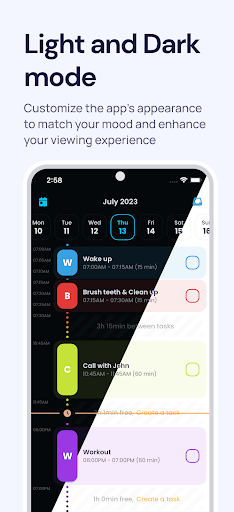
Adaptive Timeline: Say goodbye to unnecessary blank spaces. SupaTask's unique time-scaled design ensures that every minute counts. Every task fits snugly on your timeline, ensuring you see a full, uninterrupted view of your day.
Intuitive Drag-and-Reschedule: Found a change in plans? No problem! Simply drag and drop tasks to reschedule. Whether you're stretching or squeezing, SupaTask recalculates times seamlessly.
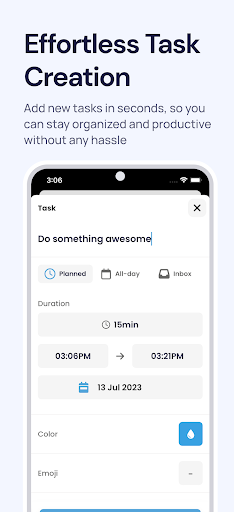
Quick Task Creation: Time is of the essence! Craft your to-dos with just a few taps, and watch them slot perfectly into your day.
Calendar Integration: Never toggle between apps again! Import your calendar events directly into SupaTask. Your events, to-dos, and plans, all under one roof!
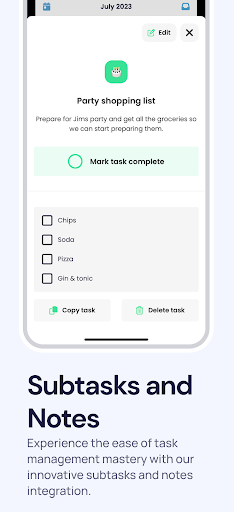
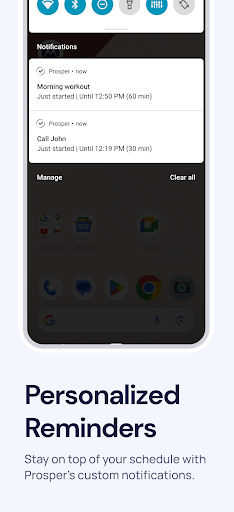
Detailed Tasking: Need more depth? Add subtasks, notes, and reminders. SupaTask ensures that every detail is just a glance away.
Homescreen Widgets: Access your plans directly from your homescreen. A quick peek, and you're set for the day!
WHY CHOOSE SUPATASK?
With SupaTasak, we've taken the essence of day planning and fused it with intuitive design and user experience. It's more than just a to-do app; it's a promise to yourself to make every day prosperous!
Join the thousands who’ve transformed their daily grind into a symphony of productivity. Download SupaTask and watch your days shine!
Privacy Policy: https://supatask.app/privacy
Terms of service: https://supatask.app/terms
Privacy
Given that SupaTask requires no permissions, users can be relatively confident in the app's privacy and security. However, it is essential to review the developer's privacy policy, available on their website, to understand how user data is handled and stored. To further enhance security, users should ensure their device and the app are updated regularly to protect against potential vulnerabilities.
Tips
To get the most out of SupaTask, users should start by thoroughly exploring the app's features, including the task tracker, schedule planner, and habit monitor, to understand how each tool can be customized to fit their needs. Regularly reviewing and adjusting daily routines within the app can help maximize productivity. Additionally, integrating SupaTask with other productivity tools or calendar apps can enhance its functionality and streamline user workflows.
What's New
Bug fixes
UI updates
In-app purchases
$1.99 - $29.99 per item
Version Information
- Version
- 1.0.34
- Downloads
- 100K+
- Updated on
- Aug 18, 2025
- Released
- Jul 3, 2023
- Requires
- Android 6.0
Statistics
Google Play Rating History
Rating Distribution
Downloads Over Time
SupaTask - Daily Planner, Todo has been downloaded times. Over the past 30 days, it averaged downloads per day.
Shaded area shows 30-day prediction based on historical trends
Historical data collection started recently. More data points will be available over time.
SupaTask - Daily Planner, Todo users say on Google Play
 Elena Pimenova
I like this app, it gives a clear view of my day. It would be almost perfect if I could add tasks from inbox/to do list directly into my daily tasks, i.e I leave one time block a day for chores I need to do for example and list these chores in the inbox/to do list. So if I could click 'create a task' on this time block and choose one of my chores from my to do list, that would be fantastic 👌
 Graham Schmuland
Feedback: The time bar doesn't automatically update to current time (broke January 2024). Still don't like the new name haha Dragging events is too granular and should snap to larger time increments (or give a setting for what increments) Review: Its a consistent app used to help organize my day and better plan out a few days at a time. It is the perfect step below a calendar as it's great for quickly "sketching" out how the day is going to go.
 Cash Youtube (Tundra)
I reviewed this app about a year ago. My only complaint was that the Google calendar sync didn't work properly. Now, a year later, it still doesn't work reliably, which makes this app useless for me. When I add a new appointment into my calendar or delete an existing one, it just doesn't show up here, even after manually syncing it. Other times, some events from Google calender just won't show up. even if it's a repeating event, which makes no sense
 Mindy Legault
I did mention in this review how I couldn't plan ahead. I tapped on the + sign nothing happened. I tapped the date I wanted to add stuff on. Guess what...... nothing happened. I could not access ways to add on the calendar. Hence unable to plan ahead. Perhaps tutorial/instructions weren't clear, however clicking on the date or locating + sign were not found. Contacting was inapplicable. It doesn't provide anything in the free version. All you can do is add items for right now.
ApkTrusted Ratings & Reviews
More from Tip Tap Apps
See more apps



Similar Apps

Daily Planner Organizer: Brite
Free

Boosted Time Tracker
Free
Sectograph. Day & Time planner
Free

Listok: To do list & Notes
Free

Tasks: To Do List & Reminders
Free

TimeTune - Schedule Planner
Free

Workflowy |Note, List, Outline
Free

TickTick:To Do List & Calendar
Free

Journal it! Productivity, Note
Free
Taskito: To-Do List & Planner
Free
Twos: Remember & Share Things
Free

Minimalistic Task Reminder
Free

Any.do - To do list & Calendar
Free

Motivated: Habit Tracker
Free

Chaos Control 2: AI Organizer
Free

WaterDo:To Do List & Schedule
Free
Scan this QR code to download

Forwarding you to the page at Google Play market in seconds...
Open Google Play market now