Sectograph. Day & Time planner v5.41
Laboratory 27




About this app
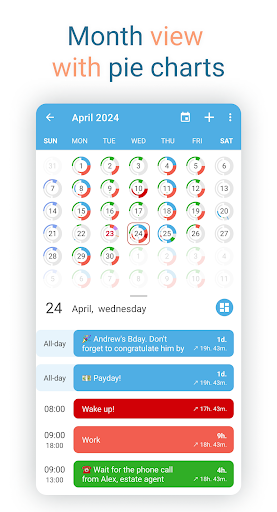
Sectograph. Day & Time planner solves the problem of visualizing daily events in a unique and intuitive way, benefiting individuals who struggle with traditional calendar views, such as those with busy schedules or difficulty keeping track of time blocks. Compared to alternatives in the Productivity category, Sectograph stands out with its 12-hour pie chart display, but may fall short for users requiring more complex scheduling features. With over 5 million downloads and a 4.6-star rating, it has established itself as a top-tier app, though its simplicity may not appeal to power users.
Pros
- Sectograph boasts an impressive download count and high user rating, indicating a well-received and effective time management tool.
- The app's unique visual approach to daily planning can be particularly beneficial for individuals with visual learning styles or those who struggle with traditional calendar layouts.
- With no permissions required, users can be assured that their data is not being collected or shared, enhancing the app's overall security and privacy.
- The developer's commitment to updates and responsiveness to user feedback, as evidenced by the frequent updates, ensures that the app remains relevant and functional over time.
Cons
- Some users may find the app's simplicity and lack of advanced features, such as reminders or integration with other calendar apps, to be a significant drawback.
- The in-app purchase model, with prices ranging from $1.99 to $99.99, may be perceived as aggressive or confusing to some users, potentially impacting the overall user experience.
- The absence of a developer website may raise concerns about the app's long-term support and development, despite the developer's email being available for contact.
Best for: The ideal user for Sectograph is an individual, likely between the ages of 18 and 50, who values simplicity and visual clarity in their time management tools, such as students, freelancers, or professionals with non-traditional schedules, and possesses basic technical skills to navigate the app's intuitive interface and customize its features to meet their specific needs.
Developer Description
A visual time planner that displays daily events in a 12-hour pie chart
The application will help you sharpen your sense of time and allow you to visualize your day.
HOW IT WORKS
In short, it is a projection of your routine and tasks onto the clock face. It visualizes your day for precise timekeeping and offers you peace of mind.
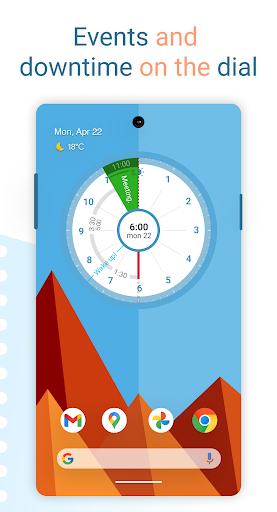
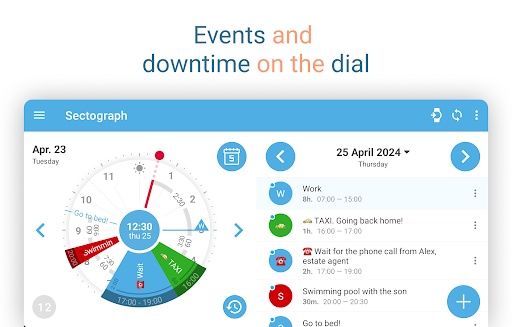
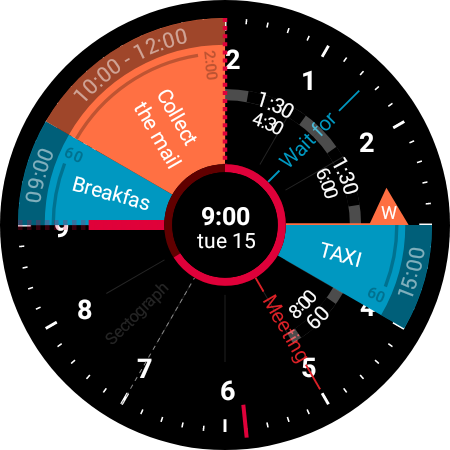
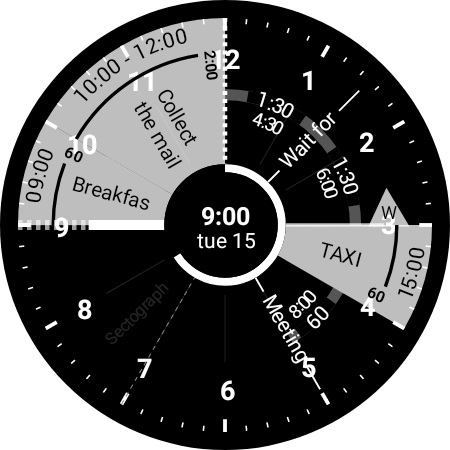
The scheduler works like an analog clock face. It automatically fetches all the events from your Google calendar (or local calendar) and places them on a 12-hour sectored watch face. This technology can be called a "Calendar clock".
HOW IT LOOKS
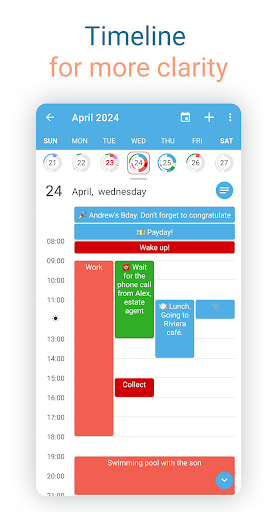
The list of your calendar events is projected in the form of a pie chart in the application and on the home screen widget.
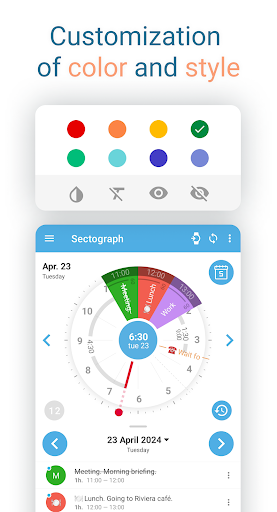
Events are sectors, the beginning and duration of which you can clearly track using special arcs to follow your plan.
A calendar and analog clock combined gives you an amazingly visual representation of your work, allowing you to effectively plan and calculate your day.
WHAT CAN THE APPLICATION BE USED FOR?
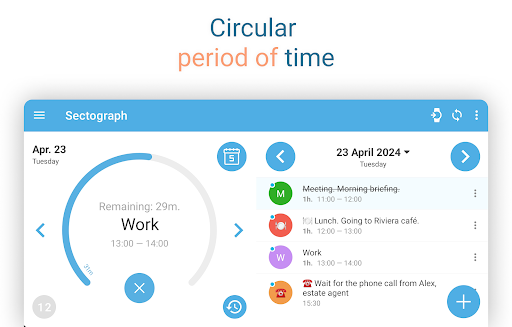
✔ Daily scheduling and visual timing. Track your daily tasks, agendas, appointments, and events in Sectograph, and at any time, find out how much time is left until the end of the current event and the start of the next one. Don't be late.
✔ Accounting and control of working hours. Keep your phone in the docking station at your workstation and your office day plan is under control.
✔ Schedule of classes. Keep your phone close at hand and see how much time is left until the end of those tiring lectures – and never be late for lab work again.
✔ Self-organization at home. Your daily routine is now more convenient than ever. Remember to balance work, rest and physical activity, just use the app as an organizer for your home routine.
✔ Trip timer and flight duration. Do you lose track of time due to endless travel and flights? Visually control your check-in, landing and flight duration. Keep everything under control.
✔ Follow your meal schedule, medication schedule, exercise therapy, and other important activities. Lead the right lifestyle and be healthy!
✔ Convenient countdown of any lengthy scheduled events. Don't miss the end of your vacation and know exactly how many days are left until the end of your military service.
✔ Monitor everyday affairs on the go and in your car. Achieve your goals by keeping the application installed on the device.
✔ Time management using GTD technology. Is planning your day confusing? With the function of striking out or hiding flagged events, keep your chart as clean as possible. Sectograph will improve your time management.
✔ My goals. The app can be used to achieve goals from your Google calendar. It will help you with timekeeping, organize your day, and assist you in completing your goals on time.
✔ Attention-deficit. According to our users, the application is effective for attention-deficit hyperactivity syndrome (ADHD). If you are wasting time and have trouble concentrating on tasks, this app may be useful to you.
✔ The application will be useful for fans of the "Chronodex" concept. You can use the Sectograph as an analog of a paper diary used by this concept.
✔ Display doings from Microsoft Outlook calendar. (beta)
Wear OS
Do you have a Wear OS smartwatch?
Then you get access to:
A watch app with an interactive widget.
A Tile for quick access to the circular planner.
A watch face for continuous schedule awareness (installed separately).
A large complication to enhance and customize some third-party watch faces.
HOME SCREEN WIDGET
Use the day planner widget on your device's home screen.
The widget automatically updates events and its clock once a minute, as well as after any new events appear in the calendar.
You can view details of the event on the widget and access some of its options by clicking on the corresponding sector.
Author and developer: Roman Blokhin
Privacy
Given that Sectograph requires no permissions, users can rest assured that their personal data is not being collected or shared, making it a secure choice for time management. However, as with any app, it's essential to review the terms of service and in-app purchase agreements to understand any potential data collection or usage. To further enhance security, users should keep their device and app updated to the latest versions.
Tips
To get the most out of Sectograph, first-time users should start by customizing the pie chart display to fit their individual scheduling needs, exploring the various color-coding and time-block options. For optimal performance, it's recommended to regularly review and adjust the app's settings to ensure they remain aligned with the user's evolving schedule and preferences. Additionally, users can enhance their experience by utilizing the app's intuitive gesture controls to quickly navigate and edit their daily events.
What's New
- New smartwatches received a Tile, watch face, and a functional widget app opened by tapping the Tile or watch face.
- Improved strings that display event waiting time.
- Added widget preview.
- Improved day indicator graphics.
- More exciting things ahead, stay with us ♡
In-app purchases
$1.99 - $99.99 per item
Version Information
- Version
- 5.41
- Downloads
- 5M+
- Updated on
- Dec 12, 2025
- Released
- Sep 1, 2013
- Requires
- Android Varies with device
Statistics
Google Play Rating History
Rating Distribution
Downloads Over Time
Sectograph. Day & Time planner has been downloaded times. Over the past 30 days, it averaged downloads per day.
Shaded area shows 30-day prediction based on historical trends
Historical data collection started recently. More data points will be available over time.
Sectograph. Day & Time planner users say on Google Play
 julien van den berk
Works very well and makes it way easier to keep track of stuff. Only gripe is that the pricing on the pro version is a little steep for relatively few things added, but since the free version works perfectly fine, that's not worth lowering the rating, since if anything, it's good the important stuff isn't locked behind a paywall. Edit: very fast response for my issue with the watch face change, so changing this back to 5 stars
 Miranda Duncan
Any plans to make compatible with the new Samsung UI8? A game-changer for someone who thrives on seeing time as a picture instead of just a set of numbers. ADHD friendly, perhaps? Worth the small learning curve to customize it. At a glance, I see how much longer till my next calendar event (syncs with Google calendar) and the duration of my in-progress event. Seriously one of the most well integrated watch faces I never could have imagined myself. Happily paid for this! Bravo 👏🏼
 Am Mi
Am Mi
Wish a companion app was available for Huawei watches. it's a great app however Android users have to pay more for premium than iOS users - how's that fair? Free version caution: You cannot take your settings with you over to a new phone so are forced to purchase. Happy to pay for premium but the watch face for Huawei watches isn't included. Also be aware the 'deal' price has always been that price so not really a deal.
 Dyl Dev
why does it require access to my calendar? I wanted to input all my stuff manually...
 Aileen O.
Sadly, I have to change my review & I'm heartbroken. The app is no longer working in a myriad of ways, and although I have emailed them 3 times, I have yet to receive a response. I'll change my 5☆ back if they get back to me & fix it. Hope it keeps working well for all y'all. 😔 I'm neurodivergent & have been looking for a highly visual calendar app for ages. Nothing fit the bill-until this! If you're neurospicy & looking for a better way to visualize your calendar, this is it. Just get it.
ApkTrusted Ratings & Reviews
More from Laboratory 27
See more apps
Similar Apps

TimeTune - Schedule Planner
Free

TickTick:To Do List & Calendar
Free
Boosted Time Tracker
Free

Daily Planner Organizer: Brite
Free
Disciplined - Habit Tracker
Free

Habit Tracker - HabitGenius
Free

Business Calendar 2 Planner
Free

Routine Planner, Habit Tracker
Free

HabitNow Daily Routine Planner
Free
Time Planner: Schedule & Tasks
Free

Daypad - Simple Time Tracker
Free
Structured - Daily Planner
Free
Habit Tracker - Habit Diary
Free
SupaTask - Daily Planner, Todo
Free
Focus To-Do: Pomodoro & Tasks
Free

Todoist: To Do List & Calendar
Free
Scan this QR code to download

Forwarding you to the page at Google Play market in seconds...
Open Google Play market now