Time Planner: Schedule & Tasks v3.22.0_6 (Massive Star)
Oleksandr Albul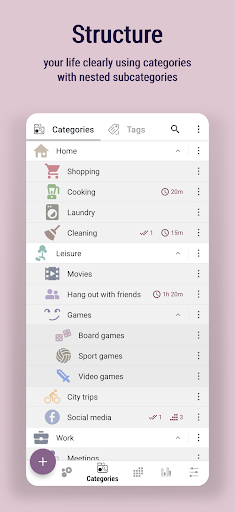





About this app
Developer Description
Increase productivity with this organizer, task list, habit tracker and calendar
Does your time fly very fast as well?
Have you ever thought, where it has disappeared?
Quit wondering where, see it with your own eyes!
If you are tired of keeping lots of time management apps like calendars, to-do lists, habit trackers, timers, alarms, note pads, try Time Planner that has all those tools included. Save time and boost your productivity in different areas of life!
Why this App?
• Fast and optimized time management tool
• Absolutely no ads (seriously!)
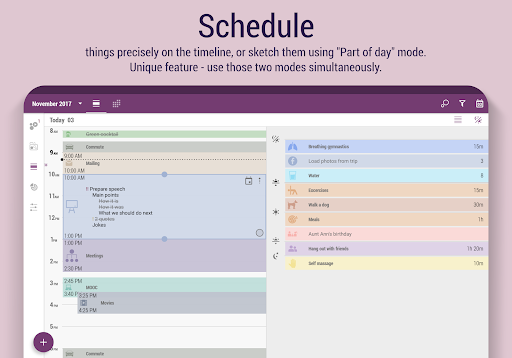
• Convenient schedule with timeline and part of the day modes
• Easy time tracking with bubbles
• Handy customizing with loads of icons and colors
• Hierarchical structure of categories and subcategories
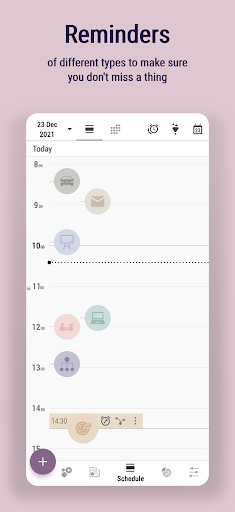
• Reminders of different types
• Task priority marks
• Notes with rich formatting
• Alarm + captcha to fight procrastination
• Moon calendar
• Import events from Google calendar
• Backup
Additionally for Pro version:
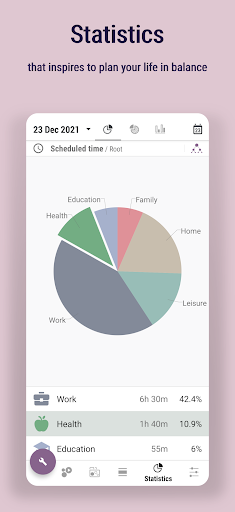
▸ Unlimited and detailed statistics of your expectations and the reality
▸ Multiple nesting levels of subtasks
▸ Various filters
▸ Timer, stopwatch and countdown
▸ Widget for quick access
▸ Enriched settings, including more sounds
Also our users proved this app goes well with:
🌞 Early wake ups
🚰 Water drinking monitoring
🚭 Controlling bad habits like smoking
📥 Quitting constant email / feed checking
⚖️ Finding balance between work and family
🎾 Making more time for hobbies
🏠 FlyLady housekeeping system
🥕 Finding self motivation to get things done
🎯 Being focused and concentrated on what you're doing
Follow us:
https://www.facebook.com/OlekdiaTimePlanner
https://www.youtube.com/c/olekdia
https://olekdia.groups.io/g/timeplanner/topics
What's New
* Logged activities can be moved and resized in Schedule tab
* Filters in Logging tab are revised and search by text added
* New default value for scheduled activity - "event type"
In-app purchases
$0.99 - $50.00 per item
Version Information
- Version
- 3.22.0_6 (Massive Star)
- Downloads
- 5M+
- Updated on
- May 19, 2023
- Released
- Nov 14, 2016
- Requires
- Android 5.0
Statistics
Google Play Rating History
Rating Distribution
Downloads Over Time
Time Planner: Schedule & Tasks has been downloaded times. Over the past 30 days, it averaged downloads per day.
Shaded area shows 30-day prediction based on historical trends
Historical data collection started recently. More data points will be available over time.
Time Planner: Schedule & Tasks users say on Google Play
 John G.
EXCELLENT App. However, if I want to purge old logged entries, I have to delete and acknowledge them one by one. Please add an option in the menu to enable or disable the "delete acknowledgement". It is horrible to delete hundreds of entries and have to acknowledge all of them one by one.
 Donielle
color, icon and dark mode options are nice. I like the simplicity of it as well. the only thing I'd like to have is to choose different sounds when checking off a task. the pencil check off and erasing is okay but sometimes I just want a different sound but I suppose that's what makes this app unique. I'm all about having a congrats too just to hype myself up so maybe something to consider.
 Lacee
Lacee
app seems to offer everything necessary I thought it was just what I was looking for but unfortunately it's too much and too confusing it is nice that they added multiple tutorials to help you navigate the app but it's still just too much for me :( unfortunately I paid for a subscription before I found this out
 Alancer Lluvia
I have more than a hundred logged tasks with more than 10 categories. Each one of them has disappeared. Furthermore, earlier on, all the categories were duplicated but none of the tasks. I am not sure what is going on, as I have paid for the premium version. I have emailed the dev and group forum so hopefully something comes of it.
 Bonnie Jean Yasosky
I bought the Pro version. Don't buy it. The app stopped working in 2023. Even with a new phone it is not functional. It deleted all information which is backed up on the cloud. The calendar does not show tasks. It is a defunct app -- a forgotten project.
ApkTrusted Ratings & Reviews
More from Oleksandr Albul
See more apps
Similar Apps

FLIP - Focus Timer for Study
Free
To Do List with Reminder
Free

Life Organizer - Journal it!
Free

Structured - Daily Planner
Free
To-do list - tasks planner
Free

Hizo: Habit Tracker & Todo
Free

To-Do List - Schedule Planner
Free

TimeTune - Schedule Planner
Free

Morning Habits - Daily Routine
Free
Sectograph. Day & Time planner
Free

TickTick:To Do List & Calendar
Free

Gratitude: Self-Care Journal
Free

Daily Planner Organizer: Brite
Free

School Planner
Free
Taskito: To-Do List & Planner
Free

Habit Tracker - HabitGenius
Free
Scan this QR code to download

Forwarding you to the page at Google Play market in seconds...
Open Google Play market now